MC1458472 Simplified Copilot experience in Microsoft Teams
Primary service: Teams
ChangePilot summary
- Microsoft Teams will get a refreshed Copilot experience with a more chat-centered layout, simplified navigation, improved chat interactions, and better agent discovery.
- The update applies to both the full-page Copilot experience in Teams and the Copilot side pane experience.
- Full-screen Copilot in Teams will also include a new Tasks view for tracking long-running Copilot activities such as agent activity and scheduled chats.
- The change is enabled by default as part of the service update; no configuration, licensing, permissions, or compliance changes are required.
- Administrators should communicate the new experience and update internal training/help desk materials that reference the current Teams Copilot UI.
Latest update: Standard start: October 2026 (previously September 2026). Standard end: October 2026 (previously September 2026).
What it means for you
What admins need to do
Prepare users and support staff for the updated Copilot interface in Teams. Update any internal documentation, training, screenshots, and help desk guidance that reference the current Copilot layout or navigation, and brief support teams on the new chat-centered experience, the refreshed side pane, and the Tasks view in full-screen Copilot so they can answer questions after rollout.
Impact on users
Users will see a new Copilot experience in Teams with a different layout, simplified navigation, improved chat interactions, and better agent discovery. In the full-page Copilot experience, they will also see a Tasks view for tracking longer-running Copilot work. The side pane will look and behave differently as well, but there are no licensing or permission changes.
If you miss it
If IT does not prepare users and support materials, the rollout will still occur and users may be confused by the changed Copilot layout, navigation, and new Tasks view in Teams. Help desk volume may increase as users look for familiar controls or ask where prior options moved. There is no expected compliance or licensing impact, but adoption and support readiness could be affected.
- Admin controls available
- No
History
Recorded changes
-
- Standard start: October 2026 (previously September 2026).
- Standard end: October 2026 (previously September 2026).
Microsoft message
Updated September 29, 2026: We have updated the timeline. Thank you for your patience.
[What and Why:]
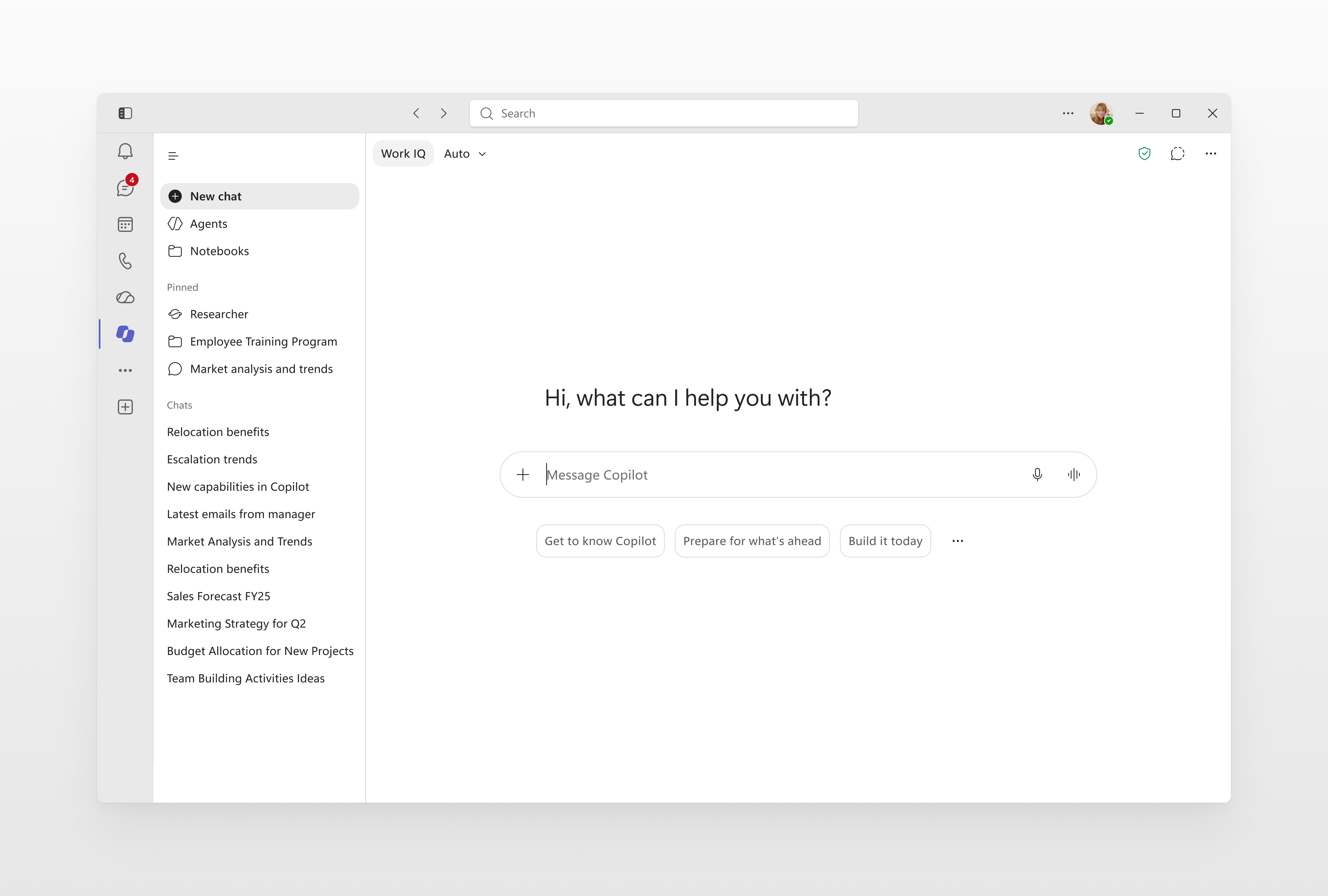
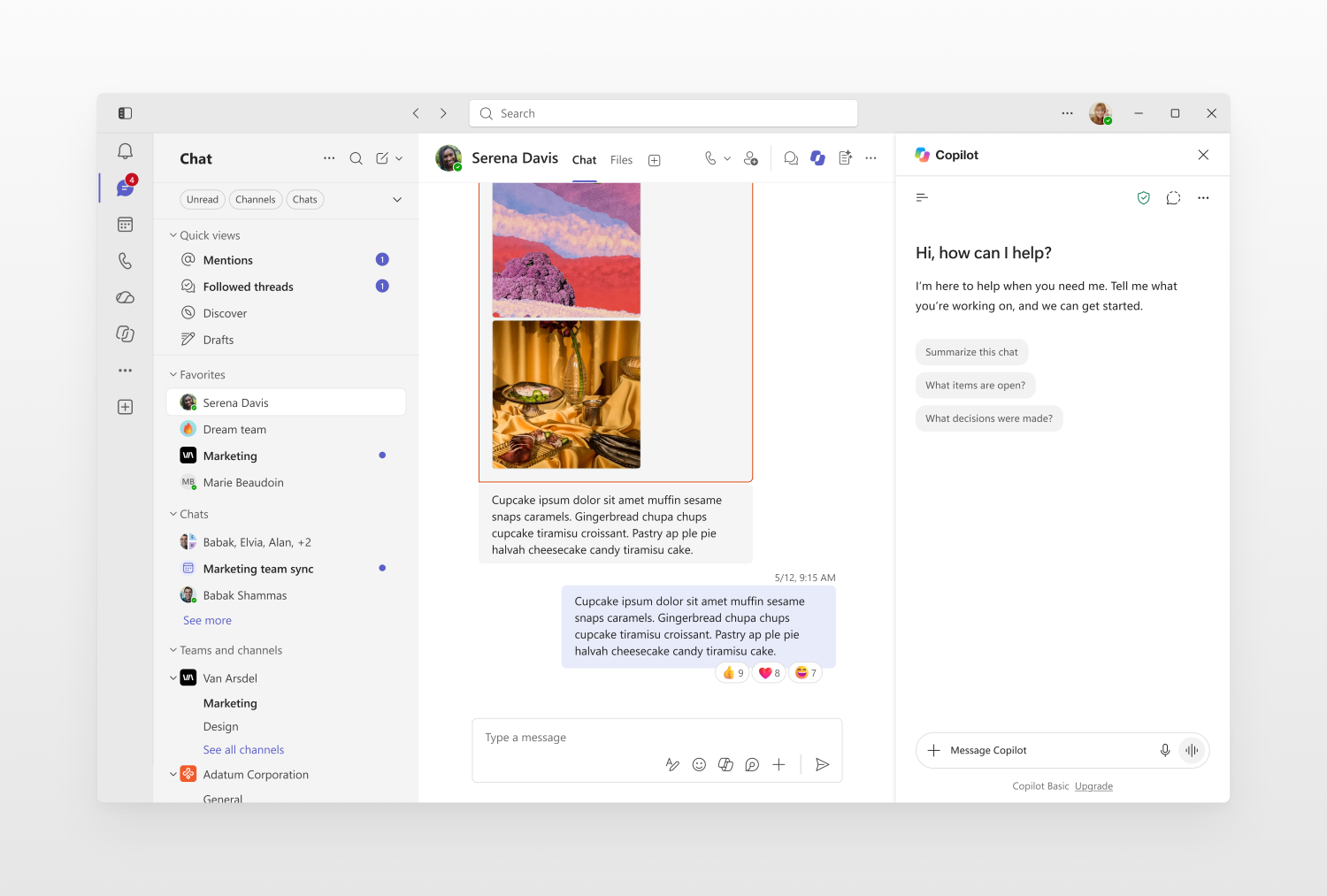
Continuing our efforts to streamline the user experience in the Copilot app as shared in MC1325422, we are introducing updates to the Copilot experiences in Microsoft Teams that deliver a similar, chat-centered experience. These updates simplify navigation, improve the chat experience, and provide new ways for users to organize work—helping them stay focused, maintain context, and move work forward efficiently. The refreshed design will be available in both the full-page Copilot experience in Teams and the Copilot side pane experience throughout Teams. The full-screen Copilot experience will closely mirror the recent updates in the Copilot app, while the side pane experience will receive a refreshed design optimized for contextual Copilot interactions within Teams.
[Rollout Schedule:]
Generally available: October 2026 (previously September).
[Impact on your organization:]
Users will see a refreshed Copilot experience in Microsoft Teams that aligns with the updated, chat-centered experience available in the Copilot app. The update applies to both the full-page Copilot experience in Teams and the Copilot side pane experience.
The refreshed experience includes simplified navigation, an updated chat layout, improved agent discovery and interaction, and the introduction of Work IQ controls. Users of the full-screen Copilot experience in Teams will also see the new Tasks view, which provides visibility into long-running Copilot activities such as agent activity and scheduled chats. The side pane experience will receive the updated design and chat experience but will not include the Tasks view.
This change is enabled by default as part of the service update and does not require user or administrator action. There are no changes to licensing, permissions, or existing compliance controls.
[Action Required / Recommendations:]
No action is required to enable this change.
To prepare for the rollout, administrators should:
- Inform users of the updated Copilot experience in Teams and the visual and navigation changes they may encounter.
- Update internal documentation, training materials, and adoption guidance that reference the current Copilot experience in Teams.
- Review and communicate the new Work IQ experience so users understand how work and web grounding are presented in the refreshed interface.
- Update any help desk or support documentation that includes screenshots or navigation guidance for Copilot in Teams.
This update will be enabled automatically and will not require configuration changes by administrators.
Details
In weekly changes
Services
- M365 Copilot
- Teams
Category
- Stay informed
Microsoft tags
- New Feature
- User Adoption
Related changes
- MC1325422 Microsoft 365 Copilot app: Simplified, chat-centered experience Message Center · M365 Copilot · Admin Low