MC1156360 Copilot Chat for Teams Chats, Channels, Calling, and Meetings
Primary service: M365 Copilot
ChangePilot summary
- Copilot Chat becomes available as a side-by-side experience in Teams for users with a Microsoft 365 Copilot license.
- This will replace today’s separate Copilot experiences for each scenario.
- Prior Copilot history will not migrate to the new experience but can still be accessed through the More Options menu.
- Supported platforms include Teams on Windows and Mac desktops as well as web browsers like Chrome, Edge, Firefox, and Safari.
Latest update: Standard start and end dates updated - previously reversed.
What it means for you
What admins need to do
Review Teams app permission and app setup policies and ensure the Microsoft 365 Copilot app is allowed for the intended users. Confirm licensing and tenant settings so Copilot is available in Teams meetings, and communicate any limitations to helpdesk and affected users.
Impact on users
Licensed users will see Copilot Chat in Teams and can use it alongside chats, channels, calling, and meetings on desktop and web. In meetings, users can also choose to stop Teams from processing spoken audio, which pauses transcription, recording, Copilot references, and Facilitator until the control is turned off.
If you miss it
Users may not see or be able to use Copilot Chat in Teams meetings if the Microsoft 365 Copilot app is not allowed in the tenant. If the new in-meeting control is not understood, users may be surprised when transcription, recording, and Copilot references are paused during protected portions of a meeting.
- Admin controls available
- Yes
History
Recorded changes
- Description updated with 'For more details, please see MC1319216'
- The release timeline for the in-meeting control General Availability has been postponed from July 2026 to September 2026.
- The release timeline for the in-meeting control General Availability has been postponed from July 2026 to September 2026.
- The timeline for the general availability of Copilot Chat for In-Meeting and in-Calls has changed: The rollout now starts and completes in July 2026, instead of starting in mid-January and completing by early March 2026.
-
- The updated content now requires administrators to ensure the Microsoft 365 Copilot app is allowed at the tenant level, which is a new admin action not mentioned in the original.
- The update provides guidance for admins on reviewing Teams app permission and setup policies, emphasizing app availability in Teams meetings based on both licensing and enablement.
- The updated content also includes a reference link to public documentation on managing Copilot access.
- The General Availability rollout for In-Meeting and in-Calls, which initially was to be completed in the weeks following mid-January, is now specified to complete by early March 2026.
- The General Availability rollout for In-Meeting and in-Calls, which initially was to be completed in the weeks following mid-January, is now specified to complete by early March 2026.
-
- A new in-meeting control is introduced in the update, allowing users to stop Teams from processing spoken audio during a meeting, affecting transcription, recording, and the Copilot and Facilitator features.
- An additional point in update specifies that Copilot and Facilitator will only have access to recordings or transcripts from periods when audio processing was active, providing more control over meeting data usage.
- The updated content includes a new statement linking the change to Microsoft 365 Roadmap ID: 501107.
- The updated content includes a new statement linking the change to Microsoft 365 Roadmap ID: 501107.
Microsoft message
Updated September 11, 2026: We have updated the content. Thank you for your patience.
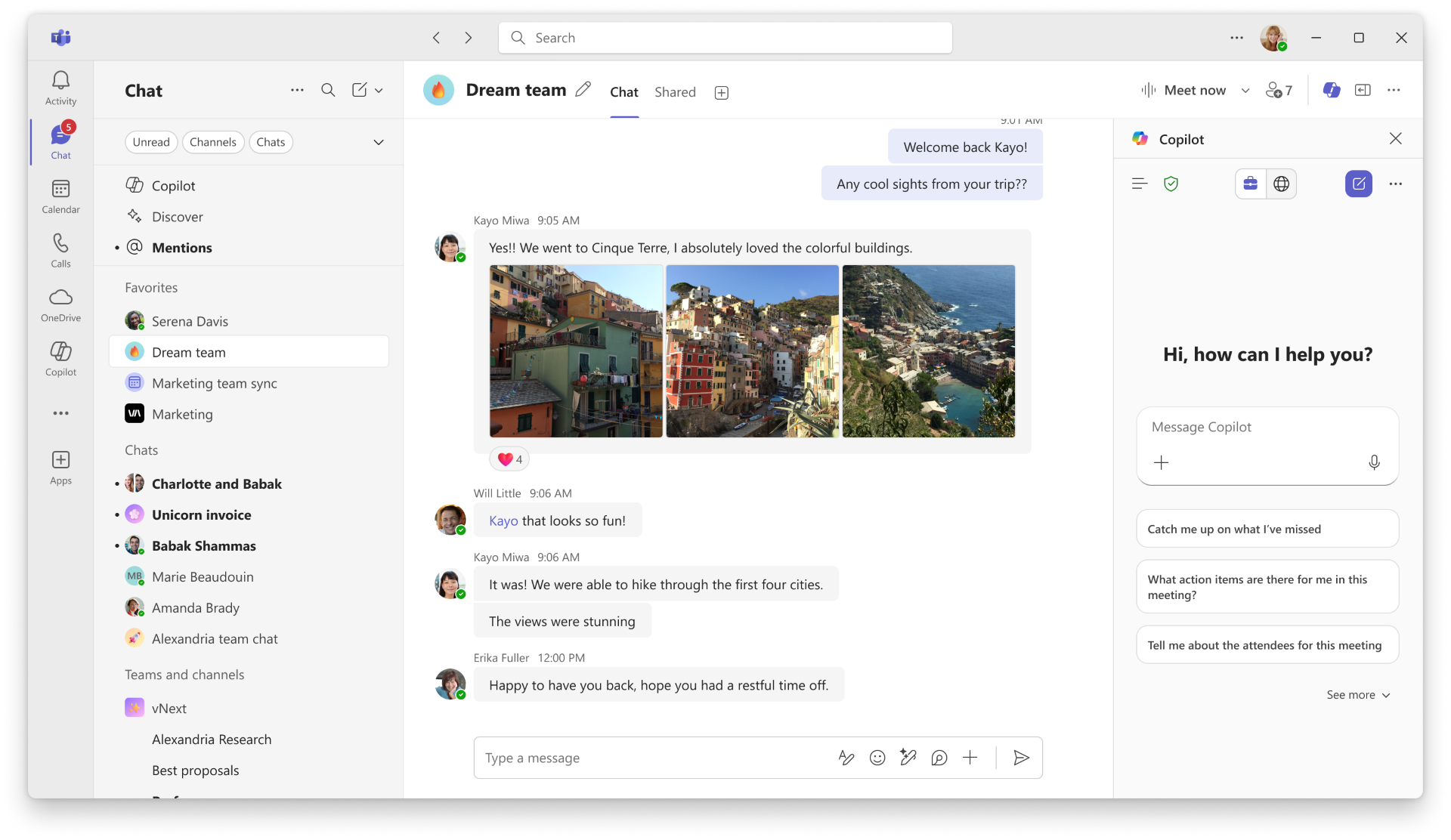
We’re excited to announce that we are making Copilot Chat available as a side-by-side experience in Teams. This will help users access the power of M365 and Web data in addition to current capabilities of Copilot in Chats, Channels, Calling, and Meeting. On Teams desktop (Windows and Mac) and web, users can open Copilot Chat from the Copilot icon located on the top right corner in these surfaces. Copilot Chat will be available in Teams for users with a Microsoft 365 Copilot license.
Additionally, a new in-meeting control lets users stop Teams from processing spoken audio during a meeting. When this control is on, Teams stops processing spoken audio — including transcription and recording — and Copilot will not use or reference anything said during this time. If Facilitator is active, it will also be turned off. Users will also be prevented from restarting recording, transcription, or Facilitator while this control is in effect.
This change is associated with Microsoft 365 Roadmap ID: 501107
Screenshot: Copilot Chat in Teams (Windows desktop) for users with a Microsoft 365 Copilot license. UI elements subject to change.
[When this will happen:]
Chats, Channels, and Post Meeting + Calling Recaps:
- Public Preview: Rollout of this change starts in early October and completes in the weeks following.
- General Availability: Rollout of this change starts mid-November and completes in the weeks following.
In-Meeting and in-Calls:
- Public Preview: Rollout of this change starts in early December and completes in the weeks following.
- General Availability: Rollout of this change started mid-January 2026 and completed early March 2026.
In-Meeting Control
- General Availability: Rollout of this change starts September 2026 (previously July) and is expected to complete in September 2026 (previously July).
- For more details, please see MC1319216
[How this affects your organization:]
Who is affected: Users with a Microsoft 365 Copilot license using Teams on Windows desktop, Mac desktop, or web (Chrome, Edge, Firefox, Safari).
What will happen:
- You can now create new Copilot Chat sessions or access other sessions within any conversation window. When you reopen Copilot Chat, it will always default back to the latest used session that was within the conversation window.
- Upon completion of the migration, all prior Copilot history will not be migrated into the new Copilot Chat experience. However, you can still access prior history by clicking on the More Options menu (…) located on the top right corner of your conversation window. An entry point to access history will be available within the More Options menu (...) of channel thread summaries as well. Within the menu, you find and select the View Copilot history option to access prior history.
Supported Platforms
Web
- Chrome
- Edge
- Firefox
- Safari
Desktop
- Windows
- Mac
[What you can do to prepare:]
Admin action required
To ensure Microsoft Copilot is available in Teams meetings, tenant administrators must allow the Microsoft 365 Copilot app.
If the Microsoft 365 Copilot app is not allowed at the tenant level, users may not see the Copilot entry point in Teams meetings, even when Copilot licenses are assigned.
Admins should review Teams app permission and app setup policies to confirm that the Microsoft 365 Copilot app is allowed for the intended users. Copilot availability in Teams meetings depends on both licensing and app enablement.
For more information, see the public documentation on managing Copilot access: https://learn.microsoft.com/copilot/manage
[Compliance considerations:]
| Compliance Area | Explanation |
|---|---|
| Does the change provide end users any new way of interacting with generative AI? | These capabilities were already available through Copilot Chat. This change extends Copilot Chat to new surfaces (Teams Chats, Channels, Calls, and Meetings). |
More information
Details
In weekly changes
Platforms
- Desktop
- Mac
- Web
Services
- M365 Copilot
Category
- Stay informed
Microsoft tags
- Feature Update
- User Adoption
Related changes
- MC1319216 In‑meeting toggle to turn Meeting AI on or off Message Center · Teams · Admin Low
- 501107 Copilot Chat for Teams Chats, Channels, Calling and Meetings Roadmap · M365 Copilot · Launched