MC1319216 In‑meeting toggle to turn Meeting AI on or off
Primary service: Teams
ChangePilot summary
- New in-meeting Meeting AI toggle added to Microsoft Teams allowing licensed meeting organizers and presenters to turn Meeting AI (Copilot, Facilitator, meeting recap) on or off during a live meeting.
- Toggle appears in the Teams meeting toolbar across supported clients and shows an AI status indicator; turning AI off stops new Copilot/Facilitator responses and notes, while previously generated artifacts remain available and governed by retention policies.
- The toggle only appears when Meeting AI is allowed by tenant policy; transcription and Meeting AI are coupled (starting one starts the other).
- No admin action is required to receive the change, but update docs/training, inform helpdesk, and review tenant Meeting AI/transcription policies to ensure behavior aligns with compliance needs.
Latest update: Targeted Release start: mid-September 2026 (previously mid-August 2026). Targeted Release end: late September 2026 (previously late August 2026). Standard start: mid-September 2026 (previously late August 2026). Standard end: late September 2026 (previously early September 2026).
What it means for you
What admins need to do
Review tenant Meeting AI and transcription policies to confirm the toggle will appear or remain blocked according to your compliance requirements; update internal documentation and end-user training to show where the Meeting AI toggle is located and that transcription and Meeting AI are coupled (starting one enables the other); brief helpdesk and prepare FAQ guidance for questions about controlling Meeting AI during meetings; consider piloting in Targeted Release and validate retention/compliance behavior for existing artifacts.
Impact on users
If you are a licensed meeting organizer or presenter you will see a new Meeting AI toggle in the Teams meeting toolbar that lets you enable or disable Copilot/Facilitator/recap during a meeting. Turning AI off prevents new AI-generated notes, responses, and recaps; previously created artifacts remain available. Be aware that starting transcription will automatically enable Meeting AI (and enabling Meeting AI starts transcription), so avoid transcription in meetings where AI involvement is not desired.
If you miss it
If IT ignores this update, the feature will still roll out where tenant policies allow it. Users may be surprised by the new toggle and by the transcription-AI coupling, which could lead to unintended AI or transcription use in sensitive meetings and increased support requests. There are no immediate licensing changes or data-loss risks, but lack of communication may elevate compliance or privacy concerns and increase helpdesk volume.
- Admin controls available
- Yes
History
Recorded changes
-
- Targeted Release start: mid-September 2026 (previously mid-August 2026).
- Targeted Release end: late September 2026 (previously late August 2026).
- Standard start: mid-September 2026 (previously late August 2026).
- Standard end: late September 2026 (previously early September 2026).
- Content update: To protect AI from accessing any artifacts, Recording and Transcription will also be turned off.
-
- The timeline for the rollout of the Meeting AI toggle has been updated, with Targeted Release now beginning in mid-August 2026 and General Availability in late August 2026, both pushed back from their previous July dates.
- The expected completion dates have been shifted from mid-July to late August for Targeted Release and from the end-of-July to early September for General Availability.
- The rollout schedule has been updated, delaying the targeted release from early June to early July 2026 and general availability from mid-June to mid-July 2026.
- The rollout schedule has been updated, delaying the targeted release from early June to early July 2026 and general availability from mid-June to mid-July 2026.
Microsoft message
Updated August 26, 2026: We have updated the content and timeline. Thank you for your patience.
[What and Why]
Microsoft Teams will introduce a new control that allows licensed meeting organizers and presenters to turn Meeting AI (including Copilot and Facilitator) on or off during a live meeting. This change builds on existing Meeting AI behavior and provides real-time flexibility to control when AI is active.
Licensed organizers and presenters can capture insights when discussions are valuable and turn off AI when conversations shift to sensitive topics. To protect AI from accessing any artifacts, Recording and Transcription will also be turned off.
[Rollout Schedule]- Targeted Release: We will begin rolling out mid-September 2026 (previously mid-August) and expect to complete by late September 2026 (previously late August).
- General Availability (Worldwide): We will begin rolling out mid-September 2026 (previously late August) and expect to complete by late September (previously early September).
Who is affected
- All Microsoft 365 tenants with Meeting AI (Copilot and/or Facilitator) enabled by policy and in Meeting Options
- Licensed organizers and presenters in Teams Meetings
- Microsoft Teams (Desktop, Web, and Mobile)
- Microsoft 365 Copilot (Meeting AI, Facilitator)
- A new control will appear in the Teams meeting toolbar for scheduled meetings:
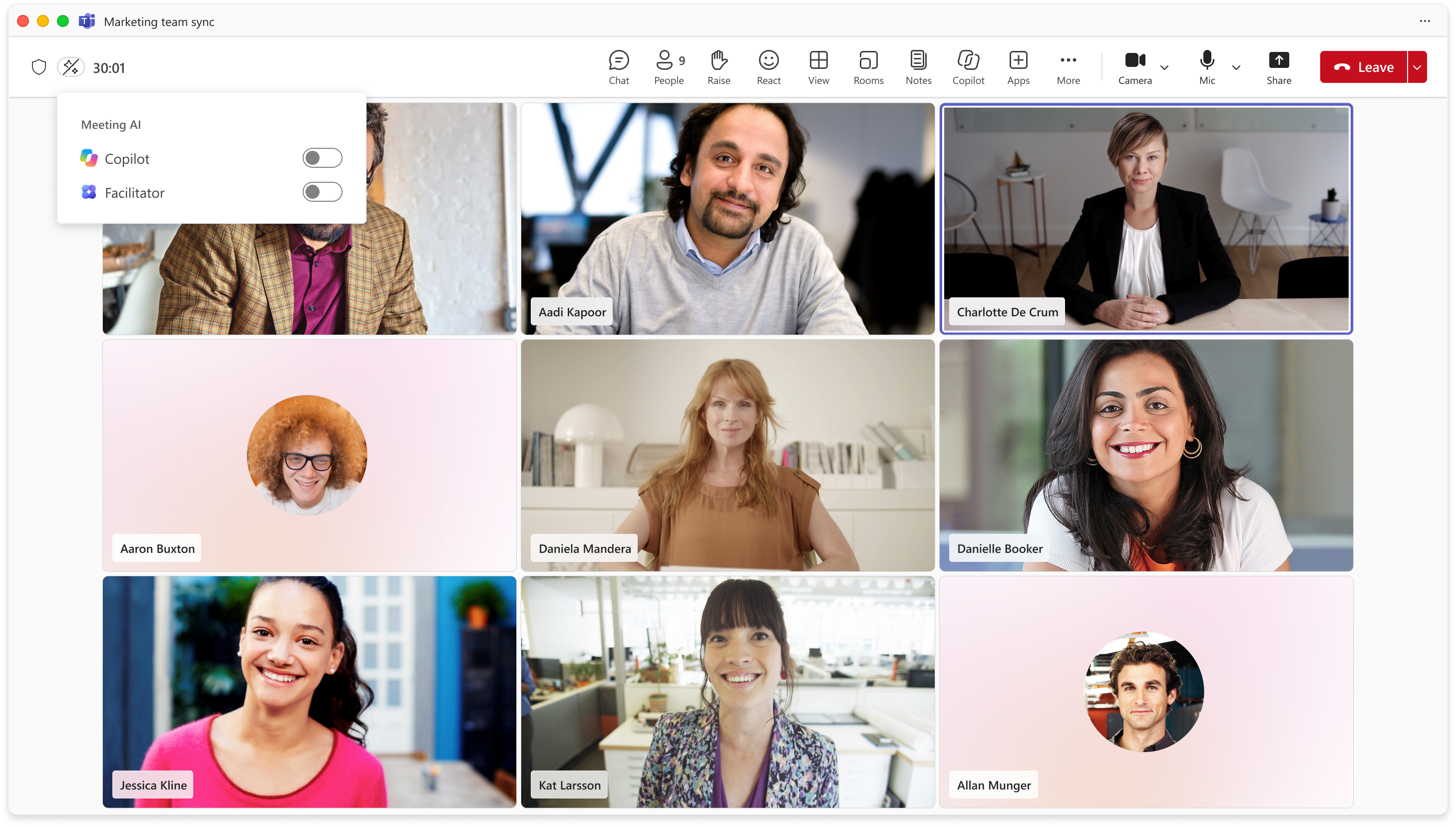
Screenshot 1 - Copilot and Facilitator toggles set to off
- Licensed organizers and presenters can turn Meeting AI on or off during meetings:
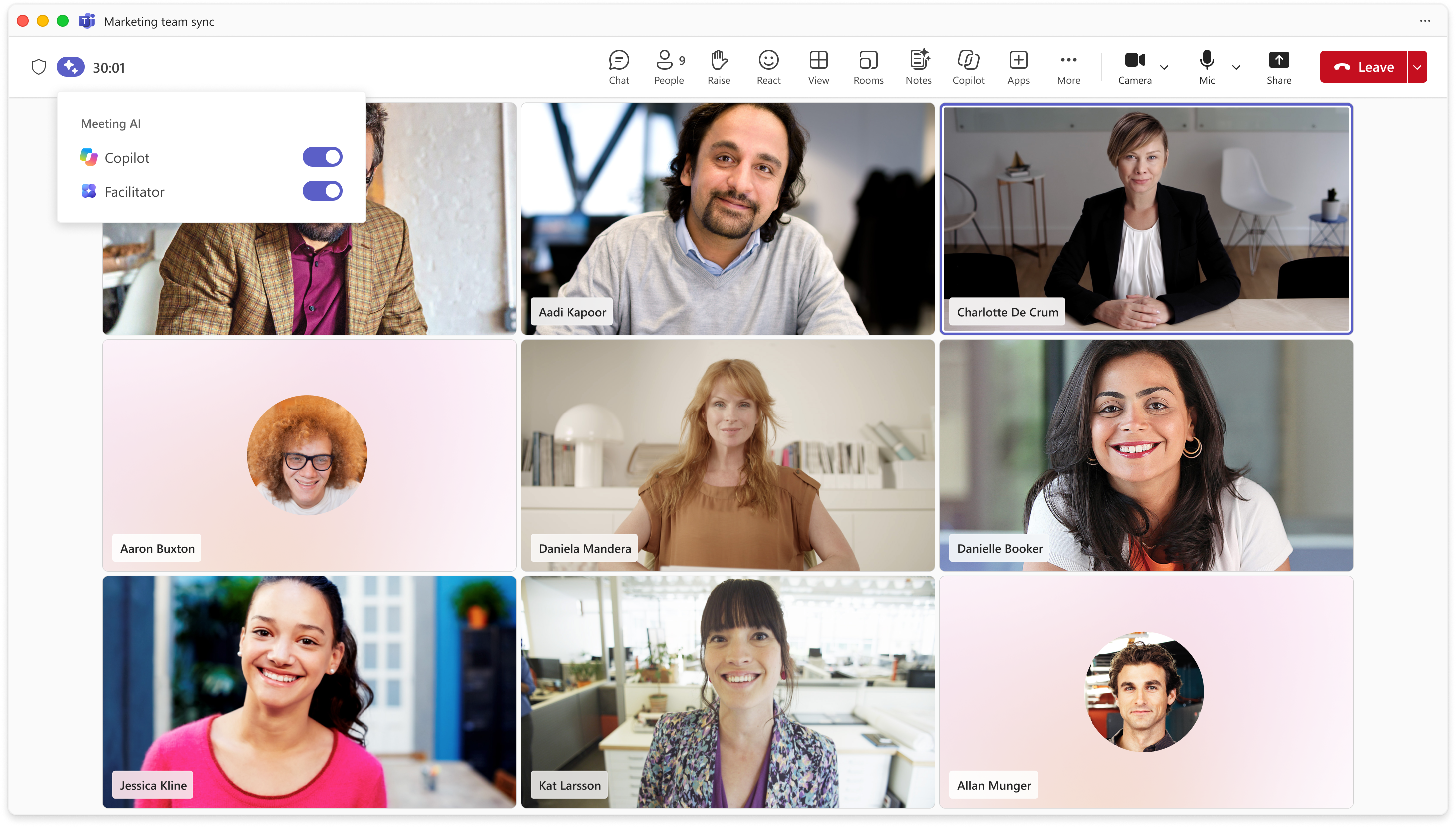
Screenshot 2 - Copilot and Facilitator toggles set to on
- Toggles are shown only when Meeting AI is allowed by policy.
- An AI status indicator will show participants whether Meeting AI is active.
Existing tenant policies and meeting options are respected:
- If Meeting AI is disabled by policy, the toggles will not appear.
When Meeting AI is turned off:
- Copilot, Facilitator responses, and Notes will no longer be generated.
- Previously generated artifacts remain available and governed by retention policies.
- If AI is used without transcription, speech-to-text data stops and Recap is not generated.
Important: Transcription Dependency
- When AI is used with transcription, they remain coupled:
- Turning on Meeting AI automatically turns on transcription and generates a recap.
- Starting transcription automatically enables Meeting AI and recap.
- To prevent Meeting AI usage, transcription and Meeting AI must remain off.
- Meeting options configured before meetings
- Recording, transcription, and sensitivity labels behavior
- Retention and compliance policies
- Licensing requirements for Copilot and Meeting AI
No action is required for this rollout.
Recommended actions:
- Update internal training and documentation to explain:
- Where the Meeting AI toggle appears
- Who can use the toggle (licensed organizers and presenters)
- Communicate to end users:
- Starting transcription automatically enables Meeting AI and recap
- Meetings that must avoid AI should not use transcription
- Prepare helpdesk teams to support user questions about:
- Controlling Meeting AI during meetings
- Understanding transcription-related behavior
No compliance considerations identified. Review as appropriate for your organization.
Details
Platforms
- Android
- Desktop
- iOS
- Mac
- Web
Services
- M365 Copilot
- Teams
Category
- Stay informed
Microsoft tags
- Admin Action
- New Feature
- User Adoption