MC999442 Data Lifecycle Management: Retention based on “last accessed” for OneDrive and SharePoint files
Primary service: Purview
ChangePilot summary
- Admins can apply retention policies or labels in OneDrive and SharePoint for files not accessed within a specified timeframe.
- This feature will help remove obsolete data, enhancing the quality of Microsoft 365 Copilot responses.
- Available by default; no admin action is required for rollout.
- Admins can configure labels and policies using the new "last accessed" option.
- Review current configurations and consider notifying users about this upcoming change.
Latest update: Standard start: late February 2027 (previously early January 2027). Standard end: late March 2027 (previously early February 2027).
History
Recorded changes
-
- Standard start: late February 2027 (previously early January 2027).
- Standard end: late March 2027 (previously early February 2027).
- Post updated to confirm - Non-office file types are not supported in this release.
-
- Targeted Release start: late November 2026 (previously late October 2026).
- Targeted Release end: late December 2026 (previously late November 2026).
- Standard start: early January 2027 (previously late December 2026).
- Standard end: early February 2027 (previously late January 2027).
-
- Targeted Release start: late October 2026 (previously late June 2026).
- Targeted Release end: late November 2026 (previously mid-August 2026).
- Standard start: late December 2026 (previously late July 2026).
- Standard end: late January 2027 (previously mid-August 2026).
-
- The timeline for the rollout has been updated; the preview rollout now starts in late June 2026 and completes by mid-August 2026, compared to previously starting in late May 2026 and completing by mid-June 2026.
- The general availability rollout now begins in late July 2026 and completes by mid-August 2026, rather than previously starting in late June 2026 and completing by mid-July 2026.
-
- The Preview phase is now expected to complete by mid-June 2026, changed from late June 2026.
- General Availability completion is now expected by mid-July 2026, changed from late July 2026.
-
- The timeline for the preview rollout has been changed rom late January 2026 to late May 2026 and is expected to complete by late June 2026, instead of late February 2026.
- The timeline for the general availability rollout has changed from beginning in late June 2026 to late June 2026 and is expected to complete by late July 2026, instead of mid-July 2026.
-
- The timeline for the rollout of the new feature has been delayed. The preview phase, initially set for mid-December 2025, has been postponed to late January 2026, with completion expected by late February 2026, instead of late December 2025.
- The general availability phase has similarly been postponed from mid-January 2026 to late June 2026, with completion expected by mid-July 2026, instead of late January 2026.
- The timeline for the rollout has been updated, with the Public Preview now scheduled for mid-December 2025 and General Availability rescheduled for mid-January 2026, both delayed from the initial schedule.
- The timeline for the rollout has been updated, with the Public Preview now scheduled for mid-December 2025 and General Availability rescheduled for mid-January 2026, both delayed from the initial schedule.
- The Public Preview rollout timeline has been changed from mid-February 2025 to mid-September 2025 and completion expectations changed from late February 2025 to late September 2025. The General Availability rollout timeline has been changed from late September 2025 to mid-October 2025, with expected completion now late October 2025.
Microsoft message
Updated October 13, 2026: We have updated the timeline. Thank you for your patience.
Enable admins to apply retention policy or retention label in OneDrive and SharePoint for files that have not been accessed by anyone in the organization after a period of time. In this release, users will be able to set up delete policies based on Last Accessed Date of Office file types. Non-office file types are not supported in this release.
This message is associated with Microsoft 365 Roadmap ID 472030.
[When this will happen:]
Preview: We will begin rolling out mid-January 2027 (previously late November 2026) and expect to complete by late February 2027 (previously end of December 2026)
General Availability (Worldwide): We will begin rolling out late February 2027 (previously early January) and expect to complete by late March 2027 (previously early February)
[How this will affect your organization:]
This feature will help delete obsolete data, which will improve the quality and relevance of Microsoft 365 Copilot responses.
This feature will be available by default.
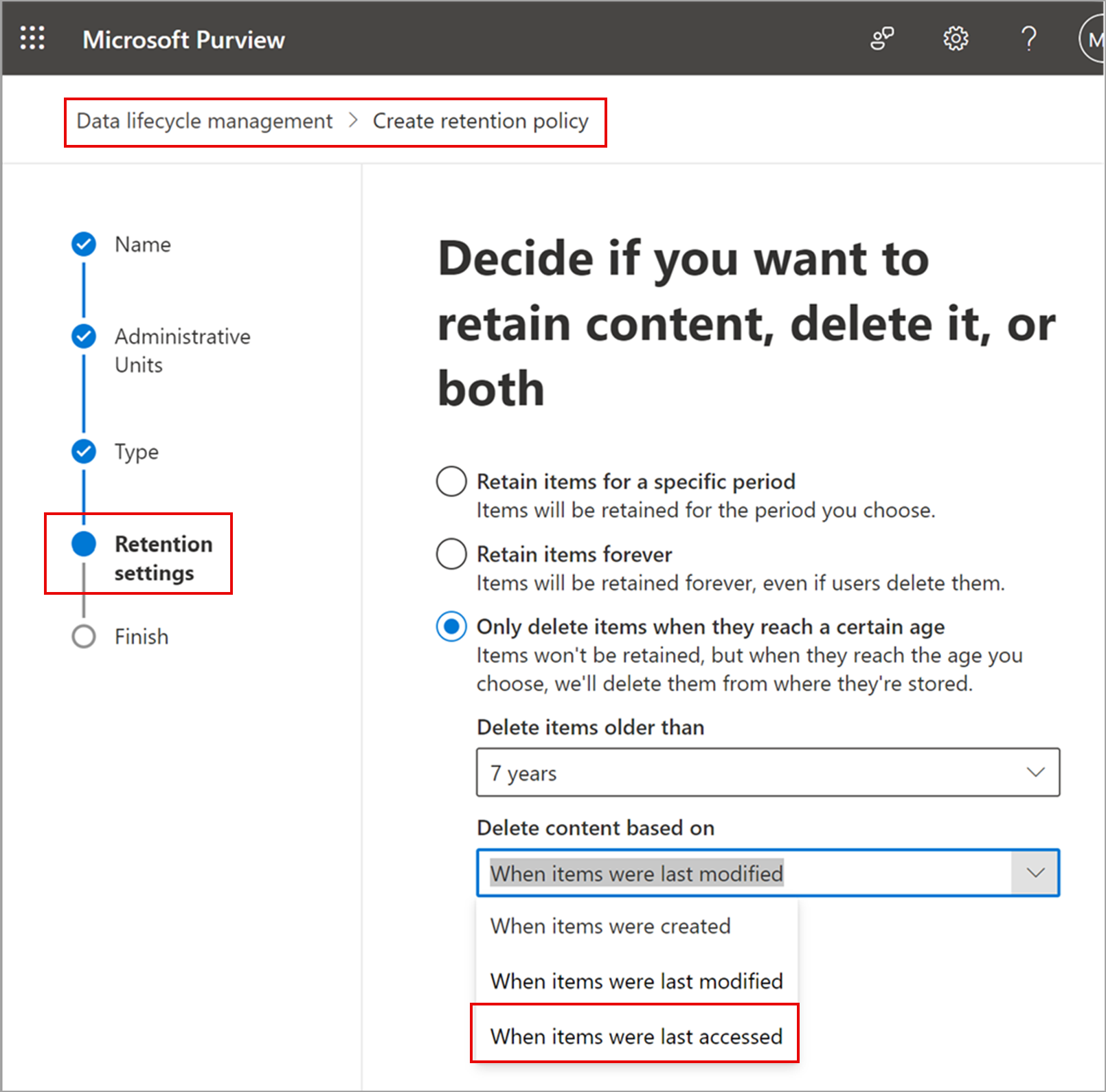
After the rollout, admins can use the retention control When items were last accessed when configuring labels and policies.
Retention settings page in Purview with the new “last accessed” option for retention policies:
[What you need to do to prepare:]
This rollout will happen automatically by the specified date with no admin action required before the rollout. Review your current configuration to determine the impact for your organization. You may want to notify your users about this change and update any relevant documentation.
Before rollout, we will update this post with new documentation.
More information
Details
In weekly changes
Platforms
- Web
Services
- Purview
Category
- Plan for change
Microsoft tags
- New Feature
- Admin Action
Related changes
- 472030 Data Lifecycle Management - Retention based on Last Accessed for files in OneDrive and SharePoint Roadmap · Purview · In development