MC785030 Microsoft Purview | Data Loss Prevention for endpoint: Optical Character Recognition (OCR) for Mac devices
Primary service: M365
ChangePilot summary
- Optical character recognition (OCR) support is being added to Microsoft Purview for Mac endpoint devices, enabling the scanning of sensitive content within images.
- The OCR feature will integrate with Data Loss Prevention (DLP) policies to detect and protect sensitive information in image files.
- Administrators will need to configure OCR settings in the Purview compliance portal to utilize this new feature.
- Billing setup is required for OCR usage, with a cost of $1.00 per 1,000 items scanned.
- Roles such as Compliance Data Administrator, Compliance Administrator, Information Protection, and Information Protection Admins will be able to configure OCR settings.
History
Recorded changes
No changes recorded since ChangePilot first saw this post.
Microsoft message
Updated July 26, 2024: We have updated the rollout timeline below. Thank you for your patience.
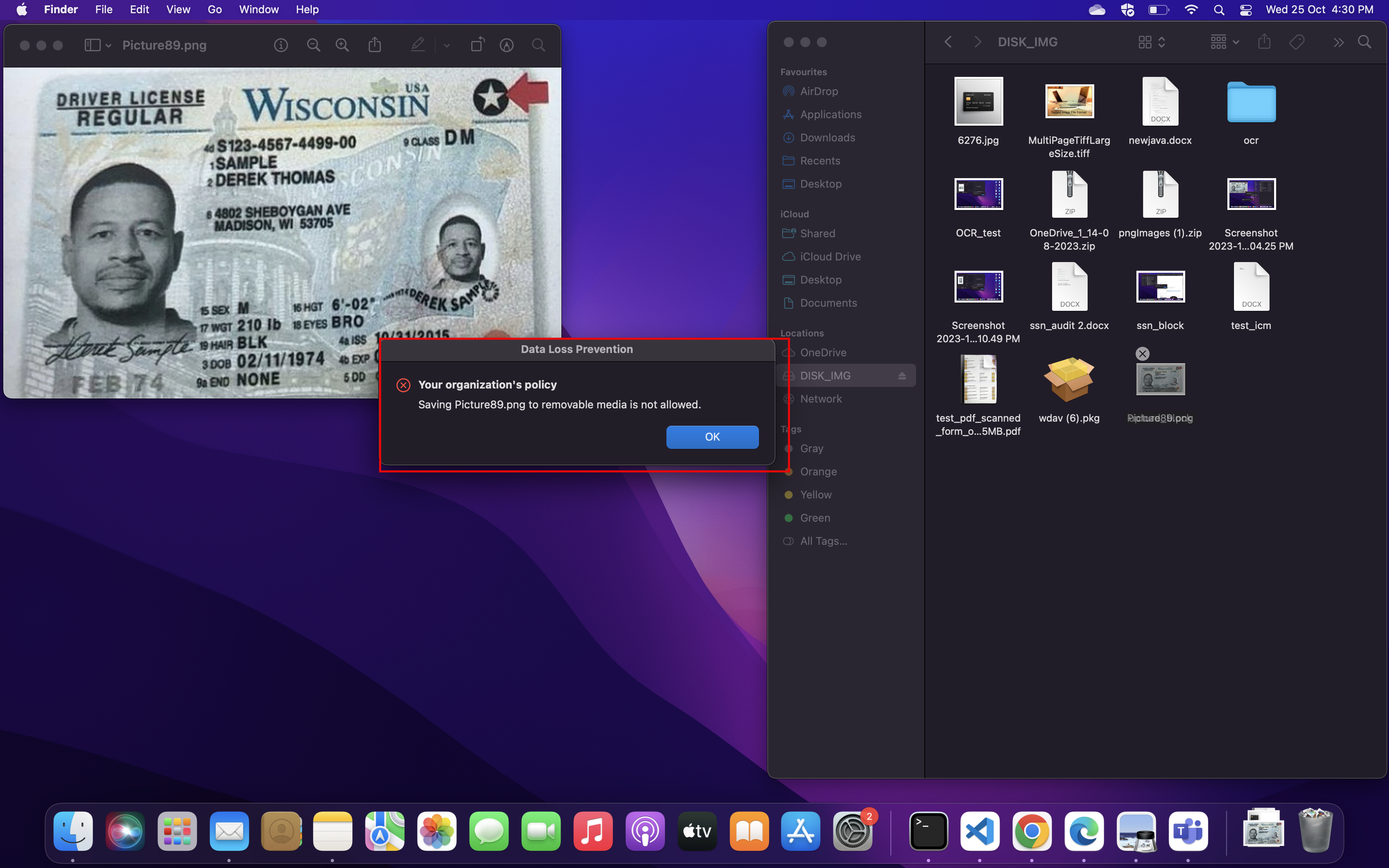
In Microsoft Purview policies like Data Loss Prevention (DLP), auto labelling can scan for sensitive content in most textual files, but images are not supported for content scanning today on Mac endpoint devices. With this rollout, we are adding optical character recognition (OCR) support on Mac devices to detect sensitive content in images and apply policies to protect these images.
This message is associated with Microsoft 365 Roadmap ID 392840.
[When this will happen:]
Public Preview: We will begin rolling out late June 2024 and expect to complete by late June 2024.
General Availability (Worldwide): We will begin rolling out early July 2024 and expect to complete by late July 2024 (mid-June).
[How this will affect your organization:]
Log in to the Purview compliance portal at compliance.microsoft.com and configure OCR in Settings > Optical Character Recognition.
Users in any of these roles will be able configure the OCR settings:
- Compliance Data Administrator
- Compliance Administrator
- Information Protection
- Information Protection Admins
When a user attempts to perform an egress operation with an image file (such as copying to removable media), DLP will detect and block sensitive content from being copied.
[What you need to do to prepare:]
Billing setup needs to be completed before you can use OCR. The charge for using OCR is $1.00 for every 1,000 items scanned. Learn more in the Workflow at a glance section of Learn about optical character recognition in Microsoft Purview (preview) | Microsoft Learn
You may want to notify your users about this change and update any relevant documentation as appropriate.
More information
Details
Platforms
- Web
Services
- M365
Microsoft tags
- New Feature