MC779843 Microsoft Syntex: New autofill columns
Primary service: SharePoint
ChangePilot summary
- Microsoft Syntex will introduce a new SharePoint document library feature called autofill columns, enabling automatic extraction or generation of metadata from file contents.
- Users can configure prompts on library columns to process files upon creation or upload, enhancing content management and metadata accuracy.
- Administrators need to connect their Azure subscription for pay-as-you-go billing to enable this feature and manage its availability in the Microsoft 365 admin center.
- The feature will be enabled by default for all sites, but can be tailored for specific site configurations.
- Users will have the ability to test the autofill prompts on library files before saving the changes, ensuring the feature works as intended.
History
Recorded changes
No changes recorded since ChangePilot first saw this post.
Microsoft message
Updated May 24, 2024: We have updated the rollout timeline below. Thank you for your patience.
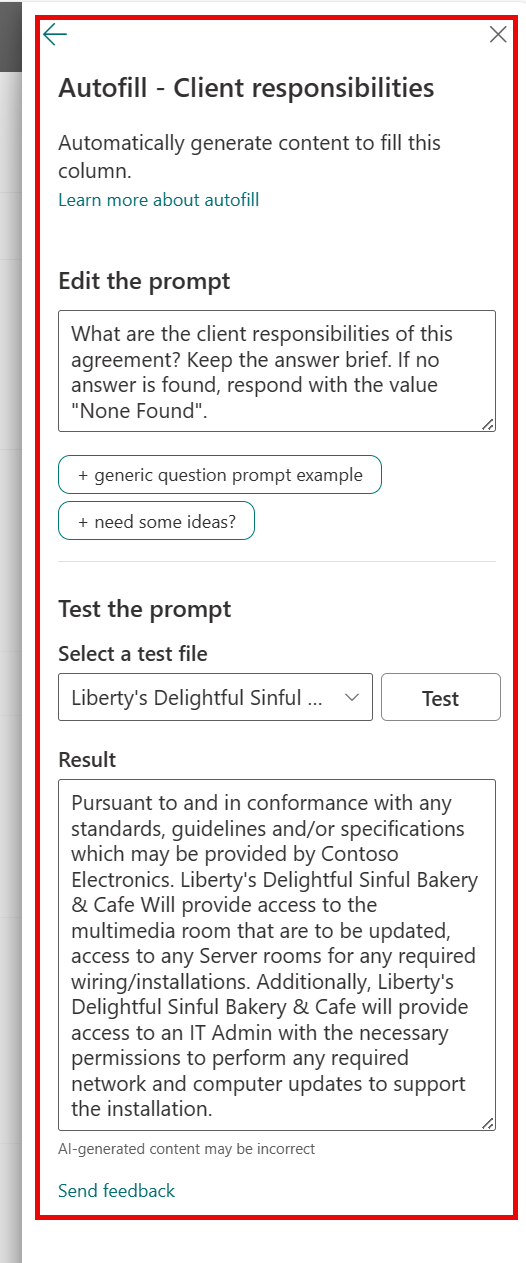
Microsoft Syntex will soon deliver a new Microsoft SharePoint document library enhancement called autofill columns that allows a prompt to be set on a library column that will process the file’s contents and save the response to the associated column. The prompt can be configured to extract information from the file or to generate a response based on the analysis of its contents.
This message is associated with Microsoft 365 Roadmap ID 389375.
[When this will happen:]
General availability (Worldwide): We will begin rolling out early June 2024 (previously mid-May) and expect to complete by late June 2024 (previously early June).
[How this will affect your organization:]
Users will be able to configure prompts on document library columns to process files created or uploaded to the library.
To start using autofill columns, visit the Content processing setup page in the Microsoft 365 admin center and connect your Azure subscription to enable pay-as-you-go billing. Then, configure the sites where you would like to have this setting available. By default, the setting is on for all sites.
Once enabled, users will be able to manually configure a prompt on a new or existing column – and test it on a library file before saving the change.
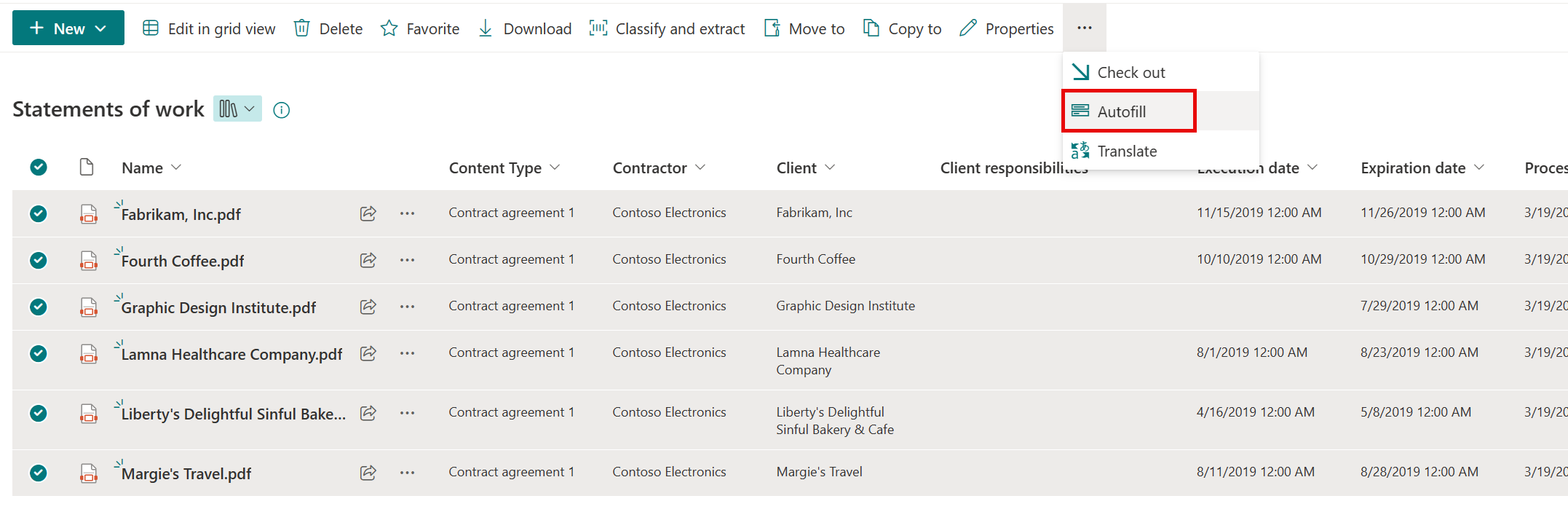
After saving, new uploaded files will be processed. To process existing library files, users can select the desired files and process them with the Autofill command from the three-dot menu:
[What you need to do to prepare:]
After the feature has rolled out, you can manage its availability to your users in the Microsoft 365 admin center.
This rollout will happen automatically by the specified date with no admin action required before the rollout. You may want to notify your users about this change and update any relevant documentation as appropriate.
Learn more
Configure Microsoft Syntex for pay-as-you-go billing - Microsoft Syntex | Microsoft Learn
Overview of autofill columns Microsoft Syntex - Microsoft Syntex | Microsoft Learn
More information
- go.microsoft.com/fwlink/p/?LinkId=2265003
- img-prod-cms-rt-microsoft-com.akamaized.net/cms/api/am/imageFileData/RW1kpyf?ver=400e
- img-prod-cms-rt-microsoft-com.akamaized.net/cms/api/am/imageFileData/RW1kuIi?ver=8d1a
- learn.microsoft.com/microsoft-365/syntex/syntex-azure-billing
- www.microsoft.com/microsoft-365/roadmap?rtc=1&filters=&searchterms=389375
- learn.microsoft.com/microsoft-365/syntex/syntex-azure-billing
Details
Platforms
- Web
Services
- SharePoint
Microsoft tags
- New Feature
- User Adoption