MC764458 Microsoft Purview | Communication Compliance: Contextual Summaries with Copilot for Security
Primary service: M365
ChangePilot summary
- New feature: Microsoft Purview capabilities in Microsoft Copilot for Security will provide contextual summaries for Communication Compliance policy matches.
- Enhanced investigation: Helps investigators quickly identify and understand potentially risky content in communications with one-click summaries and the ability to ask open-ended questions.
- Admin impact: IT administrators will need to configure Copilot for Security licenses and manage user permissions for those accessing the new feature.
- Privacy by design: The feature includes pseudonymization of usernames, role-based access controls, and audit logs to ensure user privacy.
- Preparation required: Organizations should familiarize themselves with the Microsoft Purview compliance portal and ensure proper setup for utilizing the new capabilities.
History
Recorded changes
No changes recorded since ChangePilot first saw this post.
Microsoft message
Updated May 8, 2024: We have updated the rollout timeline below. Thank you for your patience.
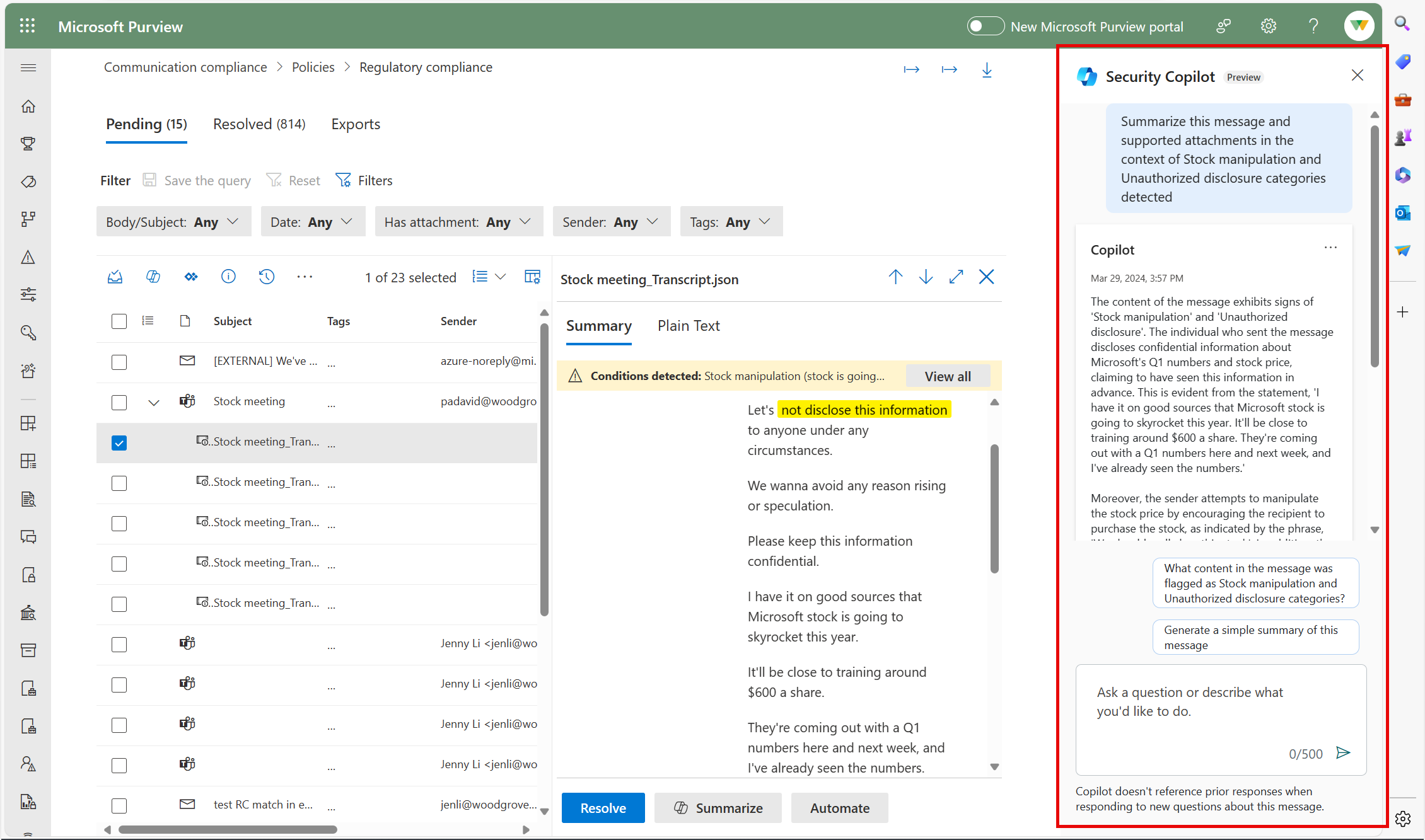
Coming soon to public preview, Microsoft Purview capabilities in Microsoft Copilot for Security introduces the ability to generate contextual summaries of a Communication Compliance policy match in the context of the conditions that flag the message.
This message is associated with Microsoft 365 Roadmap ID 388752.
[When this will happen:]
Public Preview: We will begin rolling out early April 2024 and expect to complete by late April 2024.
General Availability (Worldwide): We will begin rolling out early May 2024 (previously early June) and expect to complete by late May 2024 (previously late June).
[How this will affect your organization:]
Microsoft Purview capabilities in Copilot for Security introduces the ability to generate contextual summaries of individual Communication Compliance policy matches in the context of the conditions that flag the message as potentially risky. Investigators can more quickly identify potentially risky content and understand the meaning of the content with just one click. Users can ask additional open prompt questions for deeper insight into the message content.
[What you need to do to prepare:]
Microsoft Purview Communication Compliance provides the tools to help organizations detect business conduct and regulatory compliance violations (e.g. SEC or FINRA), such as sensitive or confidential information, harassing or threatening language, and sharing of adult content. Built with privacy by design, usernames are pseudonymized by default, role-based access controls are built in, investigators are opted in by an admin, and audit logs are in place to help ensure user-level privacy.
You must have a Copilot for Security license configured for your tenant and give proper permissions to users who will leverage the Contextual Summary feature.
Permissions needed to access Copilot for Security:
- You can access the Communication Compliance solution in the Microsoft Purview compliance portal
- You can access Communication Compliance policies to investigate and remediate policy matches.
Learn more
More information
- docs.microsoft.com/microsoft-365/compliance/communication-compliance?view=o365-worldwide
- img-prod-cms-rt-microsoft-com.akamaized.net/cms/api/am/imageFileData/RW1k39K?ver=030d
- learn.microsoft.com/purview/communication-compliance-investigate-remediate?view=o365-worldwide&tabs=purview-portal#summarize-a-message-by-using-copilot-in-purview
- purview.microsoft.com/compliance
- www.microsoft.com/microsoft-365/roadmap?filters=&searchterms=388752
Details
Platforms
- Web
Services
- M365
Microsoft tags
- New Feature
- Admin Impact