MC761235 Microsoft Teams Phone devices: Enable call forwarding directly from the device's Home screen
Primary service: Teams
ChangePilot summary
- Users will be able to enable call forwarding directly from the Home screen of Microsoft Teams certified phone devices.
- The feature will be available on both personal and common area phones, supporting touch and non-touch devices.
- Admins can enable the call forwarding feature for users via the Teams admin center or directly on the Teams phone device.
- Devices must be updated with the latest application from the Teams admin center to access the new feature.
- No admin action is required for the rollout, but it's recommended to notify users and update documentation.
History
Recorded changes
No changes recorded since ChangePilot first saw this post.
Microsoft message
Note: If your organization does not use Teams phone devices, you can disregard this message.
Coming soon: Users of Microsoft Teams certified phone devices will be able to enable call forwarding directly from a Teams phone device Home screen with just a few clicks. The feature will be supported on both personal and common area phones, including touch and non-touch phones.
This message is associated with Microsoft 365 Roadmap ID 388490.
[When this will happen:]
General Availability (Worldwide, GCC): We will begin rolling out early May 2024 and expect to complete by late May 2024.
GCC High: We will begin rolling out late June 2024 and expect to complete by late July 2024.
[How this will affect your organization:]
Enabling call forwarding from a Teams phone device Home screen:
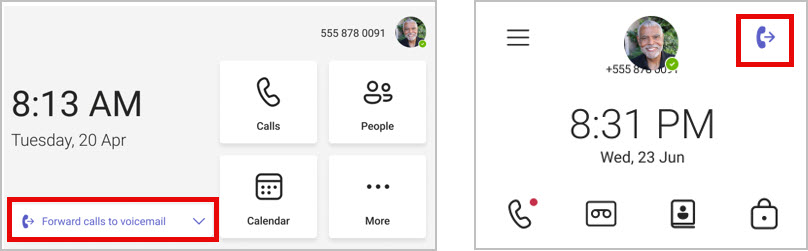
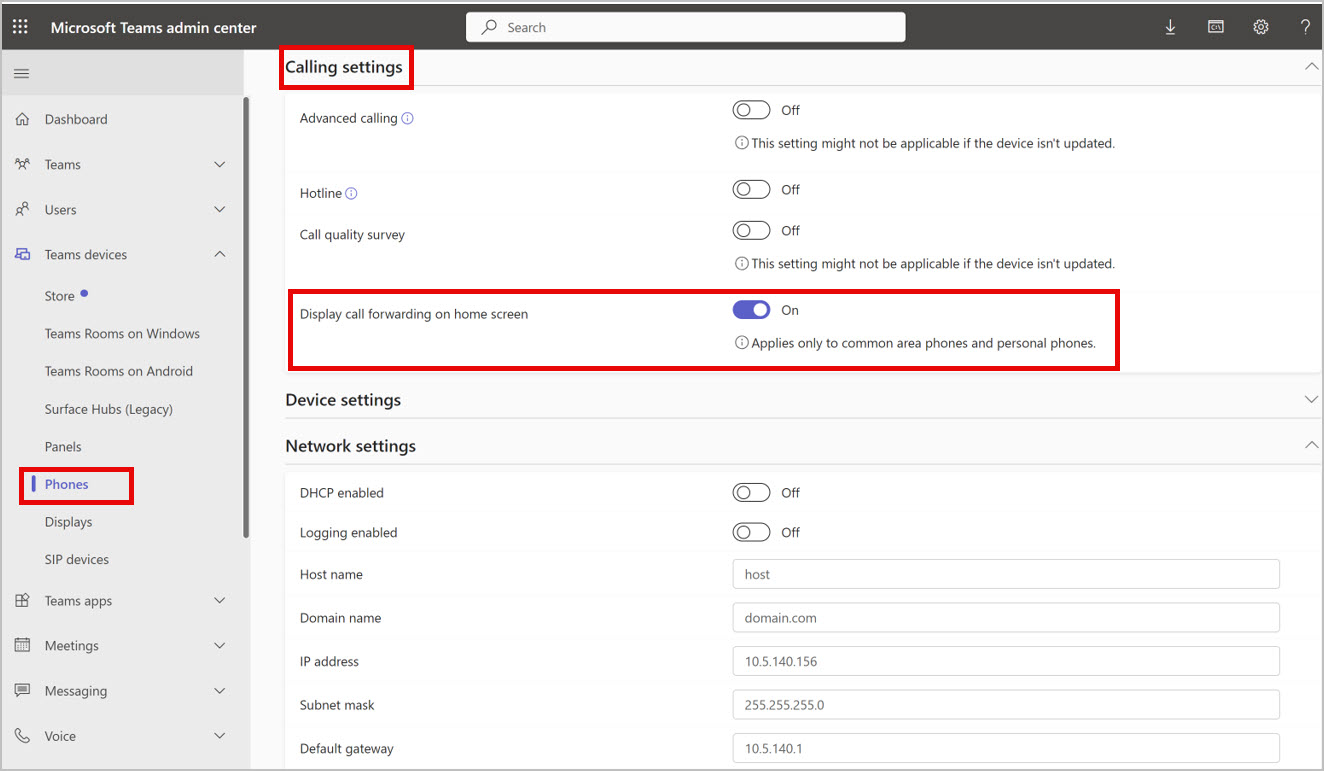
As admins, you will be able to enable call forwarding on the Home screen for your users through Teams admin center > Teams devices > Phones > configuration profile > Calling settings or on the Teams phone device through Calling settings.
[What you need to do to prepare:]
Please ensure your Teams phone devices are updated with the latest application from the Teams admin center to get access to the new feature.
This rollout will happen automatically by the specified date with no admin action required. You may want to notify your users and admins about this change and update any relevant documentation as appropriate.
Learn more: What's New in Microsoft Teams | Enterprise Connect 2024 Edition - Microsoft Community Hub.
More information
- img-prod-cms-rt-microsoft-com.akamaized.net/cms/api/am/imageFileData/RW1jOKu
- img-prod-cms-rt-microsoft-com.akamaized.net/cms/api/am/imageFileData/RW1k23Z
- techcommunity.microsoft.com/t5/microsoft-teams-blog/what-s-new-in-microsoft-teams-enterprise-connect-2024-edition/ba-p/4090711#:~:text=Teams%20Phone%20device%20UI%20improvements
- www.microsoft.com/microsoft-365/roadmap?filters=&searchterms=388490
Details
Platforms
- Teams and Surface Devices
Services
- Teams
Microsoft tags
- Feature Update
- User Adoption
- Admin Action