MC756008 Updates to the Microsoft Copilot for Microsoft 365 user interface
Primary service: M365 Copilot
ChangePilot summary
- Microsoft Copilot for Microsoft 365 UI will be updated for better visual alignment with Microsoft Copilot (formerly Bing Chat Enterprise).
- A green shield icon will be added to the UI header, providing information on Microsoft's enterprise compliance standards.
- Persistent legal and data protection disclaimers, along with links to Terms, Privacy, and FAQs, will be added underneath the chat prompt box.
- AI accuracy disclaimer will be added at the bottom of each chat to remind users that AI-generated content may be incorrect.
- Company branding or logos will be removed from the Microsoft Copilot for Microsoft 365 UI.
History
Recorded changes
No changes recorded since ChangePilot first saw this post.
Microsoft message
Updated June 13, 2024: We have updated the rollout timeline below. Thank you for your patience.
Beginning in mid-April, the Microsoft Copilot for Microsoft 365 user interface (UI) will be updated to create better visual alignment between it and Microsoft Copilot (formerly Bing Chat Enterprise). These UI updates are expected to be completed by early July.
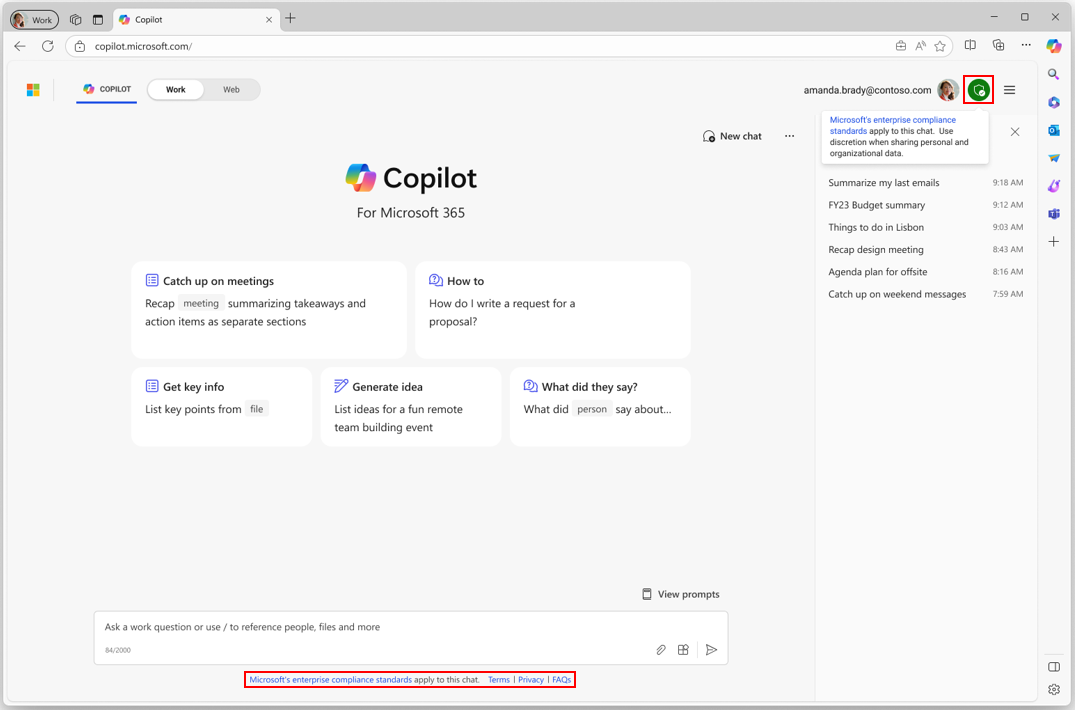
Microsoft Copilot for Microsoft 365 UI updates include:
- Adding a green shield icon to the UI header (located next to the user profile image): When a user hovers over the shield (or presses on the icon from within a supported mobile application), they will see a flyout description with a link to more information: “Microsoft's enterprise compliance standards apply to this chat. Use discretion when sharing personal and organizational data.”
- Adding a persistent legal and data protection disclaimer, along with links for Terms, Privacy, and FAQs, underneath the chat prompt box (bottom of the UI): “Microsoft's enterprise compliance standards apply to this chat. Terms | Privacy | FAQs”.
- To simplify the UI, the following duplicative instances of these disclaimers or links will be removed:
- The blue lock icon with light-grey disclaimer within the flow of Copilot chat (“Work content and chats cannot be seen outside your organization.”).
- The legal disclaimer and links for Terms, Privacy, and FAQs underneath the Copilot for Microsoft 365 branding.
- To simplify the UI, the following duplicative instances of these disclaimers or links will be removed:
- Adding a new AI accuracy disclaimer to the bottom of each chat: A shield with a lock icon and disclaimer will be added at the bottom of each chat: “AI-generated content may be incorrect.”
- Removing company branding/logo from the UI: Users will no longer see their company's branding or logo as part of the Microsoft Copilot for Microsoft 365 UI.
These updates will roll out to the following Microsoft Copilot for Microsoft 365 entry points:
- Copilot.microsoft.com
- Copilot in Bing (bing.com/chat)
- Copilot in Edge (sidebar)
- Copilot in Windows
- Mobile applications:
- Microsoft Copilot
- Microsoft Edge
The UI for Copilot for Microsoft 365-specific entry points (such as those within the Microsoft 365 apps) will not update.
The Microsoft Copilot (formerly Bing Chat Enterprise) UI is also updating with similar changes to create better visual alignment between it and Copilot for Microsoft 365. Please refer to MC756004 for details on those UI updates.
[When this will happen:]
General Availability (include all environments here on same schedule): We will begin rolling out mid-April 2024 (previously late March) and expect to complete by early July 2024 (previously late May).
[How this will affect your organization:]
These are UI updates only--they do not impact Microsoft Copilot for Microsoft 365 terms, privacy, or data protections.
[What you need to do to prepare:]
We recommend that you prepare your users by informing them of the UI updates.
Microsoft Copilot for Microsoft 365 adoption materials are available here: Microsoft Adoption: Copilot for Microsoft 365.
More information
- adoption.microsoft.com/copilot/
- aka.ms/bcbtou
- go.microsoft.com/fwlink/?LinkId=521839
- support.microsoft.com/office/frequently-asked-questions-about-microsoft-365-copilot-500fc65e-9973-4e42-9cf4-bdefb0eb04ce
- learn.microsoft.com/microsoft-365-copilot/microsoft-365-copilot-privacy#how-does-microsoft-copilot-for-microsoft-365-use-your-proprietary-organizational-data
Details
Services
- M365 Copilot
Microsoft tags
- Feature Update
- User Adoption
- Admin Action