MC744115 Microsoft Outlook Mobile: Open a Teams Meeting chat from the calendar
Primary service: Exchange
ChangePilot summary
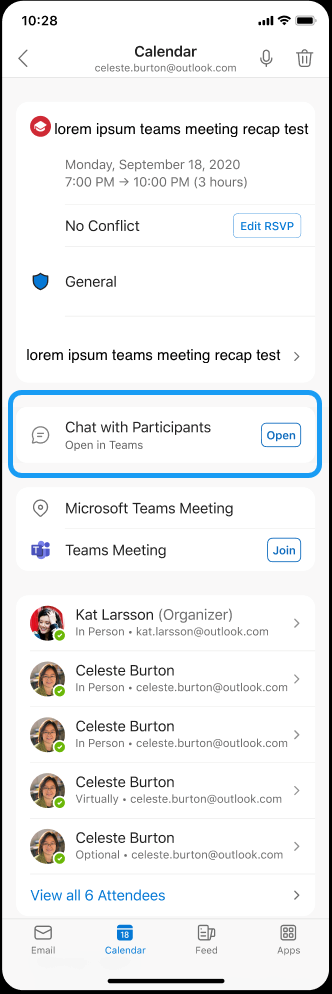
- Users will be able to access Microsoft Teams Meeting chat directly from the Outlook mobile calendar event.
- The feature will be available on both iOS and Android devices.
- The "Chat with Participants" button will facilitate entry into the Teams Meeting chat.
- If the Teams Mobile app is not installed, users will be prompted to download it.
- Existing Intune policies regarding chat access before and after meetings will still apply.
History
Recorded changes
No changes recorded since ChangePilot first saw this post.
Microsoft message
Note: If your organization does not support iOS and/or Android mobile devices, you can skip this message.
For meetings that are created as Microsoft Teams Meetings, users now have the option to open the Teams Meeting chat directly from the meeting event on their Outlook mobile calendar.
This message is associated with Microsoft 365 Roadmap ID 387501.
[When this will happen:]
Public Preview: We will begin rolling out late April 2024 and expect to complete by early May 2024.
General Availability: We will begin rolling out early May 2024 and expect to complete by late May 2024.
[How this will affect your organization:]
This rollout will give users the ability to open an event in their calendar (before or after the event) and select the Chat with Participants button to go to the Teams Meeting chat for that event. The chat will open in the Teams Mobile app, and if the user does not have the app installed, they will be linked to a page asking if they wish to download the Teams Mobile app (same experience users have today if they tap on Join a Teams meeting but do not have the mobile app installed).
If you have created Intune policies that prevent access to an event chat prior to the event beginning, or if you have created policies to restrict access to a Teams chat after the event has finished, these rules will be enforced for this new feature.
[What you need to do to prepare:]
This rollout will happen automatically by the specified date with no admin action required. You may want to notify your users about this change and update any relevant documentation as appropriate.
More information
Details
Platforms
- Android
- iOS
Services
- Exchange
- M365 Apps
Microsoft tags
- New Feature
- User Adoption