MC740508 Microsoft Viva Learning: Disable LinkedIn Learning premium content
Primary service: Viva
ChangePilot summary
- Microsoft is introducing a feature for admins to disable LinkedIn Learning premium content in Microsoft Viva Learning.
- LinkedIn Learning premium content is enabled by default for all tenants.
- The new feature will not affect existing Viva Learning functionality or configurations.
- End users will not be able to browse for LinkedIn Learning premium content if it is turned off by an admin.
- No immediate action is required for the rollout, but admins may choose to inform users and update documentation.
History
Recorded changes
No changes recorded since ChangePilot first saw this post.
Microsoft message
Updated June 28, 2024: We are evaluating the current rollout timeline and will communicate via Message center when we are ready to proceed. Thank you for your patience.
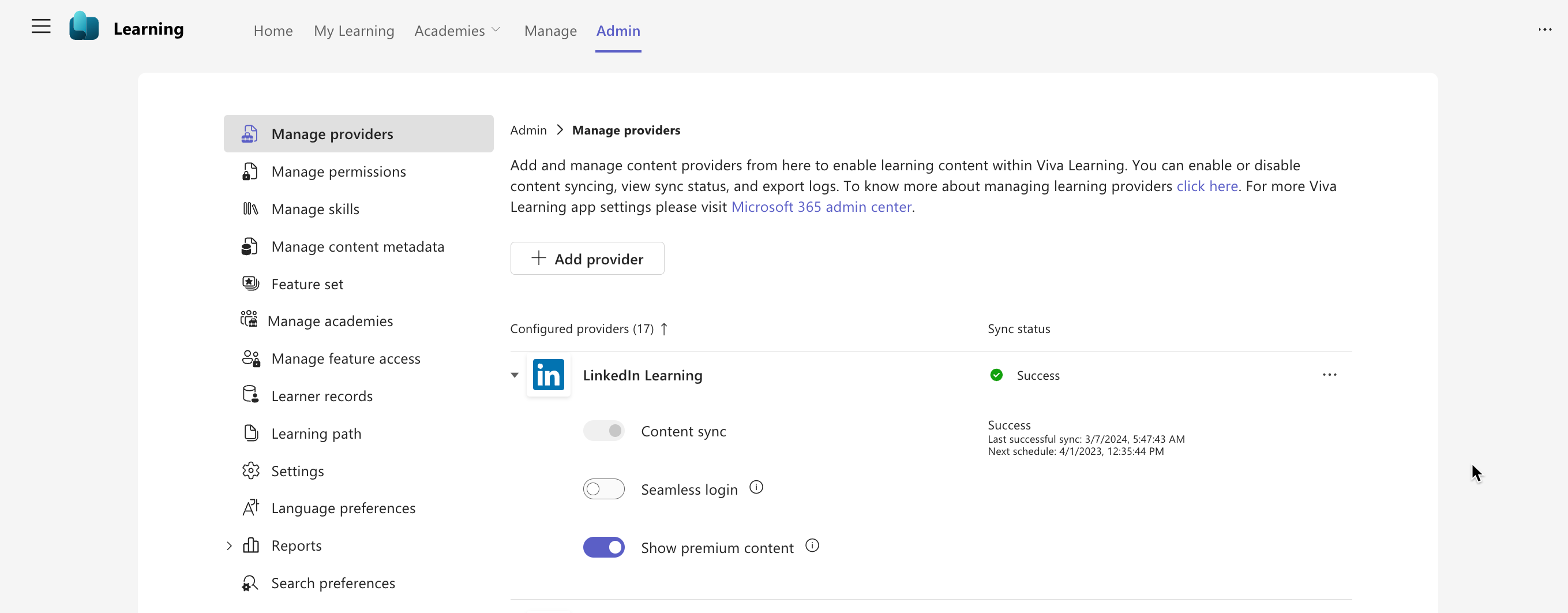
We are rolling out a feature for admins to turn off LinkedIn Learning premium content in Microsoft Viva Learning for all users in their tenant. (LinkedIn Learning premium content is on by default in Viva Learning for all tenants.)
[When this will happen:]
General Availability (Worldwide): We are evaluating the current rollout timeline and will communicate via Message center when we are ready to proceed. Thank you for your patience.
[How this will affect your organization:]
This rollout does not change any existing Viva Learning functionality or configuration. There is no impact for end users in Viva Learning. If hidden, end users will not be able to browse for LinkedIn Learning premium content.
To turn off LinkedIn Learning premium content: Viva Learning Admin > Manage Providers > LinkedIn Learning
[What you need to do to prepare:]
No action is needed from you to prepare for this rollout. You may want to notify your users about this change and update any relevant documentation as appropriate.
More information
Details
Services
- Viva Learning
Microsoft tags
- Updated
- New Feature