MC740505 Viva Learning | New language settings for admins and users
Primary service: Teams
ChangePilot summary
- Viva Learning is introducing new language settings, allowing Learning admins to define supported languages for their organization.
- Users can personalize their Viva Learning experience by selecting their preferred language within the app settings.
- User language settings will be consistent across Viva Learning platforms, including Teams app and web versions.
- Changes to language settings in Microsoft Teams or the browser will not affect the language setting in Viva Learning post-update.
- If a user's language preference is unsupported, Viva Learning will default to the organization's "Default language."
History
Recorded changes
No changes recorded since ChangePilot first saw this post.
Microsoft message
Updated April 23, 2024: We have updated the rollout timeline below. Thank you for your patience.
Viva Learning is rolling out new language settings so Learning admins and users can personalize Viva Learning with their preferred language.
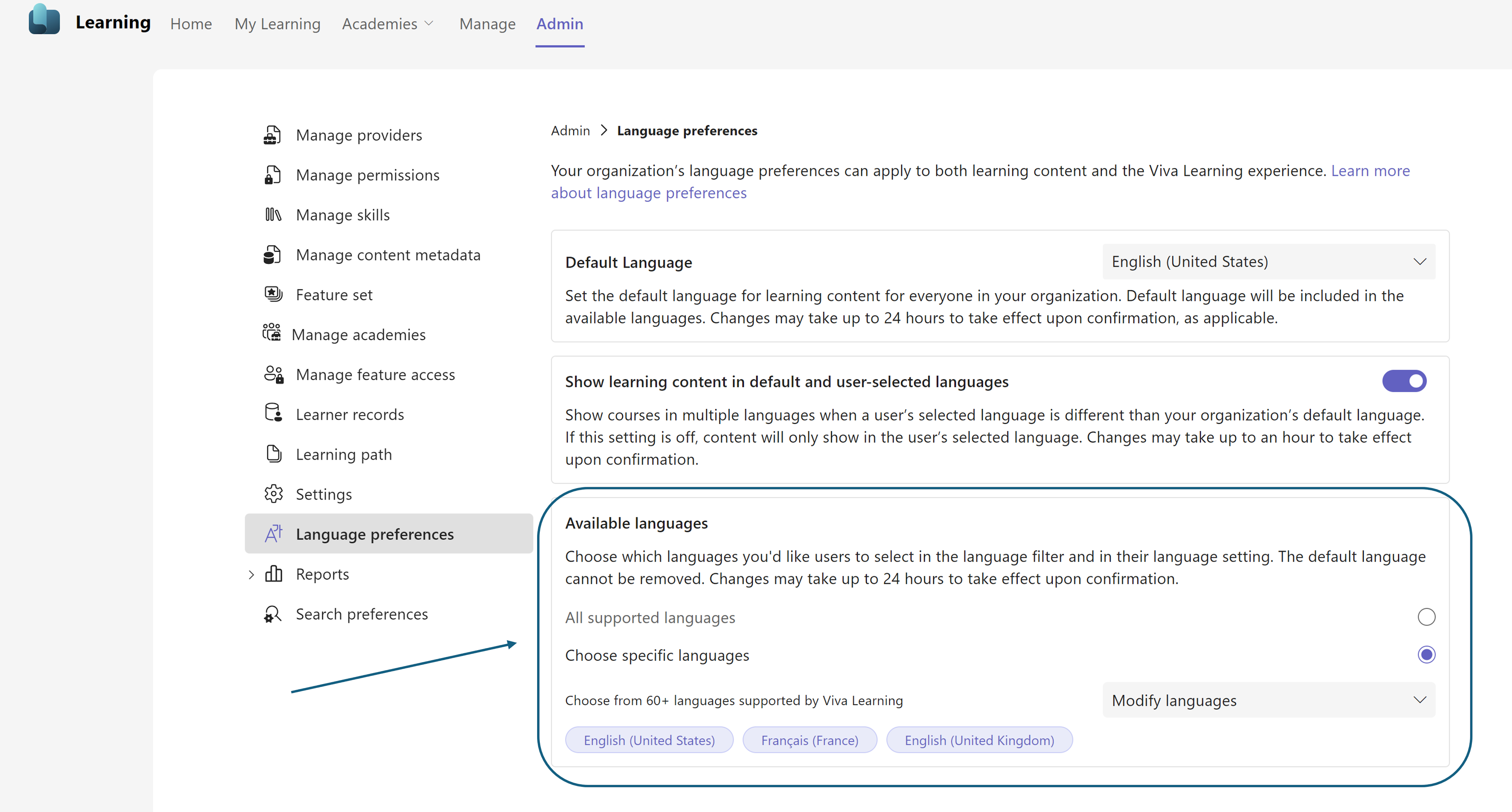
Available languages setting in the Viva Learning admin page
Knowledge admins / Learning admins can now define a specific set of languages that they support for learning in their tenant in the Available languages setting in Language preferences tab in the Viva Learning admin page. Please refer to Language preferences in Viva Learning | Microsoft Learn for guidelines on choosing supported languages and to learn about the impacted features. We advise minimizing changes to the Available languages setting for an optimal user learning experience.
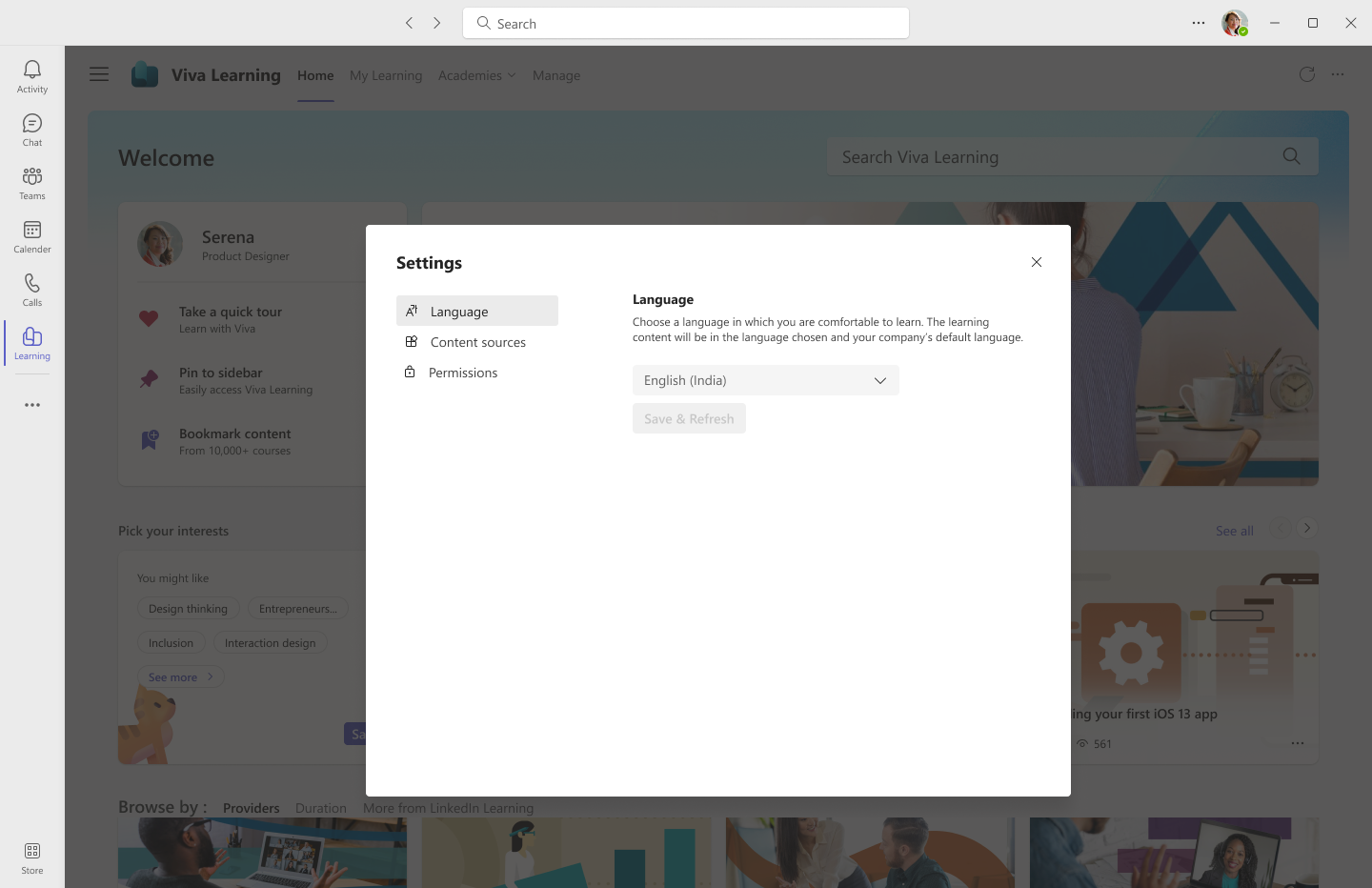
User Language option in Settings Menu in Viva Learning
Users will be able to personalize Viva Learning by choosing their preferred language in the Viva Learning app settings. User Language settings will show the language options chosen by admins in the Available languages setting in the Viva Learning admin tab. User language settings will persist across all Viva Learning experiences: changes to user language in the Viva Learning Teams app will reflect in Viva Learning for the web and vice versa.
This message is associated with Microsoft 365 Roadmap ID 162294.
[When this will happen:]
Public Preview: We will begin rolling out early April 2024 and expect to complete by mid-April 2024
General Availability: We will begin rolling out early May 2024 (previously mid-April) and expect to complete by late May 2024 (previously late April).
[How this will affect your organization:]
After rollout:
- Viva Learning will only reflect the user Language setting in Viva Learning.
- The user Language setting will be preselected based on the language the user was using in Viva Learning.
- Changing the language in Microsoft Teams for desktop or web (or changing the browser language) will not change the Viva Learning language.
For example, before rollout, a user selected English (United States) in their Microsoft Teams language setting, so English (United States) setting was also reflected in Viva Learning. After rollout, English (United States) will be automatically selected as the user's language setting. After rollout, the user can only change the language for Viva Learning through the Viva Learning user Language setting. Changes to language in Microsoft Teams or a browser will not affect the language setting for Viva Learning.
If a user is accessing Viva Learning in an unsupported language (not present in the Available languages setting), Viva Learning will reflect the Default language in the language settings.
Available languages setting in the Viva Learning admin page:
User Language setting in Viva Learning (for users):
[What you need to do to prepare:]
Learning admins may want to:
- Prepare the set of languages that the tenant supports in Viva Learning. Refer to documentation for guidance on how to choose Available languages.
- Inform users about the new capability to change Viva Learning language within the application.
- Learn more: Language preferences in Viva Learning | Microsoft Learn
More information
- img-prod-cms-rt-microsoft-com.akamaized.net/cms/api/am/imageFileData/RW1jmFX
- img-prod-cms-rt-microsoft-com.akamaized.net/cms/api/am/imageFileData/RW1juxk
- learn.microsoft.com/en-us/viva/learning/language-preferences#available-languages
- learn.microsoft.com/viva/learning/language-preferences
- learn.microsoft.com/viva/learning/language-preferences#default-language
- www.microsoft.com/microsoft-365/roadmap?filters=&searchterms=162294
- learning.cloud.microsoft/admin
Details
Platforms
- Desktop
Services
- Teams
- Viva
Microsoft tags
- Updated
- New Feature
- User Adoption