MC736437 Microsoft Loop: Guest Sharing
Primary service: M365 Apps
ChangePilot summary
- B2B guest sharing for Microsoft Loop workspaces, pages, and components will be enabled, allowing for collaboration with external guests.
- Loop sharing settings will adhere to existing OneDrive and SharePoint external sharing policies.
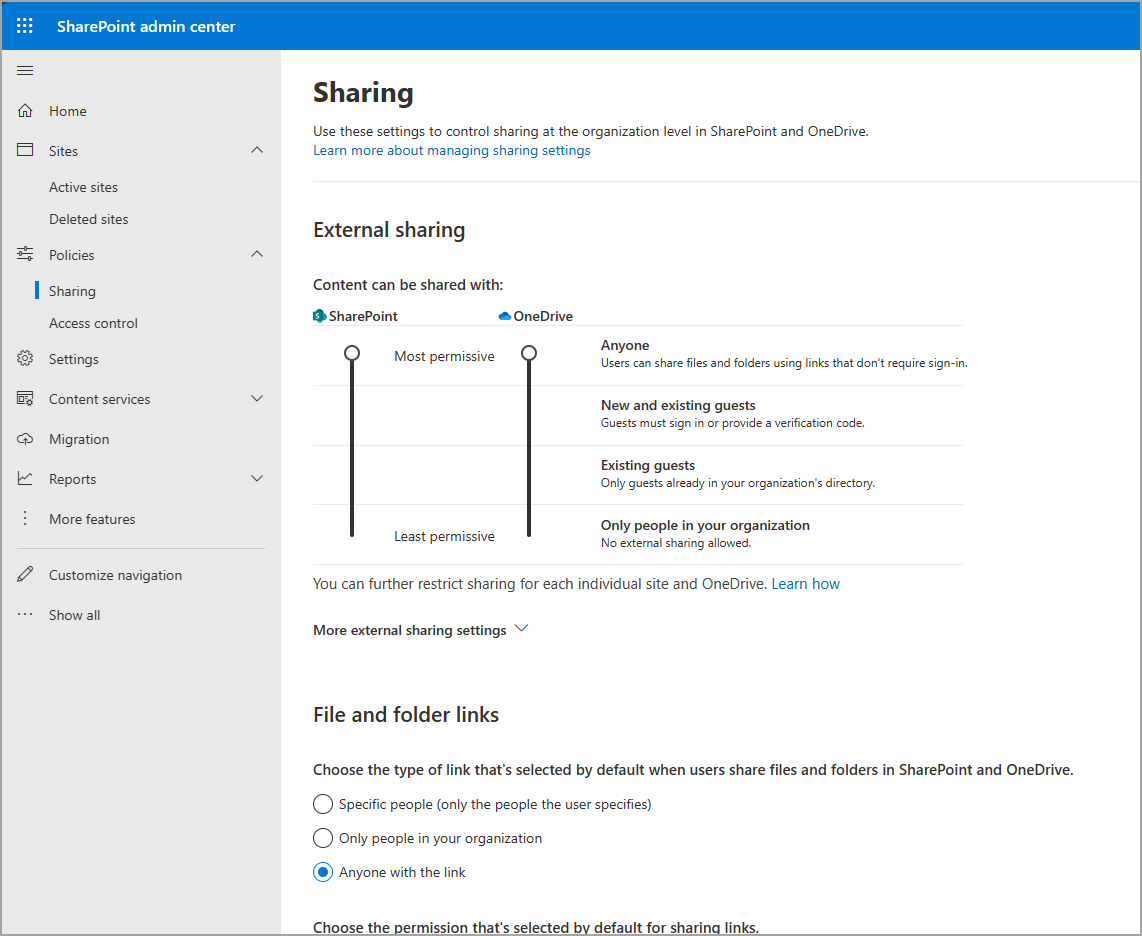
- Administrators may need to adjust SharePoint organization-level external sharing settings and enable the B2B invitation manager to utilize this feature.
- Guest users will be able to access shared Loop content but cannot create new Loop workspaces.
- No admin action is required for the rollout, but preparation may include informing users and updating documentation.
History
Recorded changes
No changes recorded since ChangePilot first saw this post.
Microsoft message
Business-to-business (B2B) guest sharing for Loop workspaces, pages, and components will be available soon, subject to administrator policy. If configured, this will enable Loop workspaces, pages, and components to be shared with people outside of your tenant.
Please note that Loop will respect your OneDrive and SharePoint sharing settings. If your tenant does not allow sharing with guests, then those settings will prevent guest sharing of Loop workspaces, pages, and components as well.
[When this will happen:]
For tenants without sensitivity labels configured: General Availability (Worldwide): We will begin rolling out late April 2024 and expect to complete by early June 2024.
Rollout for tenants with sensitivity labels configured will begin after sensitivity labels for Loop workspaces, pages, and components are generally available. Sensitivity labels will begin rolling out in the first half of 2024.
[How this will affect your organization:]
With this change, if allowed by administrator policy, users within your organization will be able to share Loop workspaces, pages, and components with people outside of your tenant via B2B guest sharing. Pages and components can be shared outside your tenant via Specific People share links. Guest users cannot create Loop workspaces.
Sharing Loop workspaces, pages, and components with guests
- In the SharePoint admin center, set the organization-level external sharing settings for SharePoint to allow content to be shared with new and existing guests or existing guests.
- Enable the B2B invitation manager for your tenant.
[What you need to do to prepare:]
This rollout will happen automatically by the specified date with no admin action required. You may want to notify your users about this change and update any relevant documentation as appropriate.
Learn more
More information
- img-prod-cms-rt-microsoft-com.akamaized.net/cms/api/am/imageFileData/RW1j9IY?ver=6e48
- learn.microsoft.com/entra/external-id/what-is-b2b
- learn.microsoft.com/microsoft-365/solutions/collaborate-on-documents?view=o365-worldwide
- learn.microsoft.com/sharepoint/turn-external-sharing-on-or-off#change-the-organization-level-external-sharing-setting
- learn.microsoft.com/sharepoint/sharepoint-azureb2b-integration
Details
Services
- M365 Apps
Microsoft tags
- New Feature
- User Adoption