MC734297 Microsoft Teams: Attach recent and relevant files more quickly to chats and channel posts
Primary service: Teams
ChangePilot summary
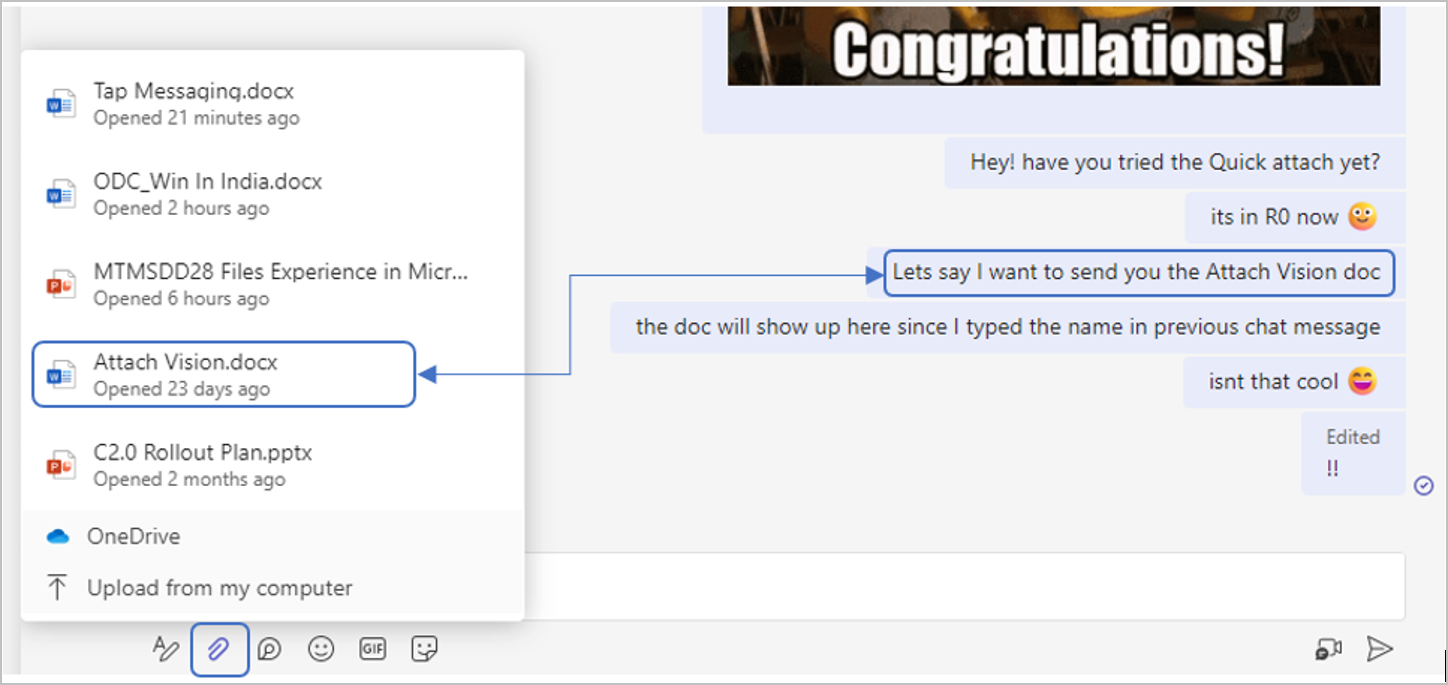
- Quick Attach in Microsoft Teams will display recent and contextually relevant files when attaching a file to a chat or channel post.
- The feature aims to save time for users by streamlining the file attachment process.
- The rollout will not affect existing file attachment options within Teams.
- Quick Attach will not be available on Teams Mobile or within private channels.
- Supported file formats include commonly used types such as Microsoft Word, Excel, PowerPoint, Visio, and Adobe Acrobat PDF.
History
Recorded changes
No changes recorded since ChangePilot first saw this post.
Microsoft message
In Microsoft Teams, we are excited to bring you Quick attach, which will display your most recent and contextually relevant files when you select the paperclip to attach a file to a Teams chat or channel post. This new feature will save time when attaching files.
This feature is related to MC513664 (Updated) Suggested Files in 1:1 Chats (November 2023).
[When this will happen:]
Targeted Release: We started rolling out mid-February 2024 and expect to complete by late March 2024.
General Availability: Worldwide, GCC, GCC High, and DoD: We will begin rolling out mid-April 2024 and expect to complete by early May 2024.
[How this will affect your organization:]This rollout does not affect existing file attachment options.
This rollout does not apply to:
- Teams Mobile
- Private channels in Teams
- The files displayed will be limited to the formats used more often in Teams, such as Microsoft Word, Excel, PowerPoint, Visio, and Adobe Acrobat PDF.
[What you need to do to prepare:]
No action is needed from you to prepare for this rollout. You may want to notify your users about this change and update any relevant documentation as appropriate.
More information
Details
Services
- Teams
Microsoft tags
- New Feature
- User Adoption