MC724832 Microsoft Defender for Office 365: User submission automatic feedback response
Primary service: Defender XDR
ChangePilot summary
- New automatic feedback feature: Microsoft Defender for Office 365 will introduce a new feature that automatically sends feedback to users who report suspicious emails, based on the results of the automated investigation.
- User impact: The change will affect end-users by providing them with immediate feedback on the emails they report, enhancing their awareness and understanding of email threats.
- Configurable settings: Administrators can configure the feature to determine which types of threats (phishing, malware, spam, or no threat found) will trigger feedback emails to users.
History
Recorded changes
No changes recorded since ChangePilot first saw this post.
Microsoft message
In Microsoft Defender for Office 365 (MDO), the user submission automatic feedback response enables organizations to automatically respond to end user submissions of phish based on the verdict from the automated investigation and response (AIR) investigation. This feature is configurable and allows organizations to dictate which threat scenarios they would like end users to receive feedback emails about. Once enabled, Microsoft Defender for Office 365 will automatically respond to end user submissions based on the investigation verdict and the configured settings.
This message is associated with Microsoft 365 Roadmap ID 186575
[When this will happen:]
Worldwide, GCC: Rollout completed in late February 2024.
[How this will affect your organization:]
Customers will have the ability to automatically respond to end user reports of phish based on the verdict of the AIR investigation.
The feature may be configured in Settings > Email & collaboration > User reported settings within the Email notifications > Results email section. On this page, the first step to enabling this feature is to check the box to Automatically email users the results of the investigation. Includes results for reported messages from all monitored platforms. Upon making this selection, three additional checkboxes will appear titled Phishing or Malware, and No threats found. These three checkboxes represent the options for the user submission automatic feedback response and allow organizations to dictate which threat scenarios they would like end users to receive feedback emails about. At least one of these options should be selected to enable this feature.
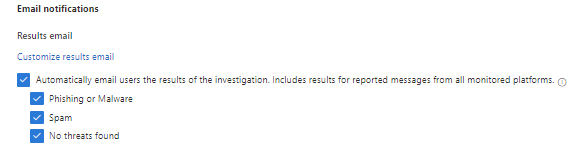
- Phishing or Malware: Selecting this box indicates that the organization would like end users to receive an automatic response email on email submissions of phish when the associated user submission investigation identifies a threat of normal phish, high confidence phish, or malware.
- Spam: Selecting this box indicates that the organization would like end users to receive an automatic response email on email submissions of phish when the associated user submission investigation shows the threat of spam.
- No threats found: Selecting this box indicates that the organization would like end users to receive an automatic response email on email submissions of phish when the associated user submission investigation finds no threats.
Responses to end users will be sent at the conclusion of the automated investigation based on the verdict, if configured.
[What you need to do to prepare:]
Customers may further familiarize themselves with the new feature by reviewing the learn document Automatic user notifications for user reported phishing results in AIR | Microsoft Learn that contains additional details. To learn more about automated investigation and response (AIR) in Microsoft Defender for Office 365 visit Automated investigation and response in Microsoft Defender for Office 365 - Office 365 | Microsoft Learn.
More information
- www.microsoft.com/microsoft-365/roadmap?filters=&searchterms=186575
- learn.microsoft.com/microsoft-365/security/office-365-security/air-user-automatic-feedback-response?view=o365-worldwide
- learn.microsoft.com/microsoft-365/security/office-365-security/air-about?view=o365-worldwide
- img-prod-cms-rt-microsoft-com.akamaized.net/cms/api/am/imageFileData/RW1iGRH?ver=ed15
Details
Platforms
- Web
Services
- Defender XDR
Microsoft tags
- New Feature
- User Adoption