MC718750 Microsoft Teams: Simplified sign in for iOS and Android devices
Primary service: Teams
ChangePilot summary
- Microsoft Teams is introducing a new sign-in feature for mobile users that allows admins to prefill domain names, simplifying the sign-in process on iOS and Android devices.
- The feature is beneficial for frontline workers using shared devices, enabling them to sign in with just the first part of their UPN and password.
- Admins can configure the sign-in experience through app configuration policies in Intune or other MDM providers, with options for defaulting to numeric keypads for numeric UPNs.
- The rollout is scheduled to begin and complete in late March 2024, with no impact if configurations are not set, but preparation is required to utilize the new feature.
History
Recorded changes
No changes recorded since ChangePilot first saw this post.
Microsoft message
Updated April 18, 2024: We have updated the content below with additional details. Thank you for your patience.
Note: If your organization does not support mobile devices, you can ignore this message.
Microsoft Teams admins will now have the capability to make sign in faster for iOS and Android device users by prefilling domain names using app configuration policies. This change will especially benefit frontline workers who frequently sign in and out of a shared device.
This message is associated with Microsoft 365 Roadmap ID 383134.
[When this will happen:]
Worldwide: We will begin rolling out late March 2024 and expect to complete by mid-April 2024 (previously late March).
[How this will affect your organization:]
After you set the app configuration policies in Intune or any other mobile device management (MDM) provider, users will be able to sign in by entering the first part of their user principal name (UPN) without the domain name. For example, if the username is 123456@contoso.com or adelev@contoso.com, users can sign with 123456 or adelev, respectively, and their password.
If the first part of your UPN is numeric only, then admins can further simplify sign in by defaulting to numeric keypads on iOS and Android.
You will be able to set these app configuration policies:
"domain_name": A string value providing the domain of the tenant to appended. Use a semicolon delimited value to add multiple domains.
"enable_numeric_emp_id_keypad": A Boolean value used to indicate that the employee ID is all numeric and the number keypad should be enabled for easy entry. If the value isn't set, the alphanumeric keyboard opens.
If desired, users can select Other ways to sign in to enter the full email or sign in with another method such as a phone number.
Android on the left, iOS on the right:
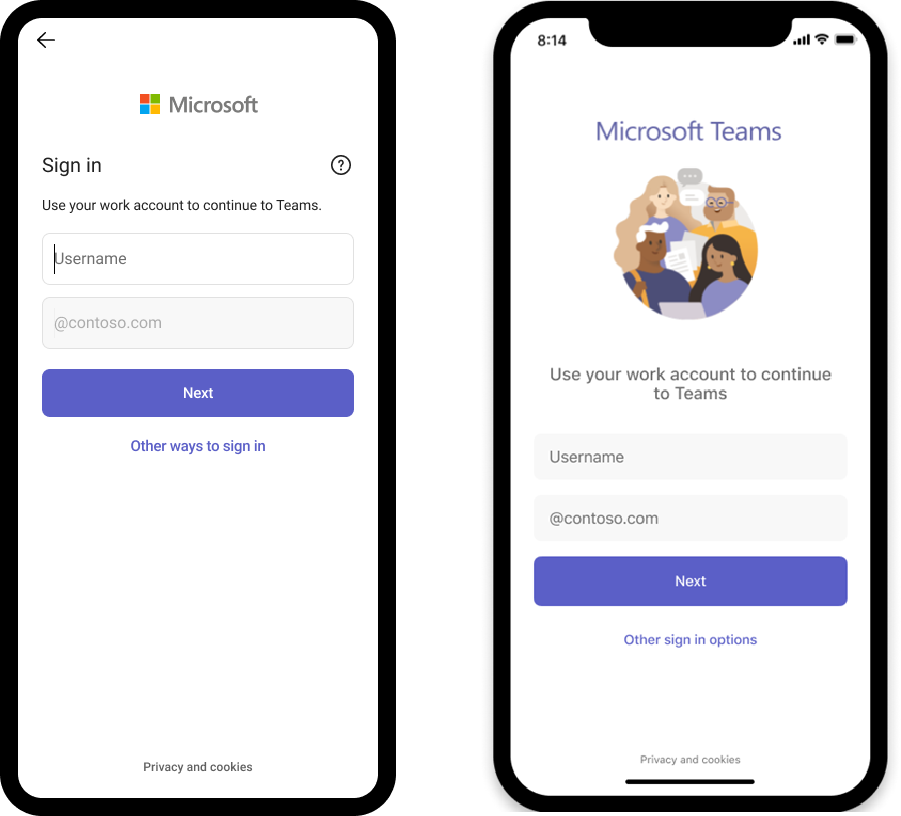
Admins can make sign in faster on Microsoft Teams app on iOS and Android by prefilling domain names using app configuration policies. This change will especially benefit frontline workers who frequently sign in and out of a shared device.
[What you need to do to prepare:]
There will be no impact on your organization if the application configurations are not set. However, to use the feature for your organization you will be required to set the app configuration policies.
You may want to notify your users about this change and update any relevant documentation as appropriate.
Learn more: How different technologies affect Microsoft Teams sign-on, including restricting sign-on, and sign-in behaviors. - Microsoft Teams | Microsoft Learn (will be updated before rollout begins)
More information
Details
Platforms
- Android
- iOS
Services
- Teams
Microsoft tags
- New Feature
- User Adoption