MC718551 Microsoft SharePoint: New Embedded Admin role impact
Primary service: SharePoint
ChangePilot summary
- Introduction of a new SharePoint Embedded Administrator role in Microsoft 365 for managing SharePoint Embedded Applications and containers.
- Global Administrators and SharePoint Embedded Administrators will exclusively have the ability to execute specific SharePoint Embedded cmdlets post-mid-March 2024.
- SharePoint admin role will lose the ability to execute SharePoint Embedded application and container-specific cmdlets as the new role is rolled out.
- Administrators need to assign the new role to appropriate personnel and update their organization's documentation and workflows to prepare for the change.
History
Recorded changes
No changes recorded since ChangePilot first saw this post.
Microsoft message
Updated May 17, 2024: We have updated the content below with additional information on managing the assigned roles.
Microsoft SharePoint Embedded, currently in Public Preview, is an API-only solution empowering app developers to leverage the file and document storage in Microsoft 365 to create line-of-business or multitenant applications. Microsoft Loop is an example of a SharePoint Embedded application.
We are introducing the SharePoint Embedded Administrator role, which will have the capability to manage various aspects of SharePoint Embedded Applications and containers. This role will be available in Microsoft 365 admin center. With the introduction of this new role, Global Administrator can continue to create and manage SharePoint Embedded applications. However, as of mid-March 2024, the SharePoint admin role will lose the ability to execute SharePoint Embedded application and container-specific cmdlets (outlined below) as we roll-out the new role integration. After the rollout, only Global Administrators or SharePoint Embedded Administrators will be authorized to execute such cmdlets. Please track this document for the announcement of availability of the new SharePoint Embedded Administrator role in the Microsoft admin center.
[When this will happen:]
Public Preview: We will begin rolling out early March 2024 and expect to complete by late March 2024.
General Availability: We will begin rolling out mid-April 2024 and expect to complete by late May 2024 (previously early May).
[How this will affect your organization:]
Tenants creating SharePoint Embedded Applications
Admins who want to create a new containertype through PowerShell cmdlets should be assigned the Global Administrator or the SharePoint Embedded Administrator to be able to execute all the available SharePoint Embedded developer admin cmdlets such as.
- New-SPOContainerType
- Get-SPOContainerType
- Set-SPOContainerType
Admins who want to run the VS code extension to create SharePoint Embedded ContainerTypes should also be assigned the Global Administrator or the SharePoint Embedded Administrator role.
Tenants Registering SharePoint Embedded Applications for use
Admins who want to manage containers created on their tenants should be assigned the Global Administrator or the SharePoint Embedded Administrator to run the PowerShell execute all SharePoint Embedded consuming tenant admin cmdlets.
- Get-SPOApplication
- Set-SPOApplication (Future)
- Get-SPOContainer
- Set -SPOContainer
- Remove-SPOContainer
- Get-SPODeletedContainer
- Restore-SPODeletedContainer
- Remove-SPODeletedContainer
[What you need to do to prepare:]
The SharePoint Embedded Administrator role is now visible on Entra. Assign this new role to yourself to continue to use the container management cmdlets on PowerShell and access containers on the new UX that will be launched shortly. Please note, that Global administrator will continue to have access to the container management cmdlets as well as the UX for containers.
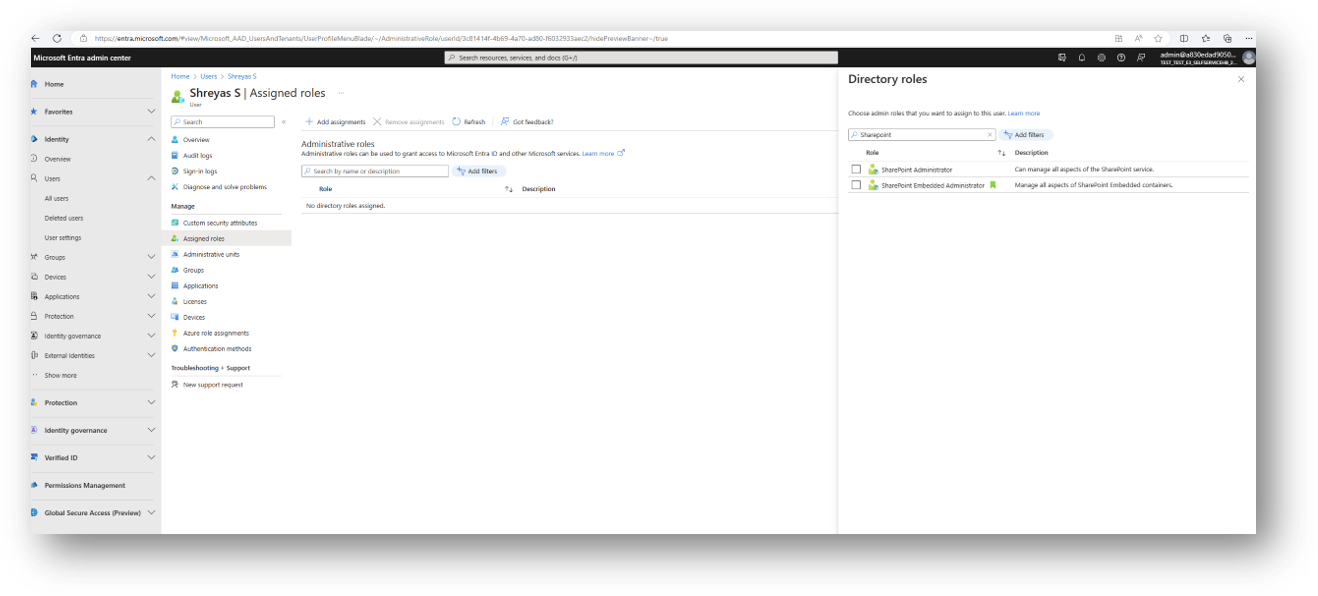
Alternatively, the Global administrators can assign the SharePoint Embedded Administrator role using the following PowerShell cmdlet:
> Install-Module Microsoft.Graph
> Connect-MgGraph -Scopes "RoleManagement.ReadWrite.Directory,User.Read.All"
> $userId = "6bd30fc4-057c-409e-991b-a76fcd4510ab"
> $roleId = "1a7d78b6-429f-476b-b8eb-35fb715fffd4"
> $roleDefinition = Get-MgRoleManagementDirectoryRoleDefinition -UnifiedRoleDefinitionId $roleId
> $roleassignment = New-MgRoleManagementDirectoryRoleAssignment -DirectoryScopeId '/' -RoleDefinitionId $roleDefinition.Id -PrincipalId $userId
Details
Services
- SharePoint
Microsoft tags
- New Feature
- User Adoption