MC718246 Microsoft Defender for Office 365: Block Sender in Quarantine notification will require signing in to security portal
Primary service: Exchange
ChangePilot summary
- Microsoft Defender for Office 365 is updating the Block Sender action in Quarantine notifications to require user sign-in at the security portal.
- The change is part of Feature Update with significant , indicating workflow and UI changes for administrators.
History
Recorded changes
No changes recorded since ChangePilot first saw this post.
Microsoft message
Updated May 31, 2024: We have updated the rollout timeline below. Thank you for your patience.
Following the feature update described in Message Center post MC711335 - Microsoft Defender for Office 365: Quarantine End User Allow and Block list management, published January 31st, 2024, sign in to the security portal will be required for the Block Sender action in Quarantine notifications.
This message is associated with Microsoft 365 Roadmap ID 380185
[When this will happen:]
Worldwide: We will begin rolling out late April 2024 (previously early March) and expect to complete by late June 2024 (previously mid-May).
GCC, GCC High, and DoD Release: We will begin rolling out mid-May 2024 (previously mid-March) and expect to complete by late June 2024 (previously late June).
[How this will affect your organization:]
When the user clicks on the Block Sender button in the Quarantine notification, the user will now be required to sign in to the security portal at https://security.microsoft.com/quarantine.
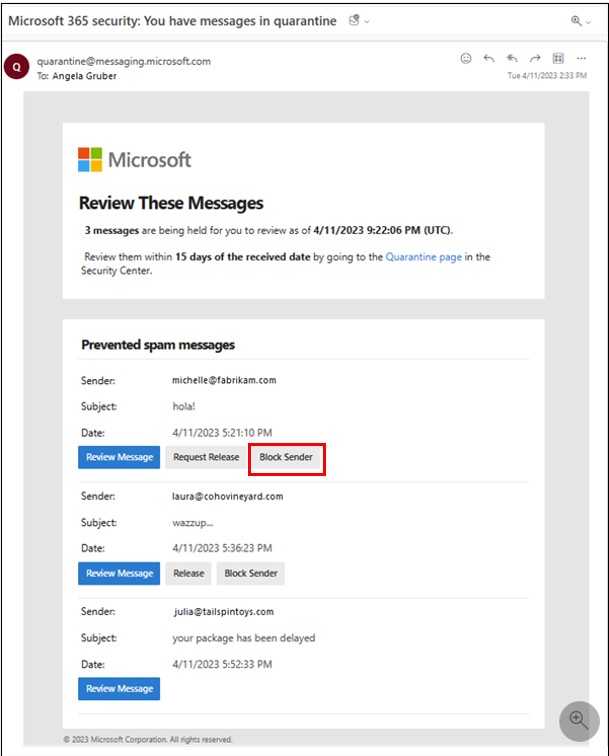
Previously, signing in was not required, and the Block Sender action was carried out automatically.
[What you need to do to prepare:]
There is no action needed to prepare for this change. You may want to notify your users about this change and update any relevant documentation as appropriate.
More information
Details
Services
- Exchange
- Defender XDR
Microsoft tags
- Feature Update