MC715429 Data Loss Prevention - Enriched Data Loss Prevention (DLP) alert email notifications for DLP admins
Primary service: M365
ChangePilot summary
- Microsoft is enhancing the alert email notifications sent to Data Loss Prevention (DLP) admins, providing them with additional context such as alert ID, policy details, device details, and more.
- To utilize this feature, DLP policy must have alert notifications turned ON.
History
Recorded changes
No changes recorded since ChangePilot first saw this post.
Microsoft message
Updated May 8, 2024: We have updated the rollout timeline below. Thank you for your patience.
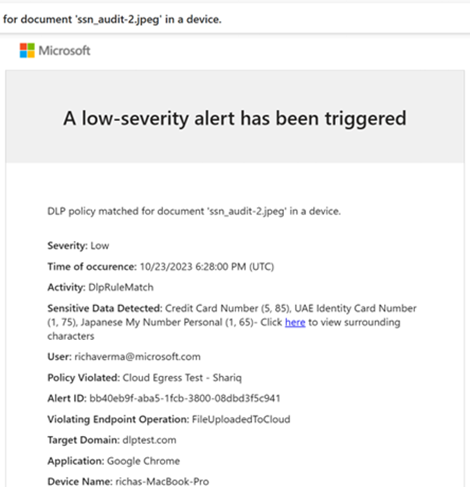
There is now increased information in the alert email notification sent to the Data Loss Prevention (DLP) admins upon a DLP policy match. Previously a DLP alert email only included the user activity and the type of sensitive information matched in the alert. Now, DLP admins will get additional context such as alert ID, policy details, device details, and more. This will help admins quickly assess the priority of an alert and determine the next steps before navigating to the Microsoft Purview DLP alerts page or Microsoft 365 Defender DLP alerts page.
This message is associated with Microsoft 365 Roadmap ID 369645
[When this will happen:]
Public Preview: Available now.
General Availability: Rollout will begin in mid-April 2024 (previously mid-March) and is expected to complete by late May 2024 (previously late April).
[How this will affect your organization:]
This feature will be available as part of the DLP alerts experience if you follow these steps:
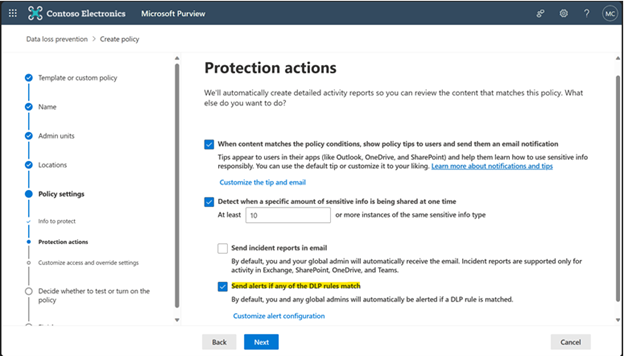
1. Ensure the DLP policy has alert notifications turned ON.
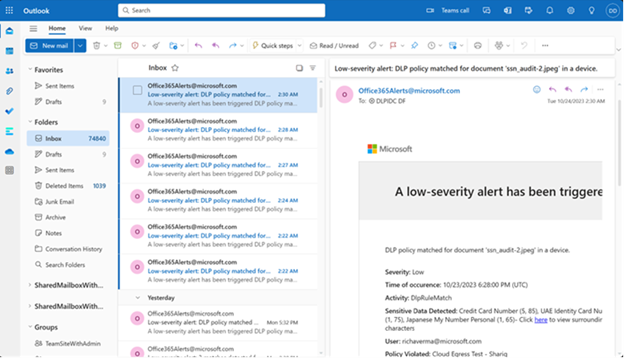
2. When DLP policy rule matches occur, the admin will receive alert email notifications in their inbox.
3. The enriched alert email notifications have additional context for alert triage. If further investigation is needed, the admin can navigate to the DLP alert page in the Microsoft 365 Defender portal (E5 customers) or Purview portal (E3 customers) directly from the email. Below is an example of an endpoint alert email notification.
[What you need to do to prepare:]
This feature will be available as part of the DLP alerts experience if the steps above are followed.
More information
Details
Platforms
- Web
Services
- M365
Microsoft tags
- New Feature
- Admin Impact