MC714186 Remove Custom Script setting in OneDrive and SharePoint
Primary service: OneDrive
ChangePilot summary
- The Custom Script setting in SharePoint and OneDrive, which allows users to execute custom scripts on personal sites and self-service created sites, will be removed in March 2024.
- A new PowerShell command, "DelayDenyAddAndCustomizePagesEnforcement", has been introduced to delay the change to custom script set on the Tenant until mid-November 2024.
- The change will impact both administrators and users. Administrators will need to adjust settings on specific sites and users may no longer be able to add, modify, or remove scripts on their sites.
- The NoScriptSite setting will be configured to True for all existing SharePoint sites and OneDrive sites except for certain site templates.
History
Recorded changes
No changes recorded since ChangePilot first saw this post.
Microsoft message
Updated August 28, 2024: The template “GROUP#0 = Team site” will not be excluded from enforcement. Previously this was part of exempted templates. Thank you for your patience.
PowerShell command (DelayDenyAddAndCustomizePagesEnforcement) to delay the change will be fully available by mid- April (Previously March).
The enforcement to set NoScriptSite to True for all existing SharePoint sites and OneDrive sites if DelayDenyAddAndCustomizePagesEnforcement is not set to True will start late-April and be completed by early-May (Previously March)
There are changes happening to Custom script settings between April and May 2024 (Previously March).
- The Custom Script setting, which determines if users can execute custom scripts on personal sites and self-service created sites will be removed by early-May (Previously March).
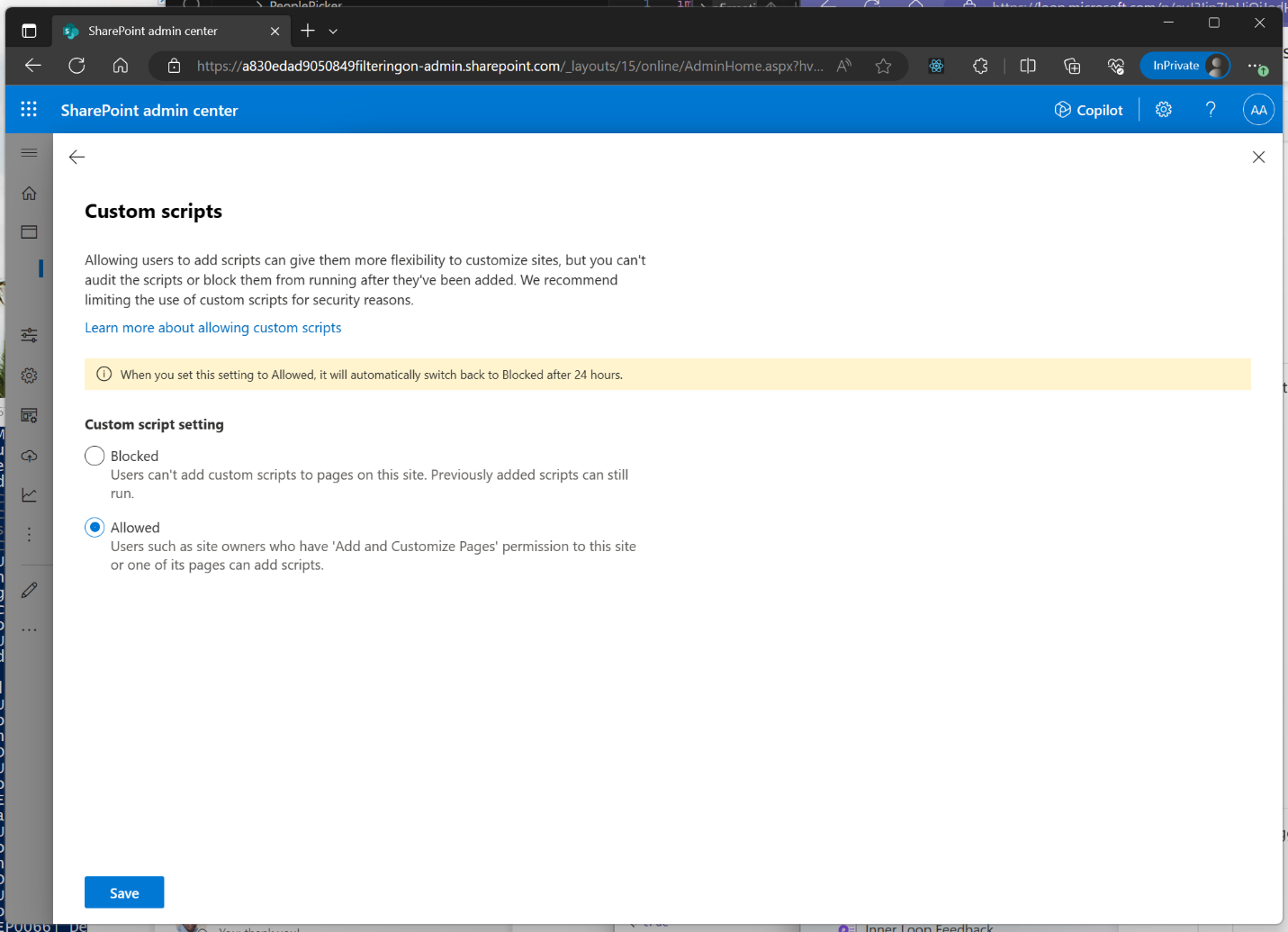
This setting is currently located in the SharePoint Admin Center, under Settings -> Classic Settings.
- A new PowerShell command, "DelayDenyAddAndCustomizePagesEnforcement", has been introduced. This command is available in the SharePoint Online Management Shell version 16.0.24524.12000, or above which allows delay of the change to custom script set on the Tenant until mid-November 2024 (previously May).
Note: that while this cmdlet is available in the latest management shell, running the cmdlet will result in an error (The requested operation is part of an experimental feature that is not supported in the current environment) until Mid-April 2024 (Previously March) when the settings are shipped.
* False (default) - for site collections where administrators enabled the ability to add custom script, SharePoint will revoke that ability within 24 hours from the last time this setting was changed.
* True - All changes performed by administrators to custom script settings are preserved. When the value is set to true, a banner shows in the active sites list of the SharePoint admin center informing that changes to custom scripts are permanent.
Set-SPOTenant -DelayDenyAddAndCustomizePagesEnforcement $True
Please be aware that the new PowerShell command will only be accessible until mid-November 2024 (previously May). Post that period, on SharePoint sites if administrators wish to continue using features that are only available when unmanaged custom scripts are permitted to run, they will need to re-enable the running of custom scripts every 24 hours. This option does not impact existing custom scripts.
- The NoScriptSite setting will be configured to True for all existing SharePoint sites and OneDrive sites except for below mentioned sites templates.
BLANKINTERNETCONTAINER#0 = Classic Publishing Portal site
CMSPUBLISHING#0 = Publishing Site
BLANKINTERNET#0 = Publishing Site
APPCATALOG#0 = App Catalog
CSPCONTAINER#0 = CSP Container
- The execution of existing scripts in OneDrive and SharePoint sites will remain unaffected.
- There will not be an option to enable custom script on OneDrive sites once the delay set using DelayDenyAddAndCustomizePagesEnforcement ends in mid-November 2024 (previously May).
- Customers will retain the ability to permit the execution of custom scripts on specific SharePoint sites using the Set-SPOSite <SiteURL> -DenyAddAndCustomizePages PowerShell command or from the Active sites page in the SharePoint Admin Center.
Any modifications made to a site will be automatically reverted to False status within 24 hours, unless the new PowerShell command “DelayDenyAddAndCustomizePagesEnforcement” is used prior to mid-November 2024 (previously May). After mid-November, the 24 hour reversion will occur regardless of this setting.

[When this will happen:]
The Custom Script setting from SharePoint admin center will be removed early-May (Previously March)..
The new PowerShell command will be available by mid-April (Previously March).
[How this will affect your organization:]
When this Custom Script setting is removed, you will no longer be able to add, modify or remove scripts within OneDrive and SharePoint sites unless administrators temporarily allow that by turning the setting on specific sites. This will not impact the ability to execute existing scripts in OneDrive and SharePoint sites.
[What you need to do to prepare:]
No extensions will be granted beyond the mentioned period.
It may be beneficial to inform all site owners about this modification and make necessary updates to your training materials and documentation accordingly.
Review the following for additional information: Allow or prevent custom script
More information
Details
Services
- OneDrive
- SharePoint
Microsoft tags
- Updated
- User Adoption
- Retirement