MC714183 Suspension of Azure Application Administrator role for Management of add-ins across Outlook, Word, Excel, and PowerPoint
Primary service: M365 Apps
ChangePilot summary
- Microsoft is updating the management of add-ins across Outlook, Word, Excel, and PowerPoint from the Integrated Apps blade in the Microsoft 365 Admin Center.
- Azure Application Administrators will no longer be able to manage these add-ins.
- Other Administrators will retain the same capabilities as before, and any add-ins previously managed by Azure Application Administrators can be managed by Global Administrators going forward.
- To prepare for this change, role assignments for users with the Azure Application Administrator role may need to be reviewed and updated.
History
Recorded changes
No changes recorded since ChangePilot first saw this post.
Microsoft message
Admins can manage add-ins across Outlook, Word, Excel, and PowerPoint from the Integrated Apps blade in the Microsoft 365 Admin Center. This capability is currently available to Global Administrators, Global Readers, Exchange Administrators, and Azure Application Administrators.
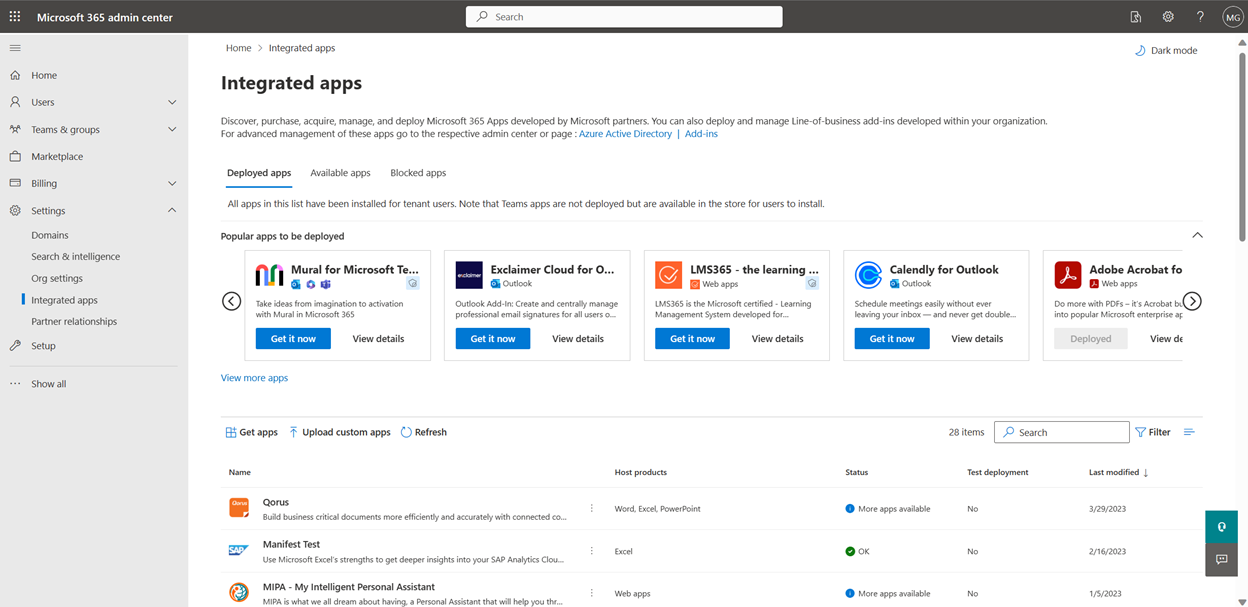
Going forward, Microsoft is suspending capability for Azure Application Administrators from management of add-ins across Outlook, Word, Excel, and PowerPoint from the Integrated Apps blade in the Microsoft 365 Admin Center.
All other Administrators will be able to manage the add-ins with the same capabilities as before. Any add-ins previously managed by Azure Application Administrators will still be available and Global Administrators can manage them going forward.
Azure Application Administrators will still continue to have access to the Integrated Apps blade and can manage Teams Apps with extended capabilities on Outlook and the Microsoft 365 App and SaaS Apps.
[When this will happen:]
We will begin rolling this out mid-February 2024 and plan to be complete by the end of February 2024.
[How this will affect your organization:]
With this release, all Azure Application Administrators in your tenant will no longer be able to manage Excel, Outlook, PowerPoint, and Word add-ins. Also, they won’t be able to perform the following actions in the Integrated Apps page.
- Can’t view list of all the add-ins and deployed apps across the affected Microsoft 365 suite products.
- Unable to deploy an add-in from AppSource to specific users/groups or entire tenant.
- Unable to deploy an LOB add-in on the affected Microsoft 365 suite products.
- Can’t manage Teams Apps with extended capabilities on Outlook for users in Outlook on Mac, on mobile, and on Windows clients with Office version older than 2304 (Build 16320.00000).
[What you need to do to prepare:]
- Review and update role assignments for the users with Azure Application Administrator role who should continue to have access for add-in management capabilities. If you would like Azure Application Administrators to continue management of Excel, Outlook, PowerPoint, and Word add-ins, assign them the Exchange Administrator or Global Administrator role in addition to the Azure Application Administrator role.
- Educate future Administrators regarding app management from the Integrated Apps page.
More information
Details
Services
- M365 Apps
Microsoft tags
- Feature Update
- User Adoption
- Admin Impact