MC714181 Outlook Mobile: Removing the Sections view in the Feed tab
Primary service: Outlook
ChangePilot summary
- Microsoft is removing the Sections view in the Feed tab of Outlook Mobile and integrating its functionality into the vertical feed and other parts of the app.
- This is a 'Feature update' that will significantly change the user interface and functionality of the Feed tab.
History
Recorded changes
No changes recorded since ChangePilot first saw this post.
Microsoft message
Updated May 17, 2024: We have updated the rollout timeline below. Thank you for your patience.
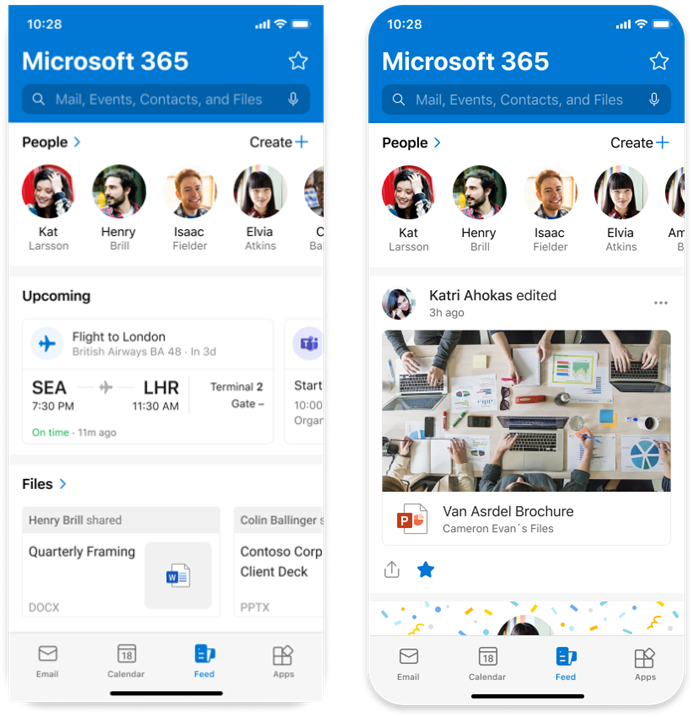
In the Feed tab of Outlook Mobile, we will remove the Sections view in the Feed tab, whose functionality and content can now be found in the vertical feed and elsewhere in the Outlook Mobile app.
[When this will happen:]
General Availability (Worldwide, GCC and GCC High): We will begin rolling out mid-March 2024 (previously early March) and expect to complete by late May 2024 (previously mid-May).
[How this will affect your organization:]
For users:
The Feed tab in Outlook mobile helps you discover and learn about people and interests relevant at work. The feed shows you a mix of content and activity from across Microsoft 365 to help you stay connected to your colleagues and informed about what's happening around you.
For users who do not have the vertical feed enabled for various reasons, such as users in sovereign clouds (GCC and GCC High) and users in tenants where admins have turned off the feed, we will remove the Feed icon from the Outlook Mobile tab bar at the bottom of the screen. These users will stop seeing the old Sections view but can still find information as follows:
- Meeting insights are in the vertical feed and in the Calendar in Outlook Mobile.
- Received files and sent files are in the Files module in the Outlook Mobile Apps tab.
- The People section is in the Contacts module in the Outlook Mobile Apps tab.
For admins:
If admins have turned off the feed using Mobile Device Management (MDM), users will not see the Feed icon in the tab bar of Outlook Mobile. With this release, if admins turn off the feed, they will now turn it off completely and users will no longer see the old Sections view of the feed.
If an admin turns on the feed again, the Feed icon will reappear in the Outlook Mobile tab bar and users will be able to see the Vertical feed.
[What you need to do to prepare:]
To prepare for this update, we encourage you to learn more at: Deploying Outlook for iOS and Android app configuration settings in Exchange Online | Microsoft Learn on how to turn the feed on and off. Admins may want to notify their users about this change and update their training and documentation accordingly.
References
For admins: Deploying Outlook for iOS and Android app configuration settings in Exchange Online | Microsoft Learn
Blog: Overview of the Microsoft Feed | Microsoft Learn
End user Support: Discover and learn with Microsoft Feed - Microsoft Support
Screenshot: Section view on the left, vertical feed on the right:
More information
- img-prod-cms-rt-microsoft-com.akamaized.net/cms/api/am/imageFileData/RW1hkYl?ver=c20d
- review.learn.microsoft.com/microsoft-365/ms-feed/m365-feed?view=o365-worldwide&branch=temanteleary-working-branch
- support.microsoft.com/office/discover-and-learn-with-microsoft-feed-9c190800-e348-46b7-9d46-41c628b80ebb
- learn.microsoft.com/exchange/clients-and-mobile-in-exchange-online/outlook-for-ios-and-android/outlook-for-ios-and-android-configuration-with-microsoft-intune
Details
Services
- Outlook
Microsoft tags
- Updated
- Feature Update
- User Adoption
- Admin Action