MC712146 Microsoft SharePoint Online: Create custom document library templates
Primary service: SharePoint
ChangePilot summary
- Microsoft is introducing a new feature in SharePoint Online, allowing users to create custom document library templates using the existing PowerShell-based tooling for creating custom list templates.
- This change will impact both administrators and users, with administrators needing to provide these new templates and users having a new feature to use.
- No action is needed to prepare for this change, but administrators may want to notify users and update relevant documentation.
History
Recorded changes
No changes recorded since ChangePilot first saw this post.
Microsoft message
In Microsoft SharePoint Online, we are introducing the ability to create custom document library templates using the existing PowerShell-based tooling for creating custom list templates.
[When this will happen:]
Targeted Release: We will begin rolling out early February 2024 and expect to complete by mid-February 2024.
Standard Release (insert environments): We will begin rolling out late February 2024 and expect to complete by mid-March 2024.
[How this will affect your organization:]
As a Global Administrator or SharePoint Administrator in Microsoft 365, you can provide custom list templates for users in your organization. With this change, these tools support the creation of document library templates (based on template ID 101) and list templates (based on template ID 100).
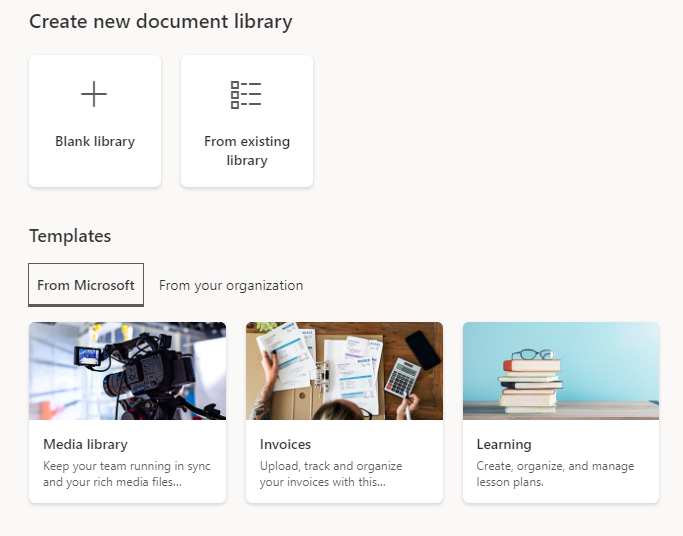
These templates will be visible inside the new Document library creation experience, in these two locations:
1) SharePoint Home > New > Document library
2) SharePoint Site > Site contents > New > Document library
[What you need to do to prepare:]
No action is needed to prepare for this change. You may want to notify your users about this change and update any relevant documentation as appropriate.
Resources
For admins: Add-SPOListDesign (Microsoft.Online.SharePoint.PowerShell) | Microsoft Learn
For end users: Custom list templates - SharePoint in Microsoft 365 | Microsoft Learn
More information
Details
Services
- SharePoint
Microsoft tags
- New Feature
- User Adoption
- Admin Impact