MC711017 Multi-Turn Conversations Supported in Copilot in Microsoft Teams chat and channels
Primary service: Teams
ChangePilot summary
- Microsoft Teams is introducing an enhanced conversational capability for Copilot in chat and channels, allowing users to ask follow-up questions to a Copilot response.
- Copilot will now be able to answer queries in a more conversational way, using the context of previous messages from the past 24 hours.
- Administrators may want to notify users about this new capability and update internal documentation as necessary.
History
Recorded changes
No changes recorded since ChangePilot first saw this post.
Microsoft message
Updated March 11, 2024: We have updated the rollout timeline below. Thank you for your patience.
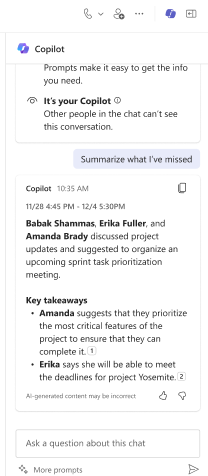
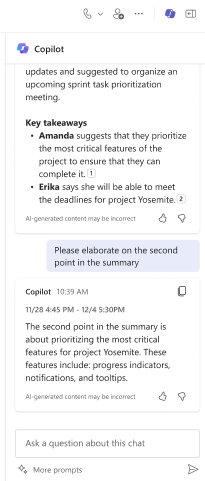
We are excited to announce that users of Copilot in Microsoft Teams chat and channels will soon be able to ask follow-up questions to a Copilot response. Copilot can now answer your queries in a conversational way, using the context of previous messages. Copilot will have context of the past two questions and responses over a period of 24 hours. You can access this feature on Desktop, Web, and Mobile.
[When this will happen:]
Worldwide: We will begin rolling out early April 2024 (previously late February) and expect to complete by late April 2024 (previously early March).
[How this will affect your organization:]
Prior to this feature, when you asked Copilot a follow-up question to a response, Copilot would be unable to adequately respond. As a result of the release of this feature, you can now ask Copilot a follow-up question to a response such as “please elaborate on the second point in the summary.”
[What you need to do to prepare:]
You may want to notify your users about this new capability and update internal documentation as appropriate.
Details
Services
- Teams
Microsoft tags
- Updated
- New Feature
- User Adoption