MC709986 Microsoft Defender XDR for Office 365: Enhanced Submissions experience from Email entity and Summary panel
Primary service: Defender XDR
ChangePilot summary
- Microsoft is enhancing the 'Submit to Microsoft for review' options on the Email entity page and Summary panel in Microsoft Defender XDR for Office 365.
- The update allows admins to convey whether they are submitting for a second opinion or to confirm a clean or malicious verdict.
History
Recorded changes
No changes recorded since ChangePilot first saw this post.
Microsoft message
Updated February 25, 2024: We have updated the rollout timeline below. Thank you for your patience.
In Microsoft Defender XDR for Office 365, we are enhancing the Submit to Microsoft for review options on the Email entity page and Summary panel so admins can convey whether they are submitting for a second opinion or submitting to confirm a clean or a malicious verdict. In the same workflow, we are also introducing the Entities allow option that Security Operations team members can use when confident about a submission.
[When this will happen:]
We will begin rolling out mid-March 2024 (previously mid-February) and expect to complete by late April 2024 (previously mid-April).
[How this will affect your organization:]
If you are part of a Security Operations team and use Microsoft Defender for Office 365 email remediation features, you will see these enhancements for the Email entity page and Email summary panel:
- You can select the Take actions button in the top right corner of the Email entity page and summary panel.
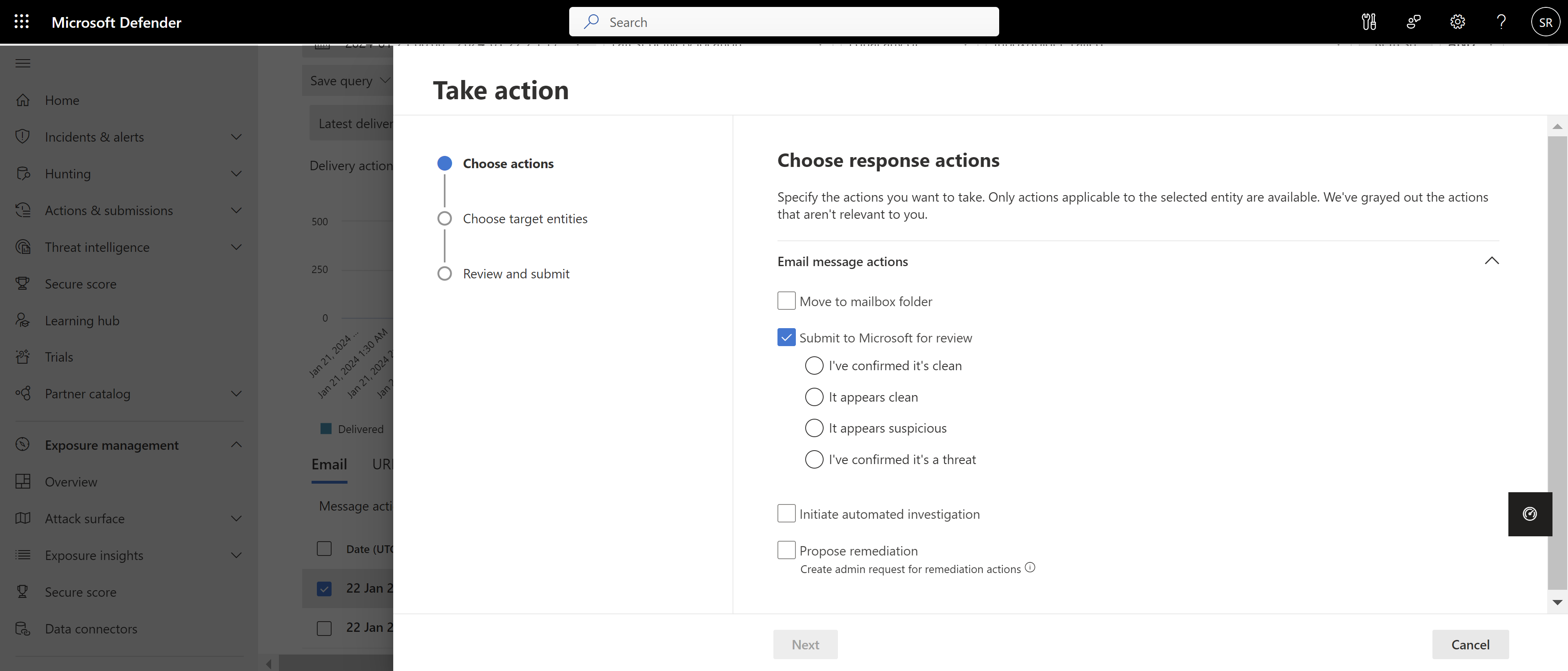
- Selecting the Take actions button will open a wizard that triggers actions such as email purge actions, investigative actions, submissions to Microsoft for further analysis, and block sender/domain/URL/ attachments.
- With these new improvements you can now share the submission intent.
- With Submit to Microsoft for review, admins can convey whether they're submitting for a second opinion from Microsoft or because Microsoft missed a true malicious message. This change will streamline Microsoft analysis of messages submitted by admins and will result in more accurate analysis.
The Submissions workflow has these options:
- I’ve confirmed it’s clean
- It appears clean
- sub-options: Tenant level allow and Tenant level block entities
- It appears suspicious
- I’ve confirmed it’s a threat
- sub-options: Tenant level allow and Tenant level block entities
[What you need to do to prepare:]
This enhancement won't impact any existing submissions or filtering or grouping functionality in submissions.
For reference
Microsoft Defender for Office 365 permissions in the Microsoft Defender portal | Microsoft Learn
Microsoft Defender: The email entity page | Microsoft Learn
Related Message Center item: https://admin.microsoft.com/AdminPortal/Home?ref=MessageCenter/:/messages/MC696850
More information
Details
Services
- Defender XDR for Office 365
Microsoft tags
- Updated
- Feature Update
- Admin Impact