MC709268 Ability to duplicate an existing webinar
Primary service: Teams
ChangePilot summary
- Microsoft Teams is introducing a new feature that allows organizers to duplicate existing webinars, streamlining the scheduling of similar events.
- The duplication feature will carry over webinar details, presenters, and theming, with options to edit for the new event.
- Rollout begins late February 2024 for Targeted Release and early March 2024 for Standard Release with completion expected by late March 2024.
- No action is required for admins to prepare for this update, but updating internal documentation is recommended.
History
Recorded changes
No changes recorded since ChangePilot first saw this post.
Microsoft message
Updated May 21, 2024: We have updated the rollout timeline below. Thank you for your patience.
Currently with webinars, you are unable to duplicate a webinar and create a new webinar based off an existing one. This can be time consuming if organizers would like to schedule multiple events that are similar to one another. To simplify event creation Microsoft Teams is introducing the ability to create a new webinar by duplicating the information for an existing scheduled one. Information includes a webinar's details, presenters, theming, and more. The organizer can also choose to edit and update the information as needed for their new webinar.
This message is associated with Microsoft 365 Roadmap ID 375177
[When this will happen:]
Targeted Release: We will begin rolling out mid-March 2024 (previously late February) and expect to complete by late March 2024 (previously early March).
Worldwide and GCC: We will begin rolling out late March 2024 (previously early March) and expect to complete by late May 2024 (previously late April).
[How this will affect your organization:]
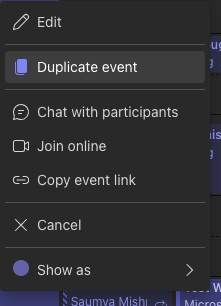
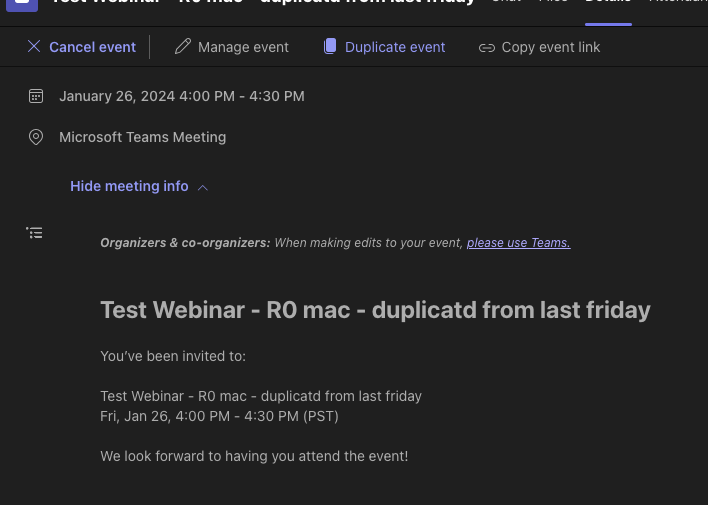
Webinar organizers in your tenant can now duplicate webinars from existing scheduled webinars. Organizers can do this by right clicking on the webinar object in the Teams Calendar and then clicking on "Duplicate event." Organizers can also duplicate an event by clicking "Duplicate event" in the details page when a user double clicks on the webinar in the calendar.
[What you need to do to prepare:]
You do not need to do anything to prepare; however, we do recommend updating your existing internal documentation on webinars to include this new update.
More information
Details
Platforms
- Desktop
- Mac
- Web
Services
- Teams
Microsoft tags
- New Feature
- User Impact
- Admin Impact