MC708499 Allow meeting participants to create Collaborative notes
Primary service: Teams
ChangePilot summary
- Microsoft Teams is enhancing Collaborative notes to allow any meeting invitee to create notes before, during, and after meetings, improving teamwork and efficiency.
- The feature rollout is scheduled for February 2024, with different timelines for Targeted and Standard releases.
- Meeting notes will be accessible and manageable in the Teams app, with real-time collaboration supported and tasks synced with Planner and To Do apps.
- Administrators can manage this feature via SharePoint PowerShell and should update documentation and inform users about the change.
History
Recorded changes
No changes recorded since ChangePilot first saw this post.
Microsoft message
Updated April 15, 2024: We have updated the rollout timeline below. Thank you for your patience.
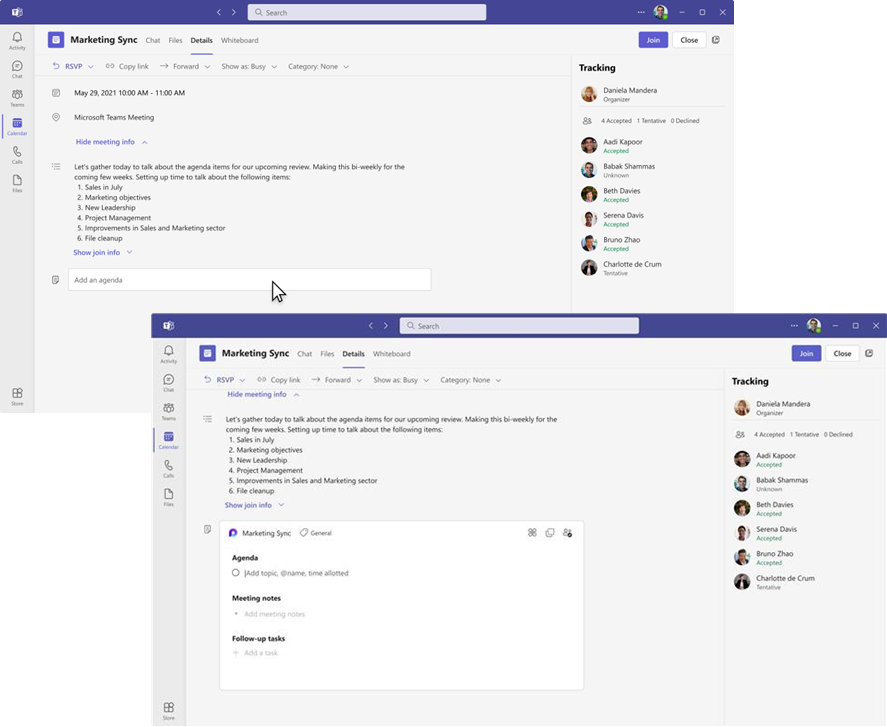
Currently, only Microsoft Teams meeting organizers can create Collaborative notes before and after meetings. We are rolling out enhanced Collaborative notes that allow any meeting invitee to create notes before, during, and after the meeting. This enhancement helps to improve collaboration and efficiency and provides a seamless teamwork experience.
This message is associated with Microsoft 365 Roadmap ID 374515.
[When this will happen:]
Targeted Release: We will begin rolling out early February 2024 and expect to complete by late February 2024 (previously mid-February)
Worldwide: We will begin rolling out late February 2024 and expect to complete by late April 2024 (previously mid-March).
[How this will affect your organization:]
In the Teams app, meeting invitees can add what they want to discuss (Agenda), what they discuss (Meeting notes), and what they need to follow up on (Follow-up tasks) on the Teams calendar meeting details page before, during, and after meetings. However, only meeting organizers can hide the notes once created. The Meeting notes will be shown on the right pane of the meeting window, and they can be opened in the browser or on a second monitor. Participants can continue real-time collaboration in meetings. When participants are assigned a task, they will also receive an email notification, synced with Planner and To Do apps.
After the meeting, Collaborative notes will be accessible for all participants on the Teams calendar meeting details page. The Agenda, Meeting notes, and Follow-up tasks are a Loop component, so they can be copied easily into chats, group chats, emails, and other documents.
You can manage this feature via Microsoft SharePoint PowerShell with:
Set-SPOTenant -IsCollabMeetingNotesFluidEnabled (boolean)
Learn more about admin controls for managing Loop experiences: Manage Loop workspaces in SharePoint Embedded | Microsoft Learn
[What you need to do to prepare:]
No action is needed to prepare for this change. You may want to notify your users about this change and update any relevant documentation as appropriate.
More information
Details
Platforms
- Desktop
Services
- Teams
Microsoft tags
- New Feature
- User Impact
- Admin Impact