MC695497 Improved Frontline Workers Availability Preferences
Primary service: Teams
ChangePilot summary
- Significant upgrades to Microsoft 365 will enhance Frontline Workers (FLW) Availability Preferences.
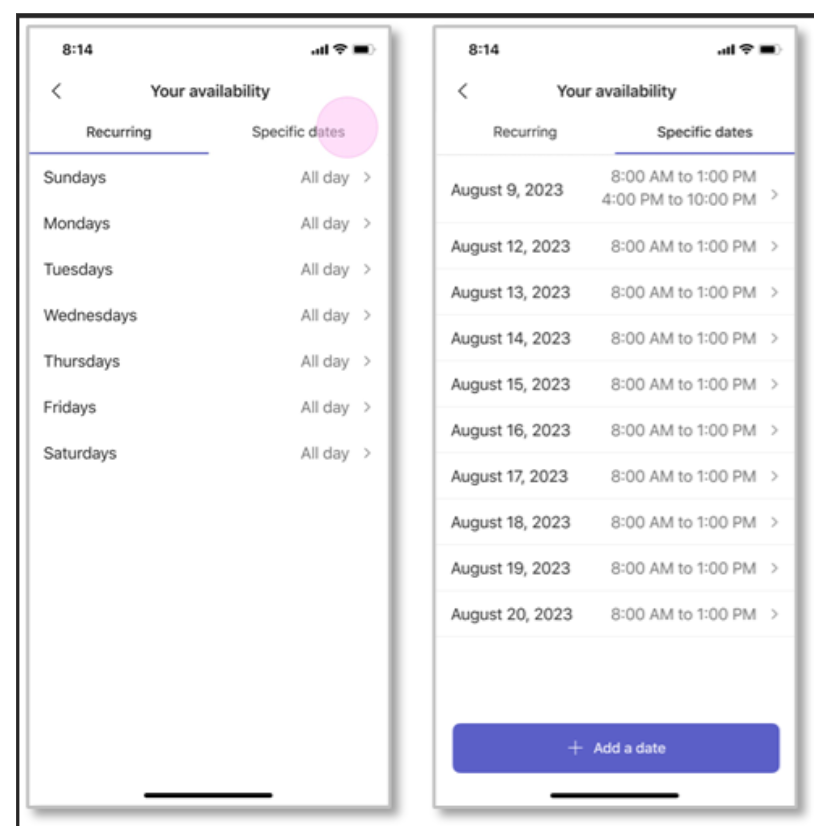
- FLWs can set their availability for specific calendar dates and recurring days, streamlining shift assignments for managers.
- Specific dates can override recurring schedules and are automatically removed as they expire.
- Users have the option to manually delete dates they no longer need.
- No preparation is needed for these changes unless organizations choose to inform their frontline workers.
History
Recorded changes
No changes recorded since ChangePilot first saw this post.
Microsoft message
Updated February 25, 2024: We have updated the rollout timeline below. Thank you for your patience.
We're excited to announce significant product upgrades focusing on enhanced FLW Availability Preferences.
Frontline workers often balance various personal commitments and specific work-time preferences. Through shifts, FLWs can establish availability preferences for calendar dates alongside recurring days. This feature streamlines shift assignments for frontline managers, who can seamlessly assign shifts by reviewing these availability preferences within the Shifts app.
This message is associated with Microsoft 365 Roadmap ID: 156952
[When this will happen:]
Worldwide & GCC: We will begin rolling out mid-January 2024 and expect to complete by mid-March 2024 (previously mid-February).
[How this will affect your organization:]
Frontline Workers can set availability by specific date in addition to recurring days. If specific dates coincide with recurring ones, they can override the recurring schedule. As dates expire, the system automatically removes them. Users also have the option to manually delete dates they no longer need.
[What you need to do to prepare:]
There is nothing you need to do to prepare for these changes unless you choose to notify your frontline workers about these updates.
More information
Details
Platforms
- Android
- Desktop
- iOS
- Mac
- Web
Services
- Teams
Microsoft tags
- New Feature
- User Impact