MC692755 Data Loss Prevention - Out-of-box Advanced Hunting queries for Data Loss Prevention incidents in Microsoft 365 Defender
Primary service: Defender
ChangePilot summary
- Microsoft 365 is introducing a Go Hunt feature in the DLP alert page of Microsoft Defender XDR, allowing organizations to select from pre-populated queries for common scenarios.
- The rollout of this feature will begin in late November and is expected to be completed by early December.
- To use this feature, organizations need to have access to the CloudAppEvents table that contains Microsoft Purview data.
- When a selection is made from the Go Hunt dropdown or Go Hunt deep link, it will open a new window in Advanced hunting with the query pre-populated. Users just need to click Run query to see the results.
- No preparation is needed for this feature as it will be automatically available in the DLP alerts experience in the Microsoft Defender XDR portal.
History
Recorded changes
No changes recorded since ChangePilot first saw this post.
Microsoft message
Organizations can click the "Go Hunt” dropdown from the DLP alert page in Microsoft Defender XDR and select from a list of pre-populated queries for common scenarios such as understanding if a file is shared externally, participants of a Teams meetings, and more.
This message is associated with Microsoft 365 Roadmap ID 185708
[When this will happen:]
Rollout will begin in late November and is expected to be complete by early December.
[How this will affect your organization:]
- Pre-requisite: Make sure you have the access to the CloudAppEvents table, that contains Microsoft Purview data, to show up in Advanced hunting by following these steps to integrate with Microsoft 365.
- Go to https://security.microsoft.com, click on Incident & alerts > Incidents > open a DLP incident in Microsoft 365 Defender
- Click on the alert to view the related events and select and event to open the DLP event details pane on the right
- You will see a “Go Hunt” dropdown at the top of the DLP event details pane and Go Hunt deep links within the Impacted entities section of the pane.
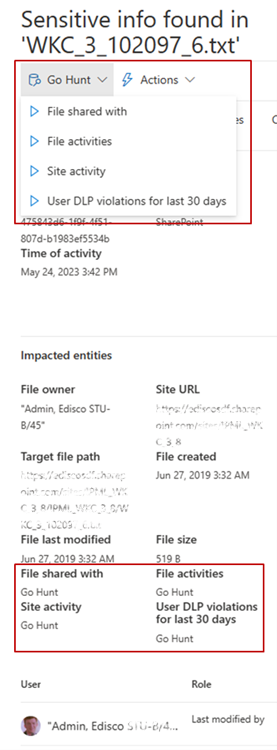
Note: In this example, we have a SharePoint alert, so the Go Hunt options provided are high value queries such as File shared with, File activity, etc. For alerts from other locations such as Exchange, Teams, and Endpoint, you will see unique out-of-box queries relevant to those alert types.
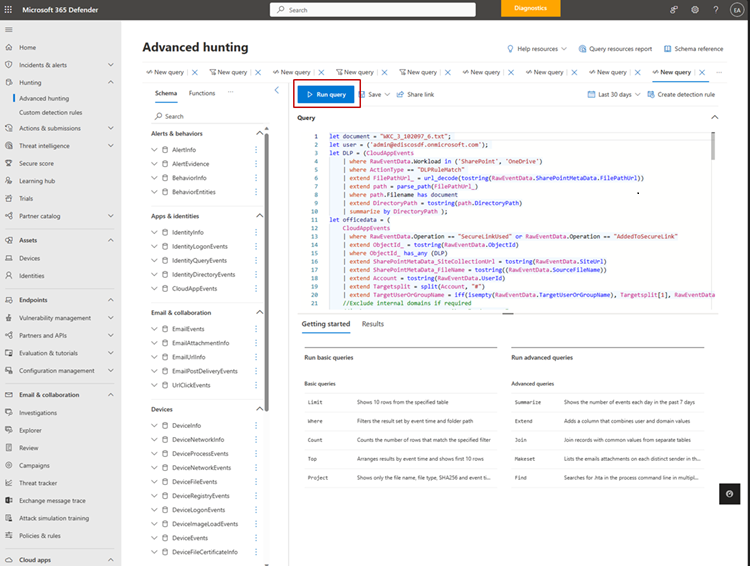
- When a selection is made from the Go Hunt dropdown or Go Hunt deep link in Impacted entities, it will open a new window in Advanced hunting with the query pre-populated and all you must do is click “Run query” to see the results.
[What you need to do to prepare:]
There is nothing you need to do to prepare, the "Go Hunt” option will be available in the DLP alerts experience in the Microsoft Defender XDR portal.
You can also learn more about Advanced hunting for Microsoft Purview Data Loss Prevention (DLP) incidents - Microsoft Community Hub in the blog post we recently published.
More information
Details
Platforms
- Web
Services
- Defneder
- Purview
Microsoft tags
- New Feature
- Admin Impact