MC690185 Prepare for device-bound passkeys in Microsoft Entra ID (changes to FIDO2 and Windows Hello for Business)
Primary service: Entra
ChangePilot summary
- Starting January 2024, Microsoft Entra ID will support device-bound passkeys as an authentication method, in addition to FIDO2 security keys.
- FIDO2 security keys will be renamed to Passkeys (FIDO2) within the authentication methods policy and Conditional Access authentication strengths policy in the Entra admin portal.
- Organizations can opt-in to this preview by enforcing key restrictions to allow specified passkey providers in their FIDO2 policy.
- A new registration option called Passkey (preview) will be introduced for end users to register a device-bound passkey on their devices.
- The existing end user sign-in option will be renamed to Face, fingerprint, PIN, or security key, and the term passkey will be included in the updated sign-in experience.
History
Recorded changes
No changes recorded since ChangePilot first saw this post.
Microsoft message
Updated February 19, 2024: We have updated the rollout timeline below. Thank you for your patience.
Beginning mid-March 2024, Microsoft Entra ID will support device-bound passkeys stored on computers and mobile devices as an authentication method in preview, in addition to the existing support for FIDO2 security keys. This enables your users to perform phishing-resistant authentication using the devices that they already have.
We will be expanding the existing FIDO2 authentication methods policy and end user experiences to support this preview release. If your organization uses FIDO2 authentication or Windows Hello for Business, please continue reading to learn more and prepare for the upcoming changes.
Admin Configuration
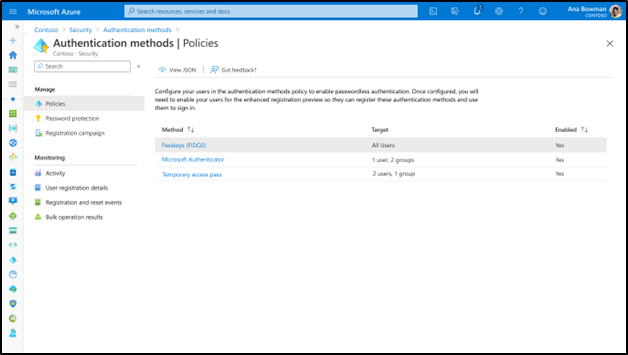
In the Entra admin portal, we will be renaming “FIDO2 security keys” to “Passkeys (FIDO2)” within the authentication methods policy and Conditional Access authentication strengths policy.
For your organization to opt-in to this preview, you will need to enforce key restrictions to allow specified passkey providers in your FIDO2 policy. Here are the possible configuration states for FIDO2 key restrictions during the preview:
- No key restrictions (FIDO2 policy default): Tenant allows all security key models. Device-bound passkey providers on computers and mobile devices are not allowed.
- Key restrictions set to "Allow": Tenant only allows the explicitly added AAGUIDs. To enable a device-bound passkey provider, add their AAGUID(s) to the key restrictions list.
- Key restrictions set to "Block": Tenant blocks the explicitly added AAGUIDs and allows all other security key models. Device-bound passkey providers on computers and mobile devices are not allowed.
End User Registration Experience
In the My Security Info portal, a new registration option called "Passkey (preview)" will be shown to end users for registering a device-bound passkey on computers, mobile devices, or security keys.
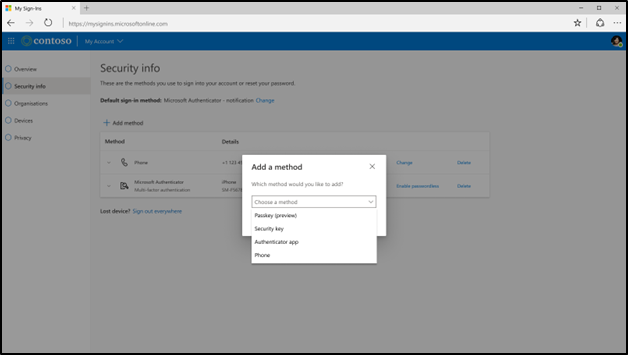
*Towards the end of 2024, the existing security key registration option will be replaced by the newly introduced passkey option.
End User Sign-in Experience
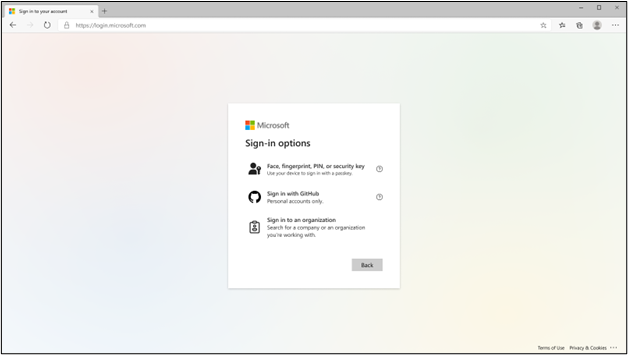
The existing end user sign-in option for Windows Hello for Business and FIDO2 security keys will be renamed to “Face, fingerprint, PIN, or security key”. The term "passkey" will be mentioned in the updated sign-in experience to be inclusive of passkey credentials presented from security keys, computers, and mobile devices.
- Text displayed to users today:
- “Sign in with Windows Hello or security key”
- "Sign in with a security key”
- "Signing in with Windows Hello or security key"
- Text displayed to users in January 2024:
- “Face, fingerprint, PIN, or security key”
- "Signing in with a passkey"
More information
- passkeys.dev/docs/reference/terms/#device-bound-passkey
- img-prod-cms-rt-microsoft-com.akamaized.net/cms/api/am/imageFileData/RW1djtB?ver=7e3f
- img-prod-cms-rt-microsoft-com.akamaized.net/cms/api/am/imageFileData/RW1djtA?ver=723c
- img-prod-cms-rt-microsoft-com.akamaized.net/cms/api/am/imageFileData/RW1doJH?ver=b514
Details
Services
- Entra
Microsoft tags
- New Feature
- User Impact
- Admin Impact