MC689499 Data Loss Prevention - Admin Units support for DLP alerts in Microsoft 365 Defender portal
Primary service: Purview
ChangePilot summary
- Microsoft 365 has released a new feature that allows admins to delegate management and remediation authority to different people in different regions or organization units using Azure Active Directory Administrative Units.
- The feature extends the Admin Units capability in Microsoft Purview Information Protection and Data Loss Prevention (DLP) to DLP alerts in the Microsoft 365 Defender portal.
- The rollout will begin in mid-November and is expected to be completed by the end of November.
- Organizations not using this feature will not be impacted. Those that require it can set it up in the Azure Portal and manage it in Purview and/or M365 Defender.
- To prepare, organizations should get started with Information Protection and Data Loss Prevention in the Microsoft Purview compliance portal and investigate data loss alerts with Microsoft 365 Defender.
History
Recorded changes
No changes recorded since ChangePilot first saw this post.
Microsoft message
We’re recently released a new GA capability that enables admins to delegate management and remediation authority for different people in different regions or organization units with role-based access control (RBAC) via Azure Active Directory Administrative Units. For example, German Admin Unit investigators would be able to investigate alerts and audit events for only German users.
With the GA rollout of this new feature, we are extending the Admin Units capability currently available in Microsoft Purview Information Protection and Data Loss Prevention (DLP) to DLP alerts in the Microsoft 365 Defender portal.
This message is associated with Microsoft 365 Roadmap ID 162292
[When this will happen:]
Rollout will begin in mid-November and is expected to be complete by end of November.
[How this will affect your organization:]
If you choose to not use this Admin Units feature, there is no impact to your organization. If your organization requires delegations of tasks based on users in specific regions or organization units, please follow the steps to set up this capability:
1. Set up Administrative Units (AU) in Azure Portal
2. Ring-fence Purview Admin Permissions to Administrative Unit scopes
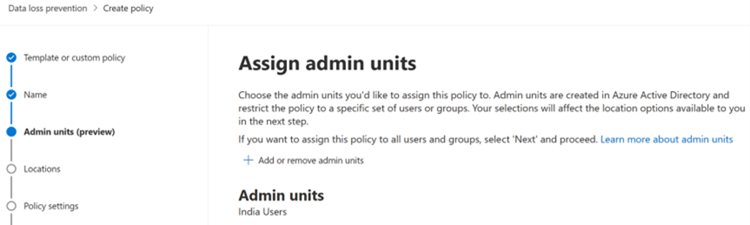
3. Create and manage Admin Unit scoped MIP/DLP policies
4. Investigate user scoped DLP Alerts, Incidents, and Logs in Purview and/or M365 Defender
5. Investigate user scoped Activities and events in Activity Explorer in Purview and/or Advanced Hunting in M365 Defender
[What you need to do to prepare:]
Get started with Information Protection and Data Loss Prevention in the Microsoft Purview compliance portal
and Investigate data loss alerts with Microsoft 365 Defender | Microsoft Learn
Learn more: Permissions in the Microsoft Purview compliance portal
More information
- www.microsoft.com/microsoft-365/roadmap?filters=&
- purview.microsoft.com/compliance
- learn.microsoft.com/microsoft-365/security/defender/dlp-investigate-alerts-defender?view=o365-worldwide#investigate-dlp-alerts-in-the-microsoft-365-defender-portal
- learn.microsoft.com/microsoft-365/compliance/microsoft-365-compliance-center-permissions?view=o365-worldwide#administrative-units-support-in-microsoft-purview
Details
Platforms
- Web
Services
- Entra
- n
- DLP
- Defender
- Purview
Microsoft tags
- New Feature
- Admin Impact