MC687207 Microsoft Teams: Files App Updating to OneDrive App Experience in Teams
Primary service: Teams
ChangePilot summary
- The Files app in the Teams desktop client is being updated to the new OneDrive app experience, bringing performance improvements and new features.
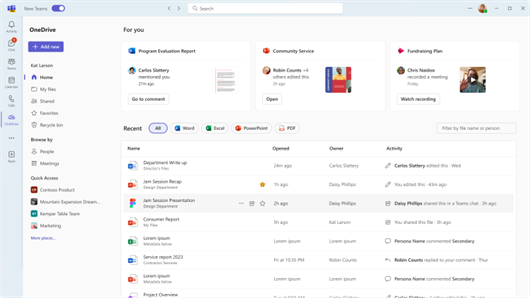
- The Files app on the left side of the new Teams desktop client will also become the OneDrive app.
- Rollout for this update will begin in mid-November 2023 and is expected to be completed by mid-December 2023.
- Teams desktop users will be shown a one-time indication when the Files app is updated to the OneDrive app.
- No action is required from users as existing policies or settings for the Files app will automatically apply to the OneDrive app.
History
Recorded changes
No changes recorded since ChangePilot first saw this post.
Microsoft message
Updated February 2, 2024: We have updated the rollout timeline below. Thank you for your patience.
The Files app accessed from the left side of the Teams desktop client will be updated with the new OneDrive app experience, bringing performance improvements, more views, and the latest features of OneDrive to both classic and new Teams. All existing features of the Files app will also be available via this new OneDrive app experience. For more details, please visit the blog page.
As part of this change, Files app on left side of the new Teams desktop client will also become OneDrive app. There is no change in the name of Files app in either classic Teams desktop client or Teams mobile client.
This message is associated with Microsoft 365 Roadmap ID 145798
[When this will happen:]
Targeted Release: We will begin rolling out in mid-November 2023 and expect to complete rollout by late November 2023.
Standard Release: We will begin rolling out in late November 2023 and expect to complete rollout by mid-February 2024 (previously late January).
[How this will affect your organization:]
Additionally, for Teams desktop users, a one-time indication will be shown for awareness when Files app is updated to OneDrive app.
[What you need to do to prepare:]
There is no action required since any existing policies or settings done through Teams Admin Center for Files app will automatically be applicable.
More information
Details
Platforms
- Desktop
Services
- Teams
- OneDrive
Microsoft tags
- Feature Update
- User Impact
- Admin Impact