MC1560935 Updates to the analyst experience in A365 Business Analytics
Primary service: Viva
ChangePilot summary
- Microsoft Viva is updating the analyst experience as part of the move to A365 Business Analytics.
- The Reports page becomes the central workspace for creating, accessing, and managing analyst reporting work.
- Existing analyses, queries, and shared reports will continue to be available in Reports alongside Power BI reports.
- The current Viva Insights app remains available during the transition, with retirement timing to be communicated separately.
- IT should notify Insights analysts and update internal training or documentation that still points to Create Analysis or Analysis Results.
What it means for you
What admins need to do
Update analyst-facing documentation, runbooks, and training materials so they direct users to Reports instead of Create Analysis or Analysis Results. Brief the helpdesk and Insights analysts about the new central workspace and confirm any bookmarks, internal links, or guidance materials are refreshed to reduce confusion during the transition.
Impact on users
Insights analysts will see Reports become the main place to create, open, and manage reporting work. Their existing analyses, queries, and shared reports will still be available there, and the current app remains usable during the transition.
If you miss it
If IT does nothing, analysts may keep using outdated guidance and spend time looking in the old workflow pages, which can slow adoption and create confusion during the transition to the new Reports-centered experience. The change is unlikely to cause service disruption, but users may be less efficient and support calls may increase.
- Admin controls available
- No
History
Recorded changes
No changes recorded since ChangePilot first saw this post.
Microsoft message
[What and Why:]
We're updating the analyst experience as part of the move to A365 Business Analytics. The key change is that Reports becomes the central place for analysts to create, access, and manage their reporting work. Today, analyst workflows are spread across multiple pages, including Advanced Analysis, Create Analysis, Analysis Results and Publish reports. In the new experience, these workflows come together in Reports, giving analysts one place from creating an analysis to accessing its results.
[Rollout Schedule:]
Global: We will begin rolling out on mid-November 2026 and expect to complete by late November 2026.
[Impact on Your Organization:]
What's changing: Reports becomes the central workspace for analyst reporting workflows. Anything you previously created as an analysis or query appears in Reports alongside your Power BI reports.
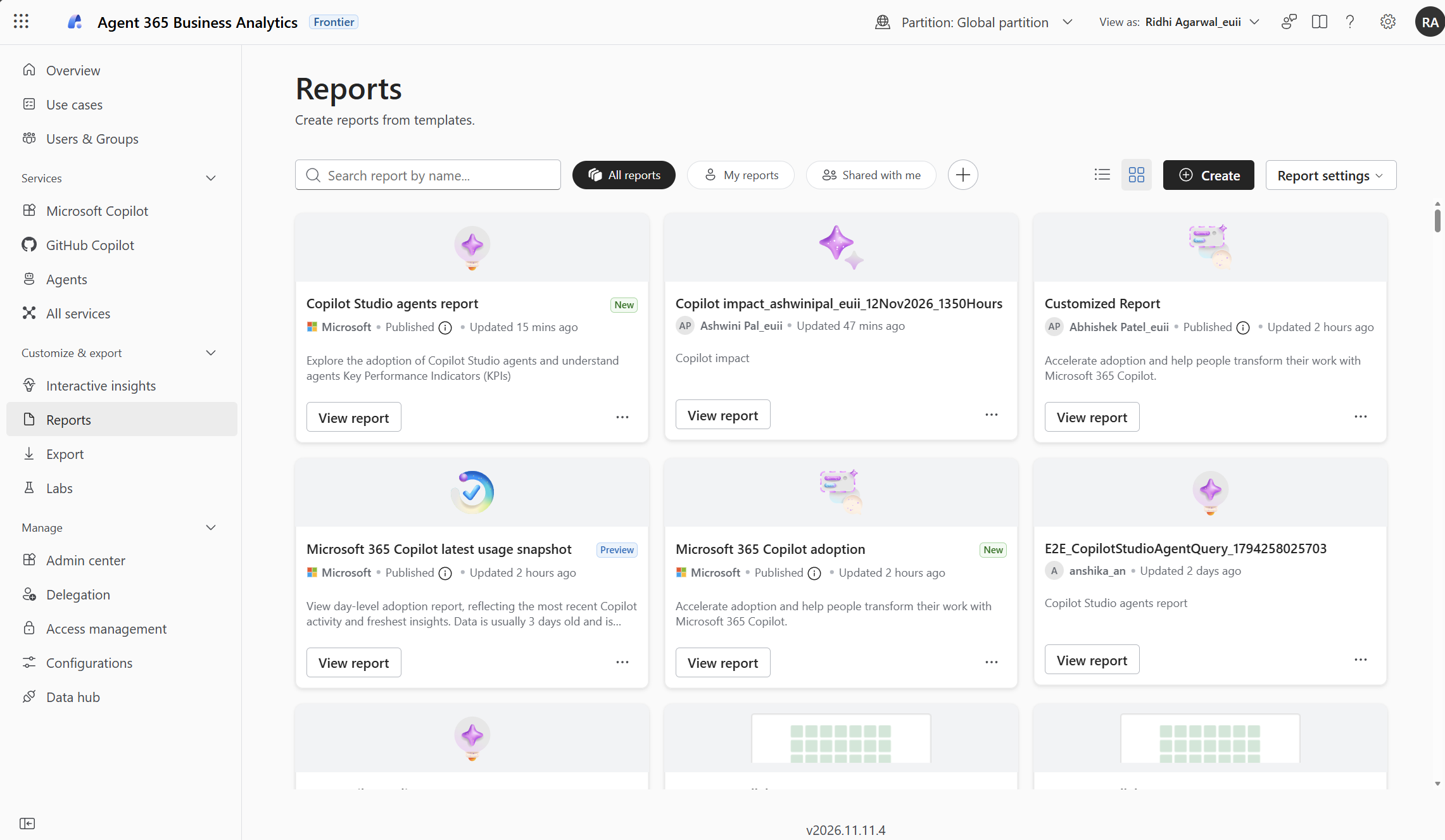
What stays the same: The Reports page is already generally available, so its list and card views, search and filtering work as they do today. Reports you created or that were shared with you remain available. The existing Viva Insights app will remain available during the transition. Information about the future retirement of the existing app, including timing and any required actions, will be shared separately as part of a broader communication.
[Action Required/Recommendations:]
Let Insights analysts know that Reports is becoming the central place for their reporting workflows. Update internal documentation or training that directs analysts to Create Analysis or Analysis Results to point to Reports.
[Compliance considerations:]
No compliance considerations identified. Review as appropriate for your organization.
Details
In weekly changes
Services
- Power BI
- Viva
Category
- Stay informed
Microsoft tags
- Feature Update