MC1552386 Page context for open tabs in the Copilot desktop app built-in browser
Primary service: M365 Copilot
ChangePilot summary
- Microsoft 365 Copilot desktop app will gain the ability to use content from open tabs in its built-in browser as page context.
- Users can ask Copilot questions or request summaries for a single tab or multiple open tabs within the current conversation.
- The feature only works when the Copilot desktop app built-in browser is enabled; if it is disabled, there is no impact.
- IT admins should review in-app browsing governance settings and validate behavior with pilot users.
- This change affects users of the Copilot desktop app and the admins who manage its browser experience.
What it means for you
What admins need to do
Review whether the Copilot desktop app built-in browser is enabled in your tenant, confirm that current governance settings for in-app browsing align with your data-use expectations, and test the new page-context behavior with a small pilot group. Update internal guidance and helpdesk notes so support teams understand that Copilot only uses page context within the current conversation.
Impact on users
Users of the Copilot desktop app with the built-in browser enabled will be able to ask Copilot questions or request summaries based on content in open tabs. The context is limited to the current conversation, and the feature will not be available if the built-in browser is turned off.
If you miss it
If IT does not review the built-in browser setting and governance, users may receive new Copilot page-context behavior without prior validation or communication. That could lead to unexpected handling of browser content in Copilot conversations, confusion about what information is being used, and additional helpdesk questions. If the browser is disabled, there is no impact.
- Admin controls available
- Yes
History
Recorded changes
No changes recorded since ChangePilot first saw this post.
Microsoft message
[What and why]
Copilot in the desktop app will be able to use content from open webpage tabs in the app's built-in browser as page context. Users will be able to ask questions or request summaries for a single tab or across multiple tabs, which helps with multi-tab workflows. Page context will be scoped to the current conversation and will apply only when the built-in browser is enabled.
Availability is limited to the Microsoft Copilot desktop app.
[Rollout schedule]
- General availability (Worldwide): We will begin rolling out in mid-November 2026 and expect to complete the rollout in late November 2026.
[Impact on your organization]
Who is affected
- Users of the Copilot desktop app in organizations where the built-in browser is enabled
- Admins who manage the Copilot desktop app and its built-in browser
Platforms and services
- Copilot desktop app (built-in browser)
- Microsoft 365 Copilot
What will happen
- When the built-in browser is enabled, Copilot will be able to use content from open webpage tabs in that browser to answer questions and provide summaries:
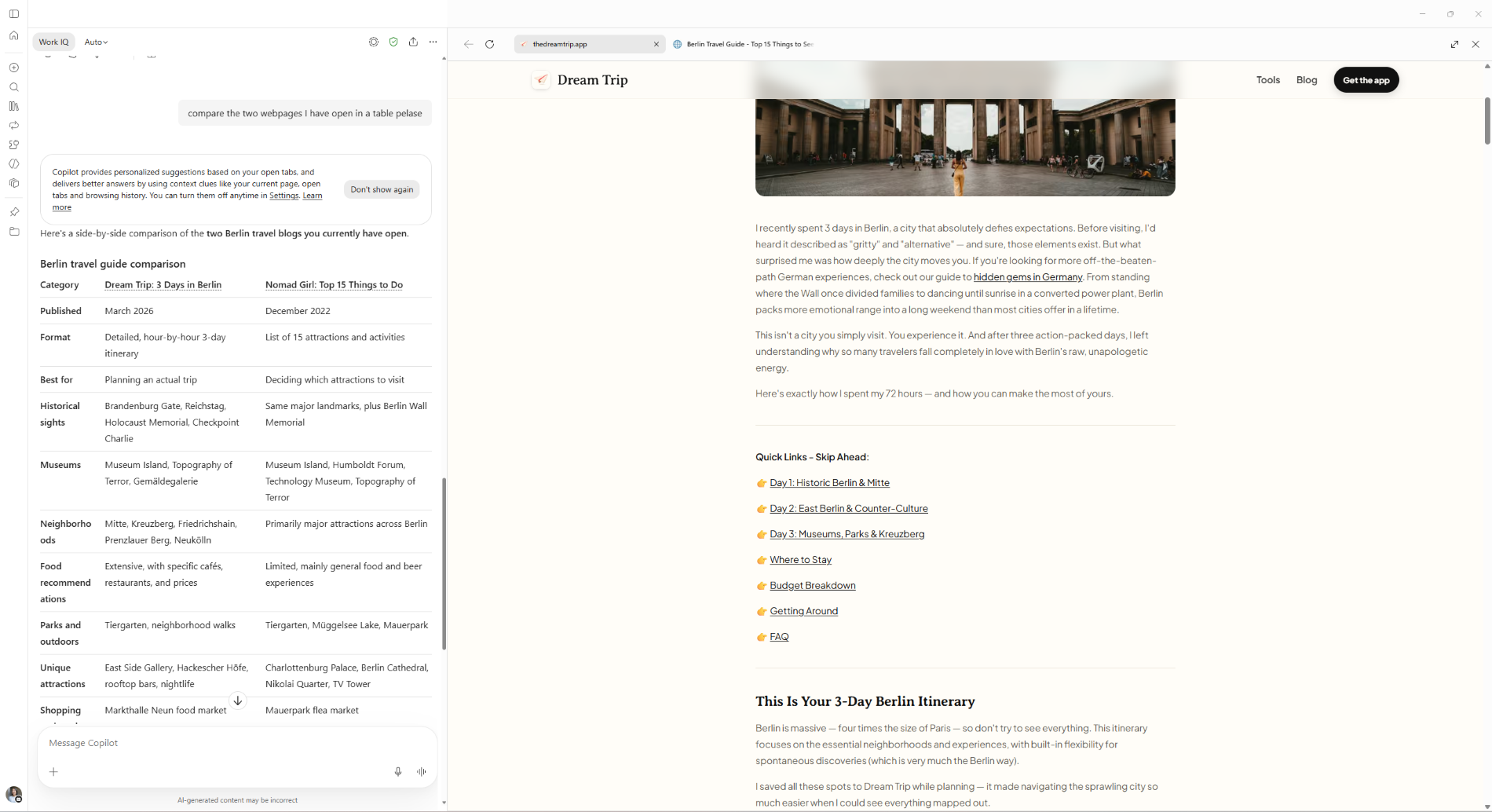
- Users will be able to ask about a single tab or across multiple tabs:
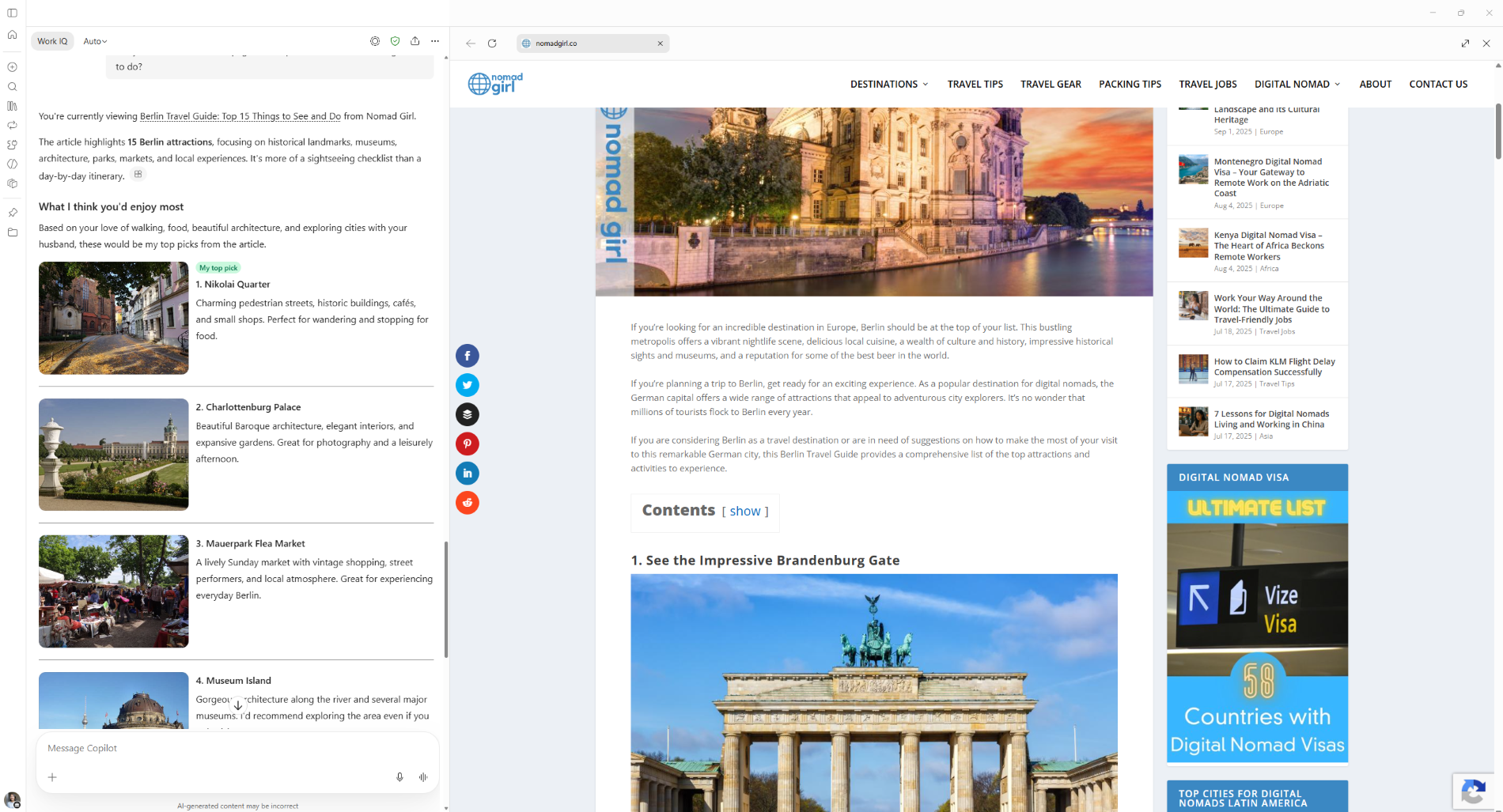
- Page context will be limited to the current conversation.
- If the built-in browser is disabled, this feature will not be active and will have no impact.
[Action required and recommendations]
No action is required. We recommend that you:
- Confirm whether the Copilot desktop app built-in browser is enabled for your organization.
- Review the governance settings for in-app browsing and page context use.
- Validate the expected behavior with pilot users.
- Tell users and helpdesk staff that page context is limited to the current conversation.
[Compliance considerations]
| Question | Answer |
| Does the change introduce or significantly modify AI/ML or agent capabilities that interact with customer data? | Yes. Copilot uses content from open webpage tabs in the built-in browser as context for answers and summaries. |
| Does the change give users a new way of interacting with generative AI? | Yes. Users can ask questions or request summaries for one tab or across multiple tabs. |
Details
In weekly changes
Platforms
- Desktop
Services
- M365 Copilot
Category
- Stay informed
Microsoft tags
- Admin Action
- New Feature
- User Adoption
- Highlighted