MC1537495 Discover featured AI Skills Navigator playlists in Learning Agent
Primary service: M365 Copilot
ChangePilot summary
- Microsoft is adding featured AI Skills Navigator playlists to Learning Agent in Microsoft 365 Copilot Chat, allowing users to find curated learning collections through natural-language prompts.
- The change is available only for organizations where AI Skills Navigator is enabled.
- Playlist recommendations depend on AI Skills Navigator settings; they will not appear if Credentials or Microsoft YouTube videos are turned off.
- No admin action is required, but admins using AI Skills Navigator should review their current settings to confirm playlists will surface as expected.
What it means for you
What admins need to do
If your organization uses AI Skills Navigator, verify that Credentials and Microsoft YouTube videos are enabled in the AI Skills Navigator settings so featured playlist recommendations can appear in Learning Agent. Update internal documentation or helpdesk guidance if you plan to promote the new learning discovery experience to users.
Impact on users
Users in enabled organizations will be able to ask Learning Agent for recommended AI Skills Navigator playlists using natural language. They may see curated learning collections for roles, products, or skills directly in Copilot Chat instead of searching for individual resources. If the required AI Skills Navigator options are disabled, playlist recommendations will not appear.
If you miss it
If admins do not review the AI Skills Navigator settings, users may not see playlist recommendations and could miss the new learning discovery experience. The business impact is limited, but adoption of the feature and related AI learning content may be reduced, and helpdesk teams may receive questions about why recommendations are unavailable.
- Admin controls available
- Yes
History
Recorded changes
No changes recorded since ChangePilot first saw this post.
Microsoft message
[What and why]
Microsoft is bringing featured playlists from AI Skills Navigator into Learning Agent in Microsoft 365 Copilot. Featured playlists bring related learning resources together around a role, product, or skill. Users can discover these structured collections through natural language conversations in Learning Agent, helping them spend less time searching individual learning resources and more time building practical AI skills.
Users can discover featured playlists with prompts such as:
- What playlists can help me build AI skills for sales?
- Find a playlist that helps me create better marketing campaigns with AI.
- Recommend some playlists to help me do code reviews faster using AI.
- Find me some playlists that help me manage my company's AI costs better.
- Show me some playlists on how I can get more done at work using agents.
[Rollout schedule]
- General Availability (Worldwide): Beginning in mid-November 2026 and expected to complete by mid-November 2026
[Impact on your organization]
Who is affected
- Users in organizations where AI Skills Navigator is enabled
Platforms and services
- Microsoft 365 Copilot
- Copilot Chat
- Learning Agent
- AI Skills Navigator
What will happen
- Users can ask Learning Agent for featured playlist recommendations through natural language conversations:
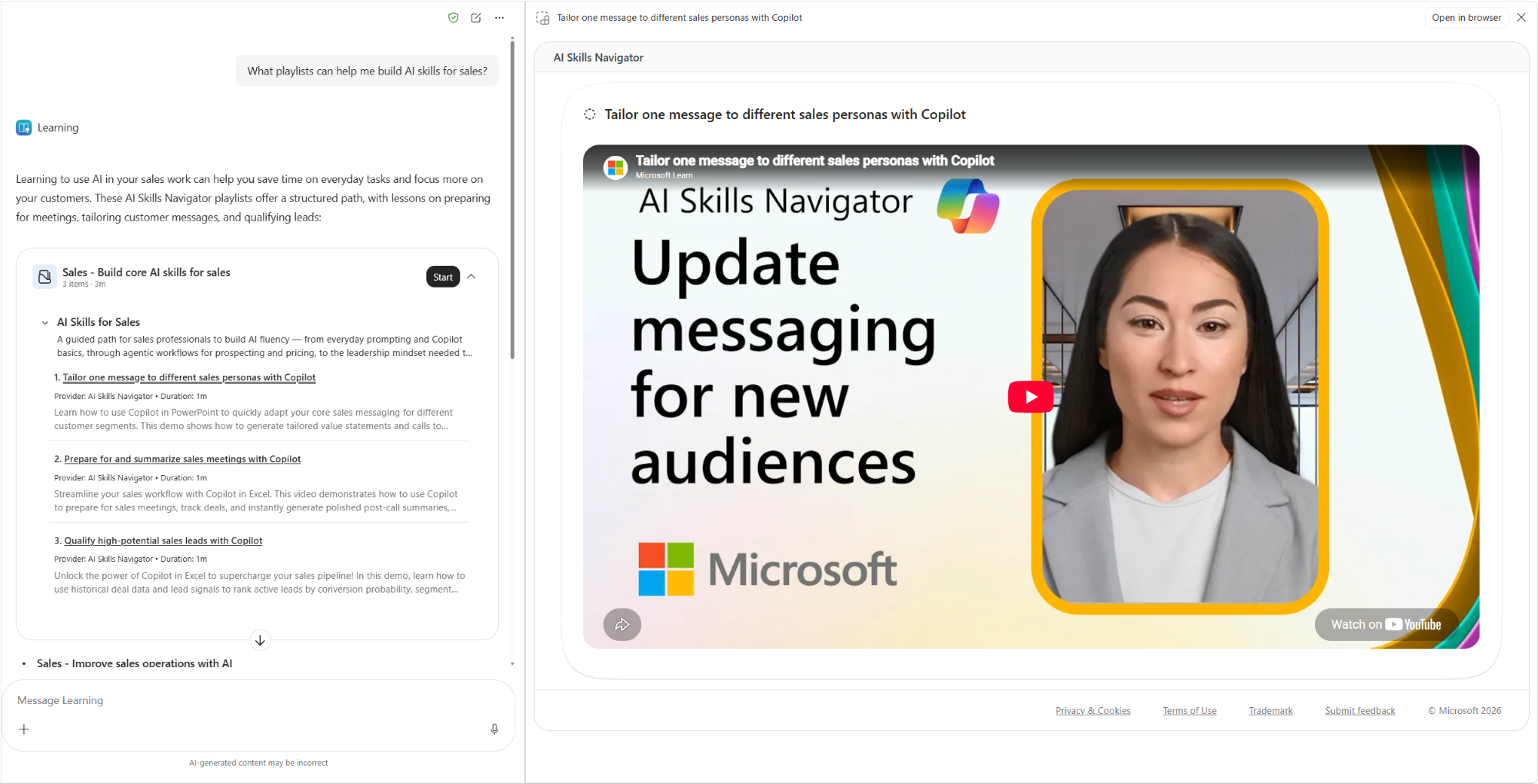
- Featured playlists provide curated sequences of related learning content aligned with a role, product, or skill
- Featured playlists are included in Learning Agent when AI Skills Navigator is enabled for your organization
- Playlist recommendations won't appear if either Credentials or Microsoft YouTube videos is turned off in your AI Skills Navigator settings
[Action required and recommendations]
No action is required.
If your organization uses AI Skills Navigator, review your AI Skills Navigator settings. Playlist recommendations won't appear if either Credentials or Microsoft YouTube videos is turned off.
[Compliance considerations]
No compliance considerations identified. Review as appropriate for your organization.
Details
In weekly changes
Services
- M365 Copilot
Category
- Stay informed
Microsoft tags
- Admin Action
- New Feature
- User Adoption