MC1532253 Enhanced Copilot and AI controls for meetings
Primary service: Teams
ChangePilot summary
- Microsoft Teams is replacing the single Copilot meeting policy with two policies: MeetingAI and TranscriptionWithMeetingAI, giving clearer control over AI availability and whether transcription starts with AI.
- Meeting options are being updated with new controls for who can manage AI, who can use AI, whether transcription starts with AI, and Intelligent Recap behavior.
- Existing Copilot meeting policy configurations will be automatically mapped to the new settings to preserve current behavior; admins do not need to recreate policies.
- Teams admins should review any PowerShell scripts, automation, runbooks, and documentation that reference the Copilot meeting policy and update them to the new policy names.
- Once the new controls are enabled, the old Copilot policy can no longer be updated directly and PowerShell will direct admins to use the new policies.
Latest update: Screenshots updated.
What it means for you
What admins need to do
Review any Teams meeting policy automation, PowerShell scripts, and documentation that currently use the Copilot policy, and update them to the new MeetingAI and TranscriptionWithMeetingAI policies. Validate your tenant’s mapped configuration after rollout to confirm AI and transcription behavior matches your intended governance model. Brief Teams admins and helpdesk staff on the new meeting options so they can support users and organizers.
Impact on users
Meeting organizers will see new AI-related meeting options in Teams, including controls for who can manage AI, who can use AI, transcription behavior, and Intelligent Recap. For most users, the main impact is that meeting AI behavior may look different in the meeting options UI, but the effective behavior should remain the same after Microsoft maps existing settings.
If you miss it
If IT does nothing, existing settings will still be mapped automatically, so the immediate business impact should be limited. The main risk is operational: scripts, automation, or documentation that still reference the old Copilot policy may fail or become inaccurate, and admins may lose time troubleshooting if they try to manage the deprecated policy after the new controls are enabled. There is also a governance risk if the mapped settings are not reviewed and do not reflect the organization’s intended AI or transcription posture.
- Admin controls available
- Yes
History
Recorded changes
-
- Standard start: early January 2027 (previously late November 2026).
- Standard end: mid-January 2027 (previously early December 2026).
Microsoft message
Updated November 19, 2026: We have updated the content. Thank you for your patience.
[What and Why:]
Microsoft Teams is updating how administrators and meeting organizers configure AI for Teams meetings. The existing Copilot meeting policy is being replaced by two more specific policies:
- MeetingAI - controls whether Copilot, Facilitator, Intelligent Recap, and other AI features are available in meetings.
- TranscriptionWithMeetingAI - controls whether transcription starts automatically when meeting AI is turned on.
This gives administrators clearer, more predictable control over whether AI is available and whether it requires (or works without) transcription, including the ability to enforce Copilot off. Organizers also gain more visibility into, and in some cases control over, these settings directly from the meeting options.
Meeting options are also being updated to make AI controls easier to understand and to provide more granular control over who can enable, manage, and use AI capabilities, including a new who can manage option that replaces the existing Allow Copilot and Facilitator meeting option:
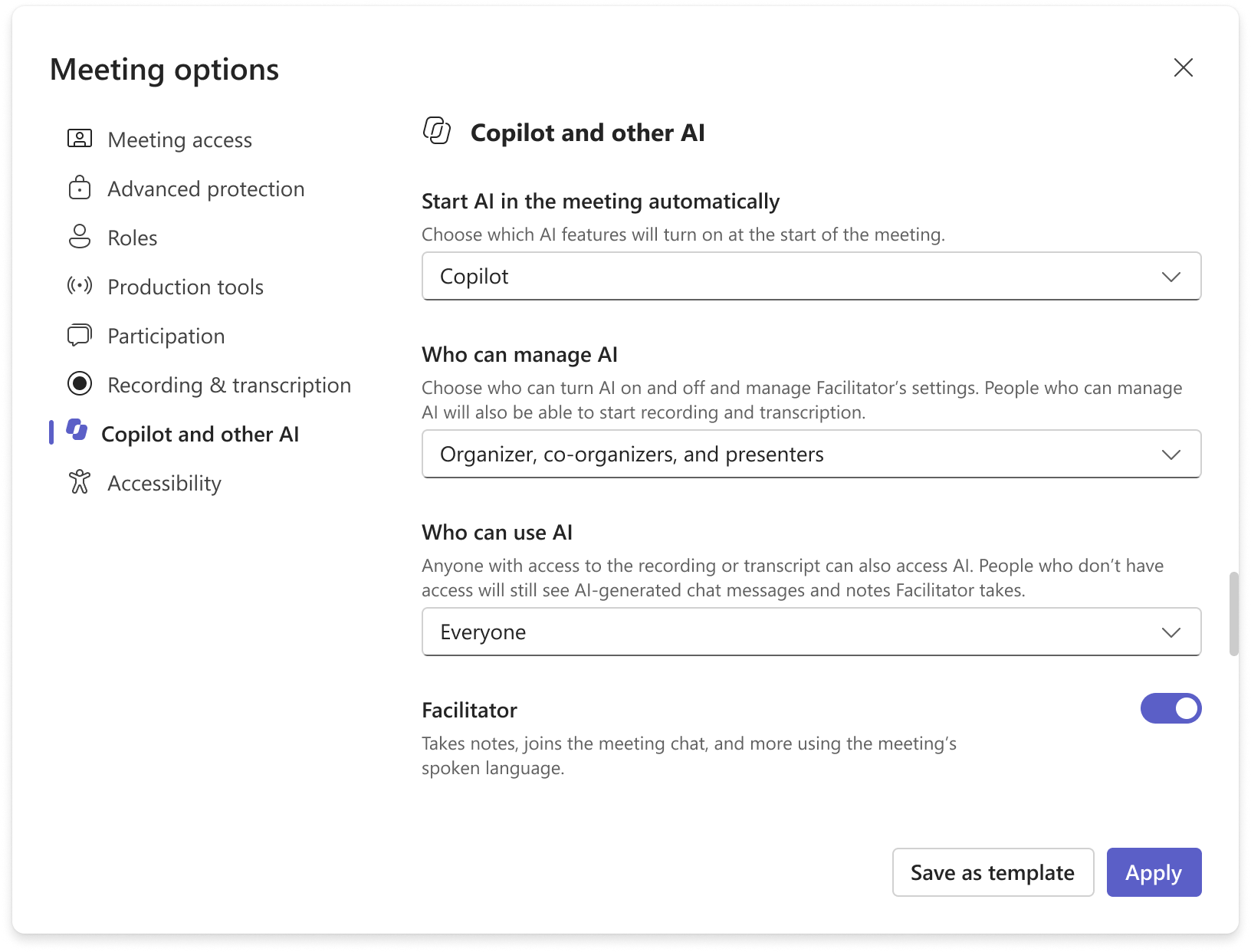
- Who can manage AI - replaces the existing Allow Copilot and Facilitator option and determines who can turn Copilot and other AI features on or off during a meeting. If an admin turns Meeting AI off, this option is set to No one.
- Who can use AI - provides more granular control over which meeting participants can use Copilot and other AI capabilities.
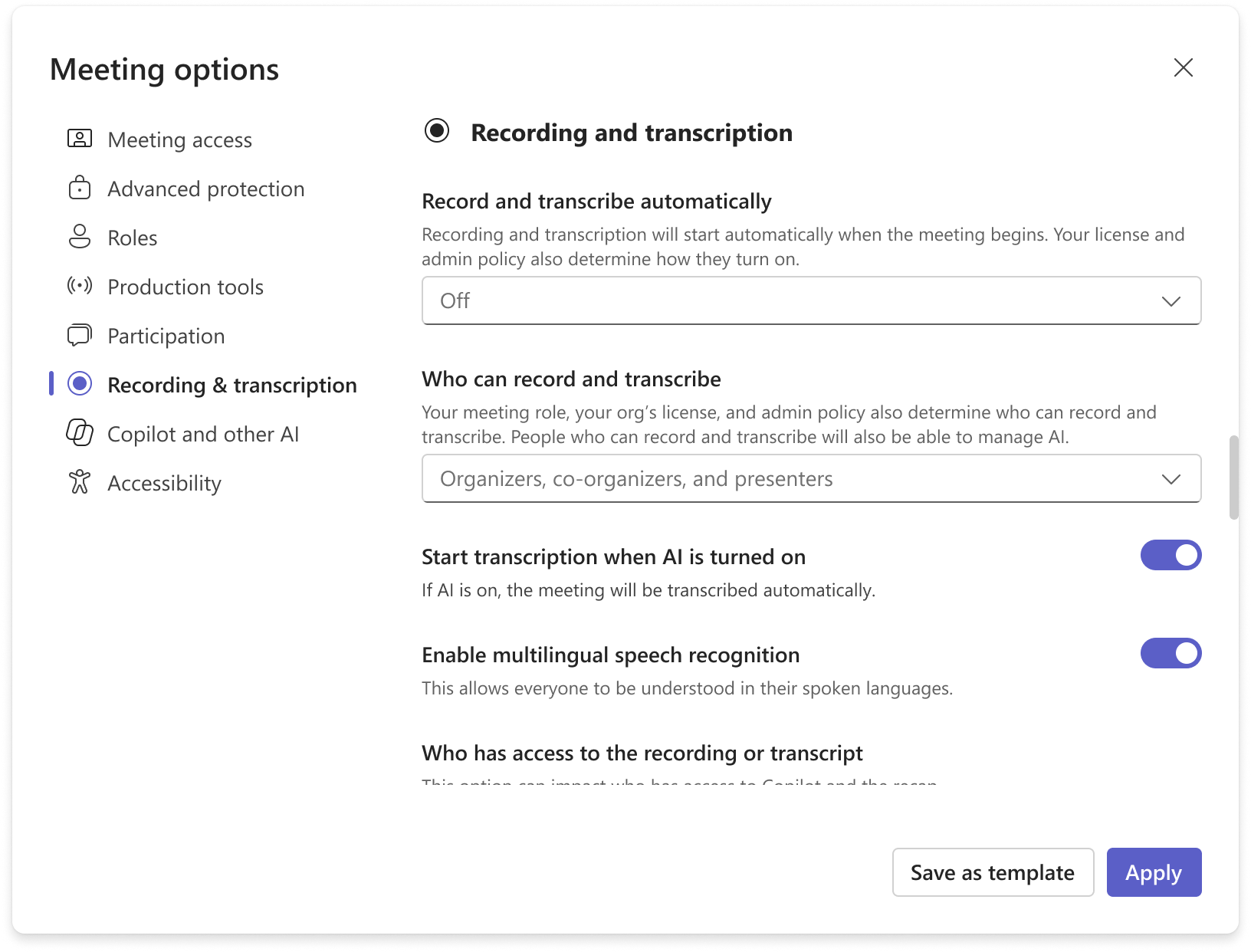
- Start Transcription with AI - lets organizers choose whether transcription starts with AI. Administrators can also control this option through Teams admin center.
- Intelligent Recap controls - lets organizers decide whether an Intelligent Recap is created when Copilot is turned on, including for meetings where a transcript is not created.
[Rollout Schedule:]
Targeted Release (Worldwide): We will begin rolling out in early December 2026 (previously mid-November) and expect to complete by mid-December 2026 (previously early December).
General Availability (Worldwide): We will begin rolling out in early January 2027 (previously late November 2026) and expect to complete by mid-January 2027 (previously early December 2026).
[Impact on Your Organization:]
Today, the Copilot policy combines whether AI is available in a meeting with whether a saved transcript is required. After this update, these behaviors are represented by two separate settings:
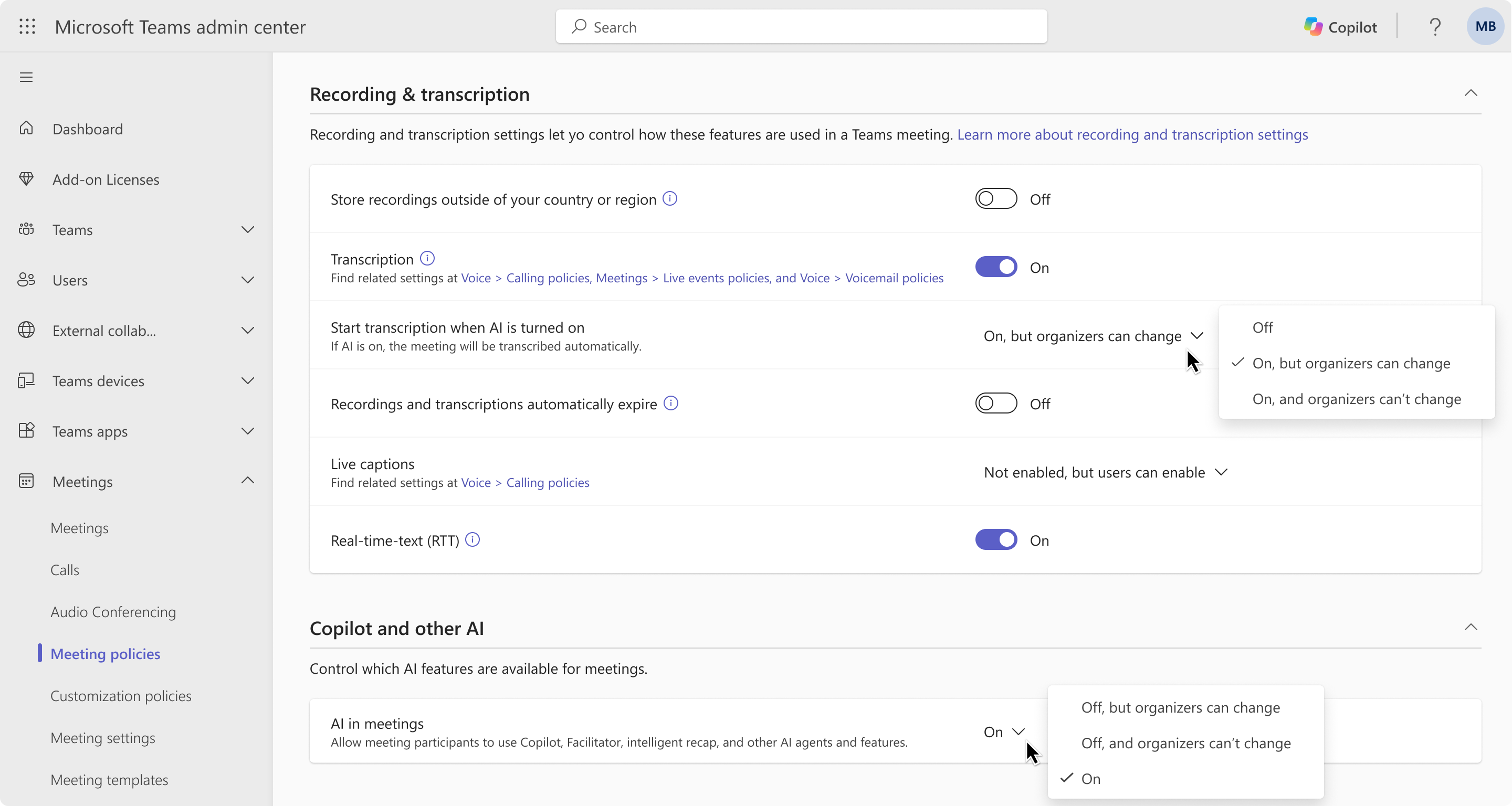
- Allow AI in meetings: On / Off, but organizers can change / Off, and organizers cannot change
- Start transcription when AI is turned on: On, but organizers can change / On, and organizers cannot change / Off
To keep the experience predictable and avoid invalid combinations: if MeetingAI is set to enforced off, transcription will also be turned off; if transcription is then turned back on, MeetingAI will no longer be enforced off.
In PowerShell, administrators will use MeetingAI and TranscriptionWithMeetingAI instead of the existing Copilot policy. Once the new controls are enabled, the Copilot policy can no longer be updated directly - attempts will return guidance to use the new policies.
What happens to existing configurations: Microsoft will perform a one-time update mapping each existing Copilot value to the corresponding MeetingAI and TranscriptionWithMeetingAI values, preserving the current effective behavior for your organization. Administrators do not need to recreate their policies. Examples include:
| Existing configuration | MeetingAI | TranscriptionWithMeetingAI |
| Copilot is on and uses a saved transcript by default | On | On, but organizers can change |
| Copilot is on and a saved transcript is required | On | On, and organizers cannot change |
| Copilot is available without transcription | On | Off |
| Copilot is off, but organizers can enable it | Off, but organizers can change | Based on the existing transcription configuration |
| Copilot is enforced off | Off, and organizers cannot change | Off |
The Transcription policy remains available and continues to control whether transcription is allowed. The new TranscriptionWithMeetingAI policy controls whether transcription starts when meeting AI is turned on.
The new settings will appear in the Teams admin center meeting policy under Recording and transcription and Copilot and other AI:
Screenshot 1 - Teams Admin Center: Meeting Policies
Screenshot 2 - Meeting options: Recording & Transcription
Screenshot 3 - Meeting options: Copilot and other AI
Screenshot 4 - Teams Admin Center: Meeting Templates
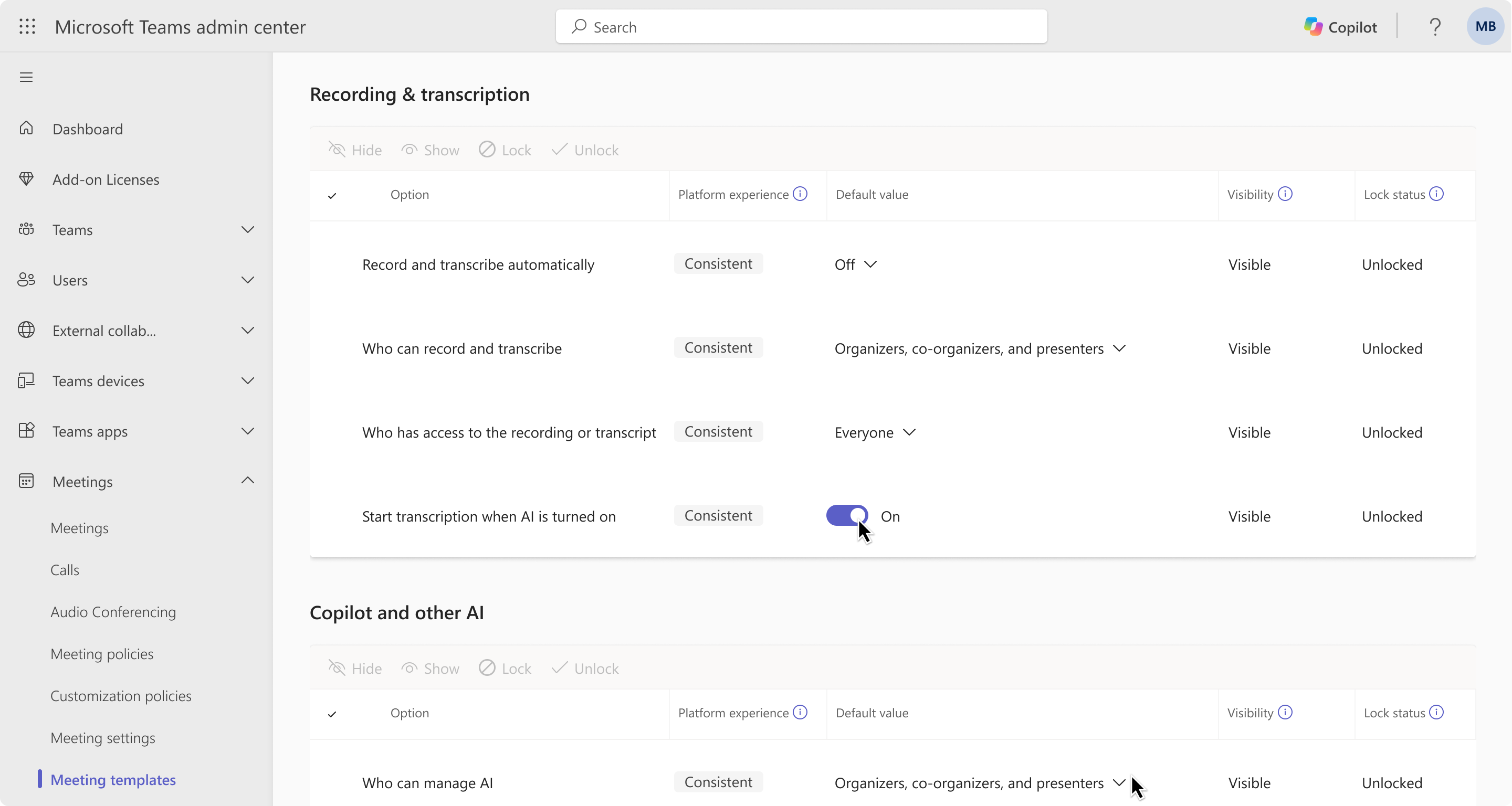
These screenshots show the new Start transcription when AI is turned on control and Allow AI in all meetings control, including the Teams Admin Center options administrators can use to set defaults or prevent organizers from changing the configured behavior.
[Action Required/Recommendations:]
No admin action is required to migrate existing configurations. Before rollout, we recommend admins:
- Review any automation or scripts that read or update the Copilot meeting policy, and update them to use MeetingAI and TranscriptionWithMeetingAI.
- Review custom tooling, runbooks, or documentation referencing the Copilot policy.
- Inform Teams administrators that existing behavior will now be represented by two settings in Teams admin center.
- Confirm the mapped configuration reflects intended behavior once the new controls are available.
If you do not use PowerShell or custom automation to manage Teams meeting policies, no action is required. Existing configurations will be mapped automatically.
[Compliance considerations:]
This change affects administrative controls over AI and transcription availability in meetings but does not alter how existing customer data is processed or stored. Review AI and transcription governance policies for your organization as appropriate.
Details
In weekly changes
Platforms
- Android
- Desktop
- iOS
- Mac
- Web
Services
- M365 Copilot
- Teams
Category
- Plan for change
Microsoft tags
- Admin Action
- Feature Update