MC1530615 Report guest invitations for security concerns
Primary service: Teams
ChangePilot summary
- Microsoft Teams will let users report suspicious or unexpected guest invitations directly from the client.
- Reported guest invitations will be sent to IT admins through the Teams admin center security submissions report and also to Microsoft for review.
- The capability is controlled by the Teams messaging policy setting for “Report a security concern.”
- No action is needed if your organization already has this setting enabled; otherwise admins should review the policy setting and decide whether to enable it.
Latest update: Standard start: late November 2026 (previously mid-November 2026). Standard end: late November 2026 (previously mid-November 2026).
What it means for you
What admins need to do
Review the Teams messaging policy setting for “Report a security concern” and confirm whether it should be enabled in your tenant. If it is already enabled, no change is needed; otherwise, plan to update the policy, brief the helpdesk, and communicate to users how to report suspicious guest invitations.
Impact on users
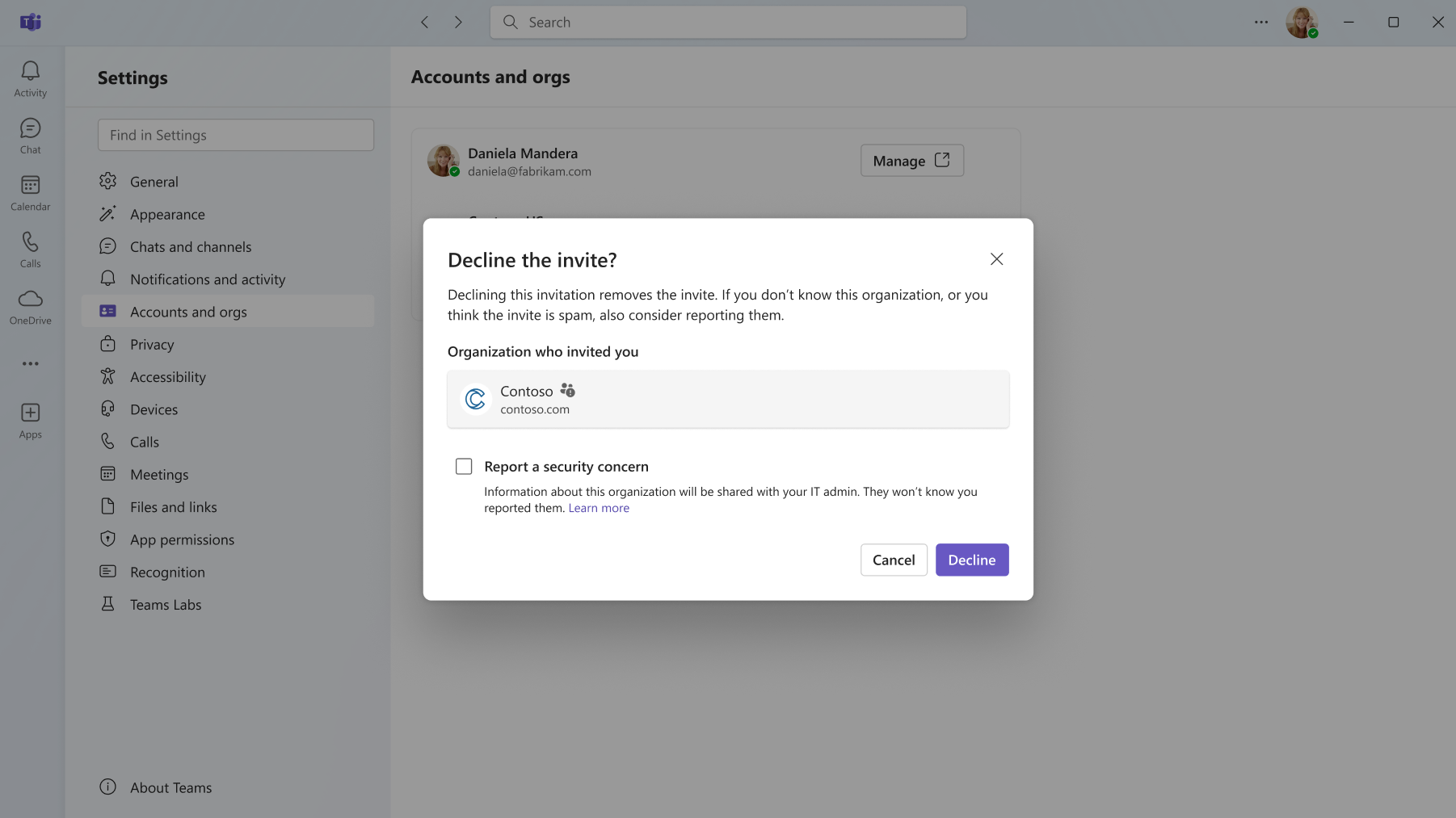
Users will see an option in Teams to report a guest invitation they believe is suspicious or unexpected when they decline it. If your organization has the security concern reporting setting enabled, users can submit the report to IT and Microsoft for review.
If you miss it
If this is missed and the policy is not enabled where desired, users will not have the new reporting option for suspicious guest invitations. That reduces visibility into potential phishing or abuse attempts through guest invites and may delay detection and investigation of suspicious activity. The operational impact is moderate rather than disruptive, but it weakens your security reporting workflow.
- Admin controls available
- Yes
History
Recorded changes
-
- Standard start: late November 2026 (previously mid-November 2026).
- Standard end: late November 2026 (previously mid-November 2026).
Microsoft message
Updated November 17, 2026: We have updated the timeline. Thank you for your patience.
[What and Why:]
Microsoft Teams will enable users to report guest invitations for security concerns directly from Teams. When users receive an unexpected or potentially malicious invitation to join another organization as a guest, they can report it to their IT admin for review, helping identify and mitigate phishing and other abuse through guest invitations.
[Rollout Schedule:]
General Availability (Worldwide): We will begin rolling out in late November 2026 (previously mid-November) and expect to complete by late November 2026 (previously mid-November).
[Impact on Your Organization:]
Users can report suspicious guest invitations when declining them in Teams. Reports are shared with their IT admin through the User reported security submissions report in the Teams admin center and with Microsoft for review.
[Action Required/Recommendations:]
No action is required for organizations that already have Report a security concern enabled in their Teams messaging policy. Admins can manage this capability through Teams admin center > Messaging policies > Report a security concern.
[Compliance considerations:]
| Question | Answer |
| Does the change include an admin control? | Yes. The capability is controlled through the Teams messaging policy setting for Report a security concern. |
Details
In weekly changes
Platforms
- Desktop
- Mac
- Web
Services
- Teams
Category
- Stay informed
Microsoft tags
- Admin Action
- New Feature
- User Adoption