MC1530610 SharePoint Lists: Refreshed user experience
Primary service: SharePoint
ChangePilot summary
- SharePoint Lists is getting a refreshed user interface to make common list actions easier to find and navigation clearer.
- The update adds a reorganized command bar, improved breadcrumb navigation for folder-based lists, more visible view selection/creation, visible filter pills, and consolidated view customization options.
- SharePoint Online tenants using Lists are affected; existing SPFx extensions, column formatting, and view formatting should continue to work as before, aside from command bar placement behavior.
- No configuration is required to receive the new experience, but admins using custom command bar formatters should review the updated command placement behavior and documentation.
What it means for you
What admins need to do
Review any custom command bar formatters used with SharePoint Lists and validate that actions still appear in the expected locations after the new command bar layout arrives. Update internal documentation and helpdesk guidance so support teams can explain the new navigation, filter pills, and view controls to users. No configuration is required to receive the update.
Impact on users
Users will see a refreshed SharePoint Lists experience with a reorganized command bar, clearer navigation for folder-based lists, easier view selection and creation, visible active filters, and more consolidated view customization controls. The core list data and existing formatting features should continue to behave normally.
If you miss it
If IT does nothing, the new Lists experience will still roll out and users may notice that common actions have moved or look different without warning. That can create short-term confusion and helpdesk questions, especially in environments using custom command bar formatting. The operational risk is low, but support teams may spend extra time explaining the new layout and validating customizations after rollout.
- Admin controls available
- Yes
History
Recorded changes
No changes recorded since ChangePilot first saw this post.
Microsoft message
[What and Why:]
Microsoft is introducing a refreshed user experience for SharePoint Lists to make common actions easier to find, improve navigation, and provide greater visibility into views and active filters. The refreshed experience includes a reorganized command bar, clearer breadcrumb navigation for lists that use folders, more prominent view selection and creation, visible filter pills, and consolidated view customization options. These updates are intended to make everyday list tasks more intuitive and help users better understand and manage the information displayed in their views.
[Rollout Schedule:]
General Availability (Worldwide): We will begin rolling out in mid-December 2026 and expect to complete by late December 2026.
[Impact on Your Organization:]
The refreshed experience includes:
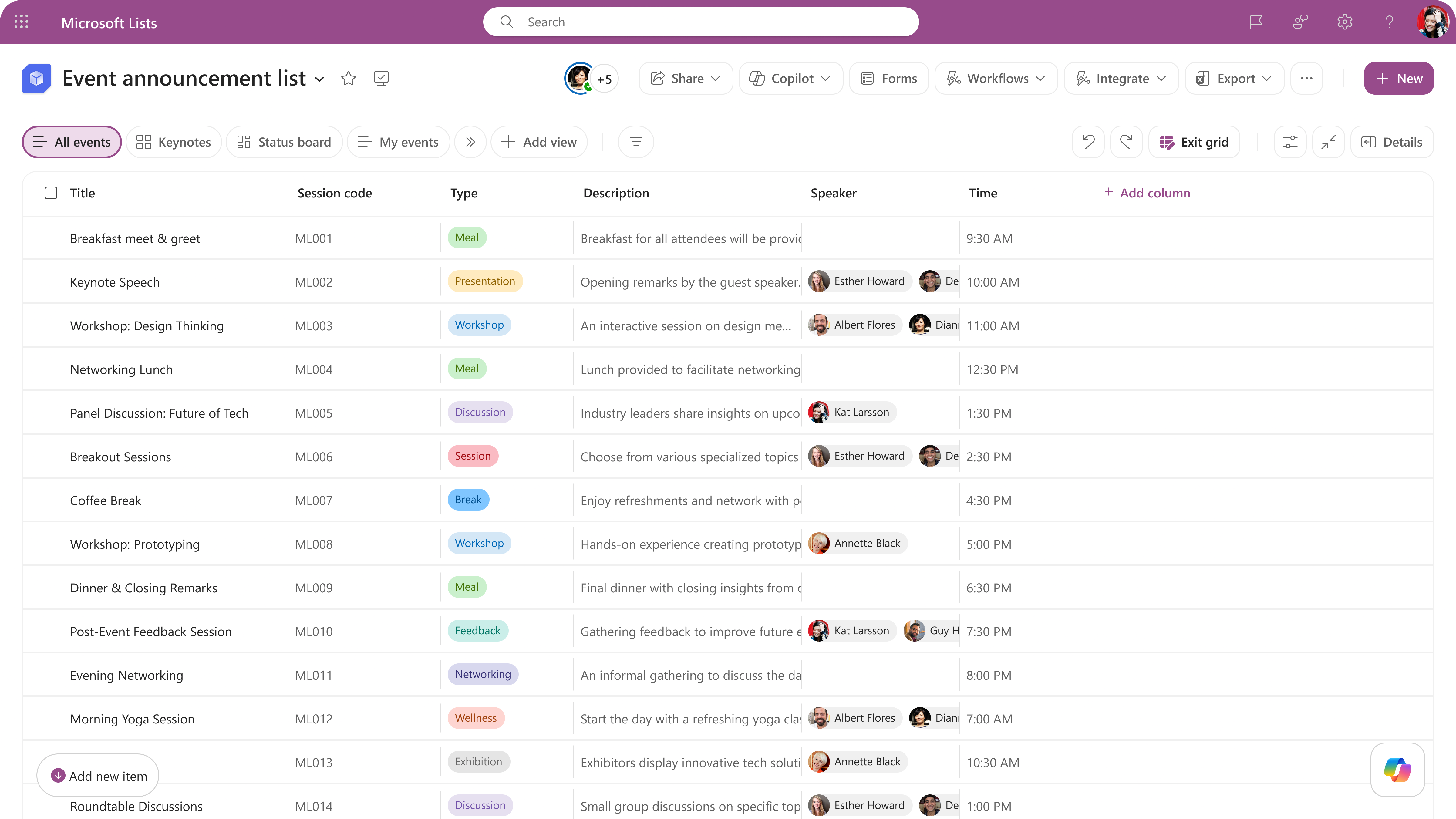
Existing SPFx extensions, column formatting, and view formatting are not expected to be affected beyond the command bar placement behavior described above.
[Action Required/Recommendations:]
No action is required to enable the refreshed experience. Organizations that use custom command bar formatters should review the updated command placement behavior and the SharePoint command bar formatting documentation.
[Compliance considerations:]
No compliance considerations have been identified. Review as appropriate for your organization.
Details
In weekly changes
Services
- SharePoint
Category
- Stay informed
Microsoft tags
- Feature Update
- User Adoption