MC1523084 Move email messages to quarantine with a new remediation action
Primary service: Defender XDR
ChangePilot summary
- Microsoft Defender for Office 365 is adding a new remediation action, Move to Quarantine, for containing suspicious email that reached user mailboxes.
- The feature is intended for organizations licensed for Microsoft Defender for Office 365 Plan 2, including eligible Microsoft 365 subscriptions that include Plan 2.
- Authorized security administrators can move supported messages from user-accessible mailbox locations into Microsoft Defender quarantine, then preview, release, or permanently delete them based on quarantine policy.
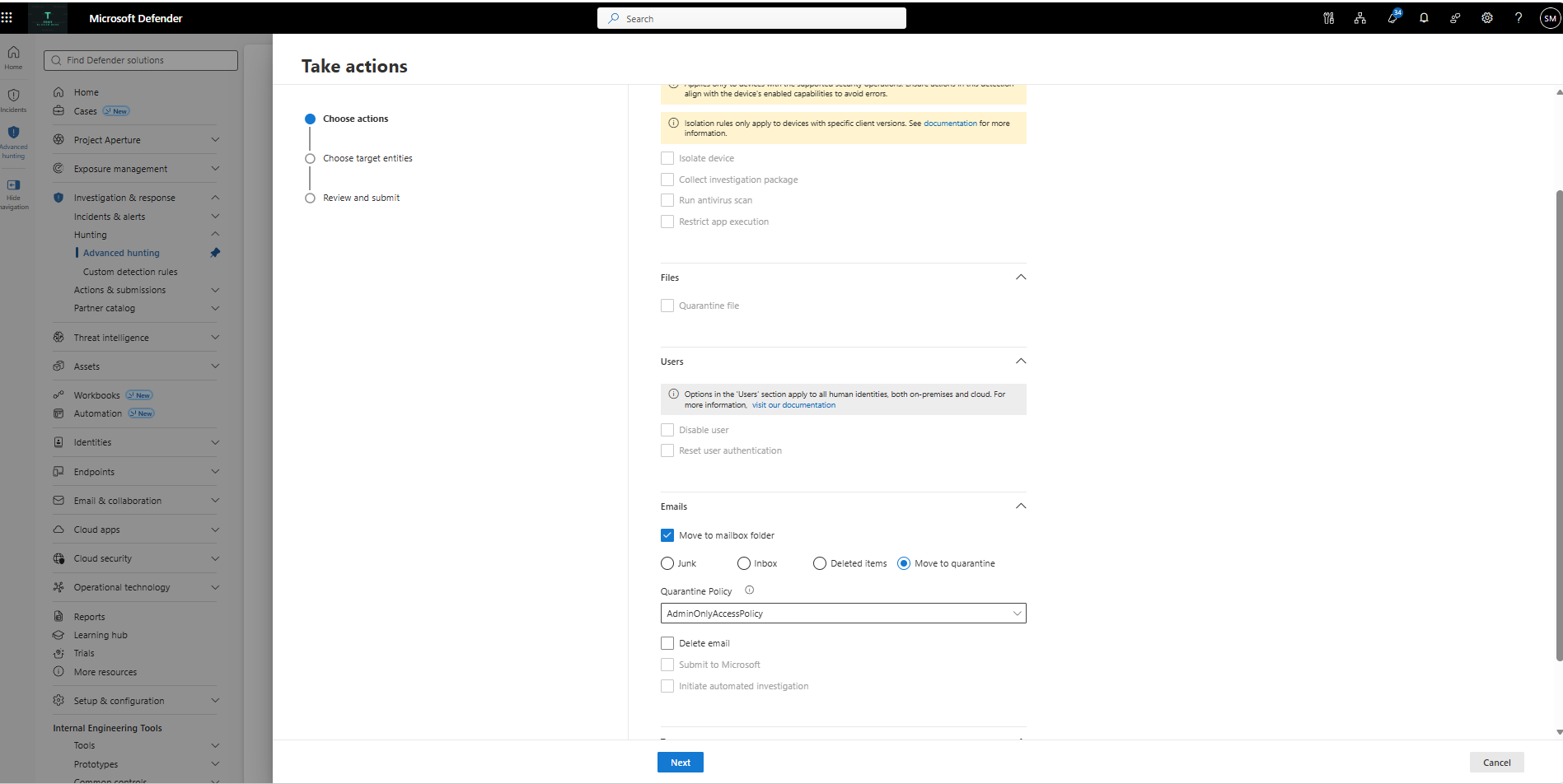
- The new action appears in Threat Explorer, Advanced Hunting, custom detection rules, email entity/summary experiences, and Unified Action Center.
- Microsoft says no enablement action is required, but admins should review quarantine policies, confirm Search and Purge permissions, and update response playbooks and training.
Latest update: Standard start: late November 2026 (previously early November 2026). Standard end: mid-January 2027 (previously mid-December 2026).
What it means for you
What admins need to do
Review your Defender for Office 365 quarantine policies and confirm which policy should apply when admins use Move to Quarantine. Verify the Search and Purge role is assigned to the security staff who approve remediation actions. Update incident response runbooks, analyst procedures, and helpdesk guidance so teams know when to use this action, what happens to messages, and how to release or permanently delete quarantined items.
Impact on users
Users may have suspicious email removed from their mailbox and placed into quarantine by authorized security staff. Depending on the quarantine policy, they may later be able to view or receive released messages, but some quarantined messages may be unavailable to them until an admin acts.
If you miss it
If IT does not prepare, security teams may not use the new containment option effectively and could rely on slower or less flexible remediation steps. In the event of a phishing or malware incident, suspicious messages could remain accessible in mailboxes longer than intended, increasing security risk and delaying response. Lack of updated playbooks and permissions may also create confusion during investigations and remediation.
- Admin controls available
- Yes
- Licences affected
- Plan 2
History
Recorded changes
-
- Standard start: late November 2026 (previously early November 2026).
- Standard end: mid-January 2027 (previously mid-December 2026).
Microsoft message
Updated November 5, 2026: We have updated the timeline. Thank you for your patience.
[What and why]
We are introducing Move to Quarantine, a new remediation action in Microsoft Defender for Office 365. It enables security teams to move potentially malicious email messages from users' mailboxes directly to Microsoft Defender quarantine. This provides a safer and more flexible way to contain suspicious messages that bypassed initial detection while preserving the ability to investigate, release, or permanently delete them later.
This capability is available with Microsoft Defender for Office 365 Plan 2, including eligible Microsoft 365 subscriptions that include Plan 2.
[Rollout schedule]
- General Availability (Worldwide): Beginning in late November 2026 (previously early November) and expected to complete by mid-January 2027 (previously mid-December)
[Impact on your organization]
Who is affected
- Organizations with Microsoft Defender for Office 365 Plan 2
- Authorized security administrators who remediate email threats
Platforms and services
Microsoft Defender for Office 365, including:
- Threat Explorer
- Advanced Hunting
- Custom detection rules for email results
- Email entity and email summary experiences
- Unified Action Center
What will happen
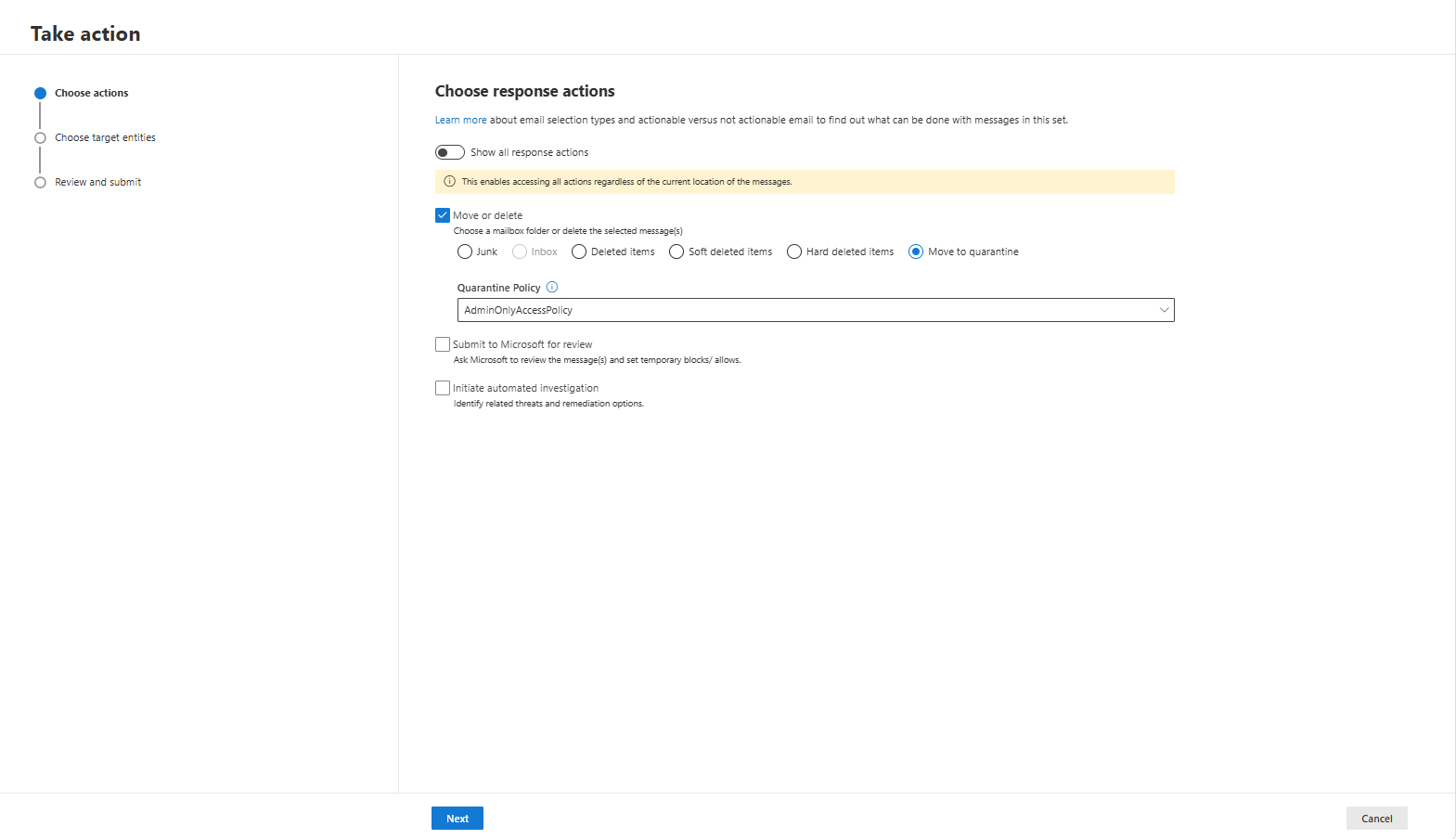
Authorized administrators will see a new Move to Quarantine remediation action.
When an administrator selects Move to Quarantine:
- Selected email messages are removed from user-accessible mailbox locations and placed in Microsoft Defender quarantine.
- Supported source locations include Inbox, Junk Email, Deleted Items, and recoverable soft-deleted locations.
- Admins can select the quarantine policy when using the Move to quarantine action. The selected policy determines how end users can interact with the quarantined messages. By default, quarantined messages are accessible only to admins.
- The remediation action and status are tracked in the Unified Action Center and related investigation experiences.
- Quarantined messages are identified with the quarantine reason Admin triggered.
- Authorized users can preview, release, or permanently delete quarantined messages according to the applicable quarantine policy.
- Releasing a message from quarantine delivers the message to the user's Inbox.
- The Search and Purge role is required to approve remediation actions.
- If one or more messages cannot be moved, eligible messages continue processing and administrators can review the results for partial failures.
Screenshot 1 - Move to Quarantine option in the Take Action wizard:
Screenshot 2 - Admin-triggered message and action details displayed in Advanced Hunting:
The following existing functionality is unchanged:
- Existing remediation actions, including Move to Junk, Move to Deleted Items, Soft delete, and Hard delete
- Threat verdict assignments
- Existing remediation approval workflows and permissions
- Automated Investigation and Response (AIR) actions
- Microsoft Graph API capabilities
- Messages in unsupported locations, including hard-deleted messages and messages hosted in on-premises or external mailboxes
[Action required and recommendations]
No action is required to enable this capability.
We recommend that you:
- Review your organization's quarantine policies.
- Verify that appropriate administrators have the required Search and Purge role.
- Update incident response playbooks and security operations procedures to include Move to Quarantine as a remediation option.
- Update internal training and operational documentation as appropriate.
- Inform security analysts and responders about the new containment action.
Learn more
- (To be updated during rollout) Remediate malicious email that was delivered in Office 365 - Microsoft Defender for Office 365 | Microsoft Learn
[Compliance considerations]
| Question | Answer |
| Does the change alter how existing customer data is processed, stored, or accessed? | Yes. Authorized administrators can move selected email messages from supported user mailbox locations into Microsoft Defender quarantine. |
| Does the change modify how users can access, export, delete, or correct their personal data within Microsoft 365 services? | Yes. Selected messages can be removed from user-accessible mailbox locations. Authorized users can later preview, release, or permanently delete quarantined messages according to the applicable quarantine policy. |
More information
Details
In weekly changes
Services
- Defender
- Defender XDR
- Exchange
Category
- Plan for change
Microsoft tags
- Admin Action
- New Feature
- User Adoption