MC1521617 Updated placement of the Create or upload button in OneDrive for the web
Primary service: OneDrive
ChangePilot summary
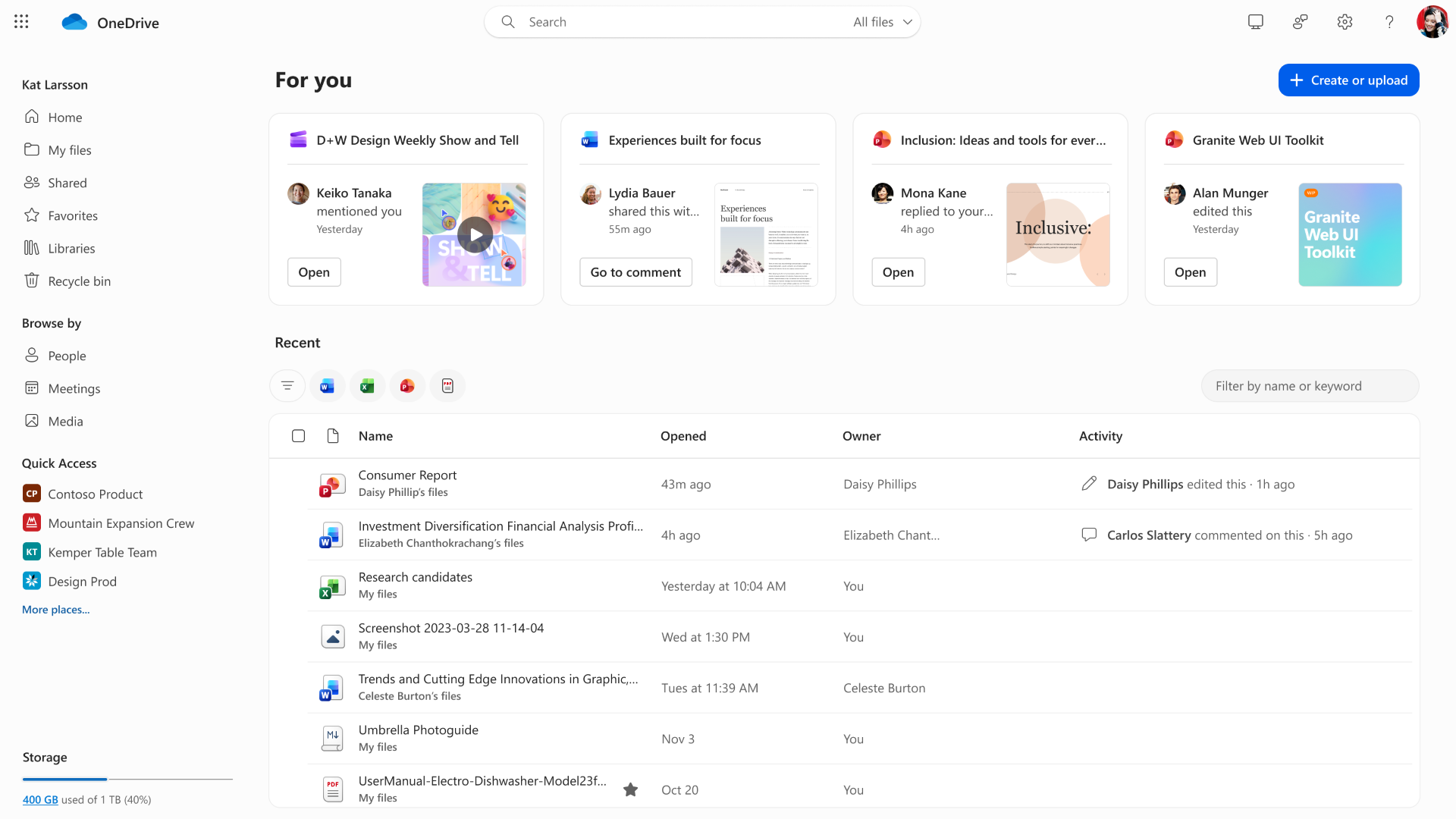
- Microsoft OneDrive for the web is changing the placement of the Create or upload button from the left navigation pane to the top-right area of the page.
- The button will no longer appear in Libraries, Recycle Bin, Meetings, or Media views.
- File, folder creation, and upload capabilities are unchanged; this is a UI/location update only.
- Users may see the change at different times within the same organization.
- No admin configuration is required, but Microsoft recommends updating training and informing help desk/support teams.
What it means for you
What admins need to do
Update internal OneDrive for the web guidance, screenshots, and any training materials that reference the old Create or upload button location. Brief the service desk and support teams so they can answer user questions, but no technical configuration changes are needed.
Impact on users
Users will see the Create or upload button move to the top-right of OneDrive for the web and disappear from some library-related views. The available create and upload options stay the same, so the main impact is that the button will be in a new location.
If you miss it
If this change is not communicated, users may think the button was removed or broken when they cannot find it in the old location. This could increase help desk tickets and slow routine file creation or upload tasks, but there is no service outage or compliance impact.
- Admin controls available
- No
History
Recorded changes
No changes recorded since ChangePilot first saw this post.
Microsoft message
[What and why]
We are updating the Microsoft OneDrive web experience. As part of this update, the Create or upload button will move from the left navigation pane to the right side of the page, aligning the experience with SharePoint document libraries. The Create or upload button will also no longer appear in Libraries, Recycle Bin, Meetings, or Media. The available options for creating files and folders or uploading content will remain unchanged.
Note: Some users may receive this update sooner than others within your organization.
[Rollout schedule]
- General Availability (Worldwide): Rollout will begin in late October 2026 and is expected to complete by early December 2026.
[Impact on your organization]
Who is affected
- Users of Microsoft OneDrive for the web
Platforms and services
- Microsoft OneDrive for the web
What will happen
- The Create or upload button will be moved from the left navigation pane to the right side of the page, and will no longer appear in Libraries, Recycle Bin, Meetings, or Media.
- Options for creating files and folders or uploading content are unaffected by this update.
- Some users may see this change before others within your organization.
Updated button placement
[Action required and recommendations]
No administrative configuration or action is required. We recommend that you update internal training materials that reference the previous Create or upload button placement and inform help desk, support teams, and users who regularly use OneDrive for the web about this change.
[Compliance considerations]
No compliance considerations identified. Review as appropriate for your organization.
Details
In weekly changes
Platforms
- Web
Services
- OneDrive
Category
- Stay informed
Microsoft tags
- Feature Update
- User Adoption