MC1519872 Check Multi-Geo move status using SharePoint Admin Agent
Primary service: SharePoint
ChangePilot summary
- Microsoft is adding a new Microsoft 365 Copilot skill in SharePoint Admin Agent for Multi-Geo environments.
- The skill helps admins identify OneDrive content that needs cross-geo movement after Preferred Data Location changes, monitor cross-geo move progress, and find failed or stalled moves.
- Affected areas include OneDrive, SharePoint sites, and Microsoft 365 Groups involved in Multi-Geo move operations.
- Microsoft says no additional configuration is required, but organizations must have the required Microsoft 365 Copilot and Multi-Geo licenses to use the capability.
What it means for you
What admins need to do
Verify that your tenant has the required Microsoft 365 Copilot and Multi-Geo licensing before relying on this capability. Update internal Multi-Geo operating procedures and train the administrators who manage geo moves on where to find the SharePoint Admin Agent skill and how to use it to review move status and exceptions.
Impact on users
End users should not see a direct change in their day-to-day experience. This capability is for administrators to monitor and troubleshoot Multi-Geo content moves behind the scenes.
If you miss it
If IT does not account for this capability, admins may continue using slower or fragmented methods to track Multi-Geo moves, making it harder to identify content that still needs to be moved or to spot failed and stalled moves. The business impact is mainly reduced operational efficiency and slower issue resolution rather than a direct user-facing outage.
- Admin controls available
- Yes
History
Recorded changes
No changes recorded since ChangePilot first saw this post.
Microsoft message
[What and Why:]
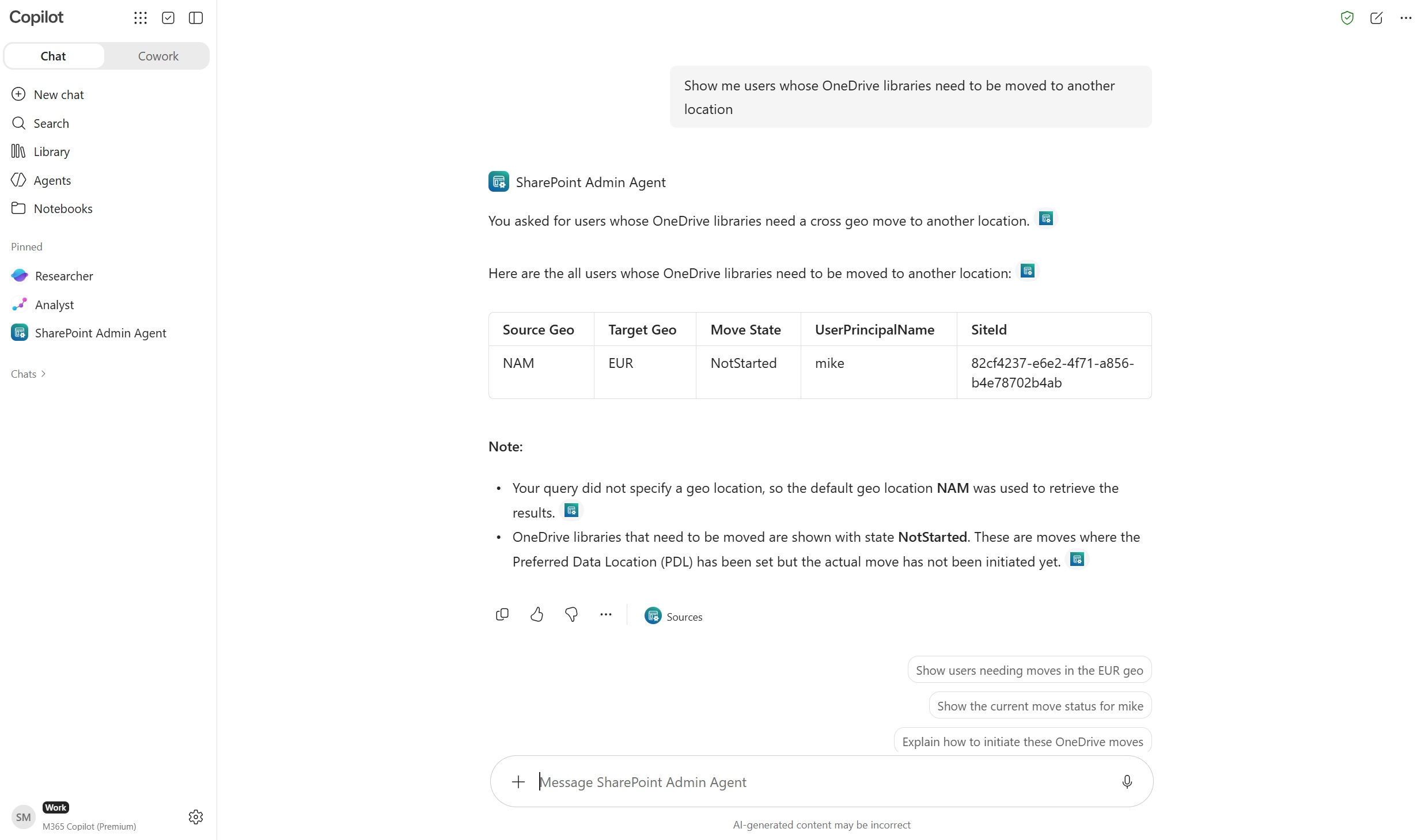
We’re introducing a new Microsoft 365 Copilot skill in the SharePoint Admin Agent that helps identify content requiring a cross-geo move and monitor move progress across OneDrive and SharePoint:
- Identify OneDrives that need to be moved: Find users whose Preferred Data Location was updated but whose OneDrive were not moved to the target Geo.
- Check the status of moves: Track the progress of cross geo OneDrive, SharePoint site, and Microsoft 365 Group moves initiated in the past.
- Identify moves that require attention: Find moves that didn’t complete successfully or have remained in progress for an extended period.
[Rollout Schedule:]
Global: We expect to complete rolling out by mid-October 2026.
[Impact on Your Organization:]
- Improved move visibility: Monitor OneDrive, SharePoint site, and Microsoft 365 Group moves in one place, helping administrators quickly identify content ready to move and moves that require attention.
- Simplified Multi-Geo administration: Track move status across all geographies from a single view in SharePoint Admin Agent, eliminating the need to connect to each geography separately.
[Action Required/Recommendations:]
Ensure your organization has the required Microsoft 365 Copilot and Multi-Geo licenses to use these capabilities. No additional configuration is needed to enable this skill.
[Learn more:]
- SharePoint Admin Agent overview - SharePoint in Microsoft 365 | Microsoft Learn
- Multi-Geo - Identify OneDrive Libraries to move to another geo | Microsoft Learn
- Multi-Geo - Identify cross geo moves that failed | Microsoft Learn
- Multi-Geo - Monitor status of cross geo moves | Microsoft Learn
[Compliance considerations:]
No compliance considerations identified. Review as appropriate for your organization.
More information
- learn.microsoft.com/en-us/sharepoint/content-governance-agent
- learn.microsoft.com/en-us/sharepoint/content-governance-agent#onedrive-libraries-to-move-to-another-geo
- learn.microsoft.com/en-us/sharepoint/content-governance-agent#cross-geo-moves-that-failed
- learn.microsoft.com/en-us/sharepoint/content-governance-agent#status-of-cross-geo-moves
Details
In weekly changes
Services
- M365 Copilot
- OneDrive
- SharePoint
Category
- Stay informed
Microsoft tags
- Admin Action
- New Feature