MC1519866 Phishing detection for messaging
Primary service: Teams
ChangePilot summary
- Microsoft Teams is adding AI-powered, context-aware phishing detection to identify phishing, impersonation, social engineering, and deceptive behavior in chats.
- The feature analyzes conversation context, including cases where there are no malicious links or files, to detect suspicious external first-contact messaging.
- Teams mobile users in China may also receive extra fraud protection for in-tenant conversations.
- No admin configuration is required; Microsoft recommends reviewing user guidance for interacting with unfamiliar contacts and reinforcing reporting of suspicious activity or false positives.
What it means for you
What admins need to do
Review and update internal guidance for Teams chat safety, especially for external first-contact conversations. Prepare helpdesk staff to explain the new phishing warnings and how users should report suspicious messages or false positives. If your organization has users in China on Teams mobile, include the additional fraud-protection behavior in local user communications.
Impact on users
Users may start seeing warnings in Teams when a message appears suspicious or potentially deceptive, even if it does not contain a malicious link or file. In some cases, Teams may quietly evaluate conversations in the background before warnings are shown. Teams mobile users in China may also see extra protection for certain in-tenant chats.
If you miss it
If users are not prepared, they may be surprised by new warning prompts or may ignore legitimate alerts because they do not understand them. The business could also be more exposed to phishing and impersonation attempts if users are not reminded to report suspicious messages. IT impact is limited because no configuration is required, but support calls may increase if users misinterpret the new detection behavior.
- Admin controls available
- No
History
Recorded changes
No changes recorded since ChangePilot first saw this post.
Microsoft message
[What and why]
Microsoft Teams is introducing AI-powered, context-aware phishing detection to help identify phishing, social engineering, impersonation attempts, and deceptive intent. The capability analyzes conversation context to identify suspicious behavior that may not include traditional indicators such as malicious links or files.
[Rollout schedule]
- Targeted Release: Beginning in early November 2026 and expected to complete by mid-November 2026
- General Availability (Worldwide): Beginning in early December 2026 and expected to complete by mid-December 2026
[Impact on your organization]
Who is affected
- For most users, detection focuses on external first-contact chats.
- Teams mobile users in China may also receive additional phishing and fraud protection for in-tenant conversations.
Platforms and services
- Microsoft Teams
What will happen
- Teams will use AI-powered, context-aware detection to identify potential phishing and related suspicious behavior.
- During initial quality validation, detection may run in the background without showing warnings to users.
- After validation, users may see a warning when potential phishing is detected:
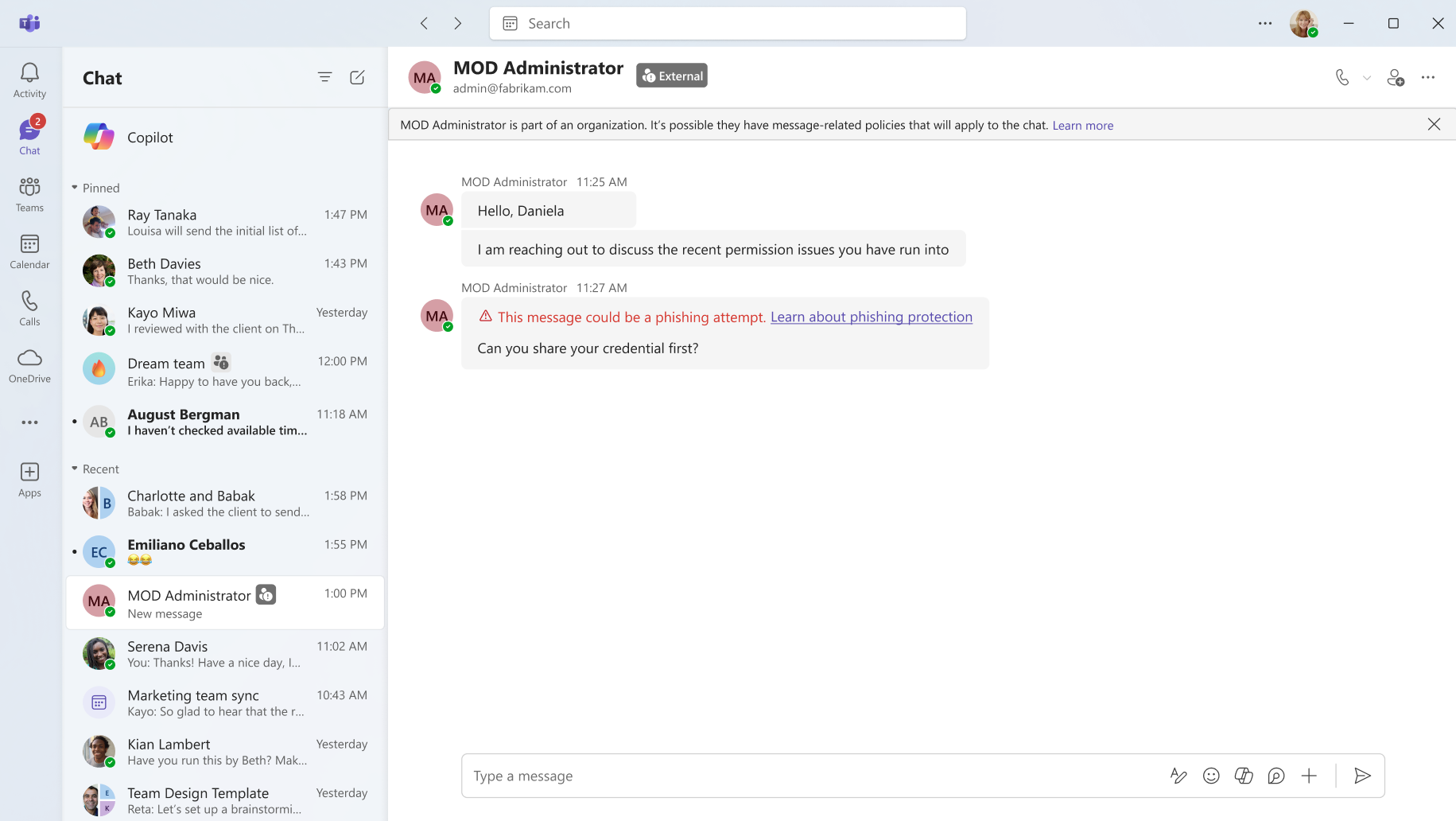
- For Teams mobile users in China, additional protection may also apply to in-tenant conversations to address fraud patterns observed in the region.
- This capability is used only for security protection and not for productivity, summarization, advertising, user monitoring, or other non-security purposes.
- Customer message content is not retained by the detection system for model training or other secondary uses.
- No new admin configuration is required.
[Action required and recommendations]
No admin action is required to enable this protection.
We recommend that admins review organizational guidance for interacting with unfamiliar external contacts and remind users to report suspicious activity or incorrect detections through available Teams reporting experiences.
Learn more
[Compliance considerations]
| Question | Answer |
| Does the change alter how existing customer data is processed, stored, or accessed? | Yes. Teams analyzes conversation context to detect suspicious behavior. The request states that customer message content is not retained by the detection system for model training or other secondary uses. |
| Does the change introduce or significantly modify AI/ML capabilities that interact with customer data? | Yes. The change introduces AI-powered, context-aware detection that analyzes conversation context for phishing, social engineering, impersonation attempts, and deceptive intent. |
More information
Details
In weekly changes
Platforms
- Android
- Desktop
- iOS
- Mac
- Web
Services
- Teams
Category
- Stay informed
Microsoft tags
- Admin Action
- New Feature
- User Adoption