MC1515931 Simplified app enablement experience in Teams admin center
Primary service: Teams
ChangePilot summary
- Microsoft Teams admin center is getting a simplified, guided app enablement flow under Teams apps > Manage apps > Manage access.
- The new experience combines access control, app installation, permission consent review, and allow/block actions into one workflow.
- The flow adapts to the app’s current state and highlights required steps, reducing navigation and effort for admins managing Teams apps and agents.
- Existing tenant app settings do not change automatically; changes are only applied after an admin reviews the configuration and selects Apply.
What it means for you
What admins need to do
Review internal Teams app management documentation and helpdesk guidance so admins know where to use the new guided flow in Teams admin center. No configuration change is required before rollout, but service owners should continue following existing app approval and permission-consent processes.
Impact on users
End users should not see any direct change from this update. The rollout only affects how admins manage app access, installation, and permissions in Teams admin center.
If you miss it
If this message is missed, there is little business risk because existing tenant app settings are not changed automatically and no pre-rollout action is required. The main downside is that admins may be slower to adopt the new guided workflow, and internal documentation or support guidance may be out of date.
- Admin controls available
- Yes
History
Recorded changes
No changes recorded since ChangePilot first saw this post.
Microsoft message
[What and why]
Microsoft is introducing a simplified app enablement experience in Teams admin center. The new guided flow brings together key app management actions, including setting who can access an app, choosing who should have the app installed, reviewing and accepting required permissions, and allowing or blocking the app.
The flow adapts to the app’s current state and highlights steps that require attention, reducing the steps and navigation needed to manage app enablement.
[Rollout schedule]
- General Availability (Worldwide): Beginning in mid-October 2026 and is expected to complete by mid-November 2026
[Impact on your organization]
Who is affected
- Admins who manage agents and apps in Microsoft Teams admin center
Platforms and services
- Microsoft Teams admin center
What will happen
- Admins can use the new guided experience in Teams admin center under Teams apps > Manage apps > Manage access.
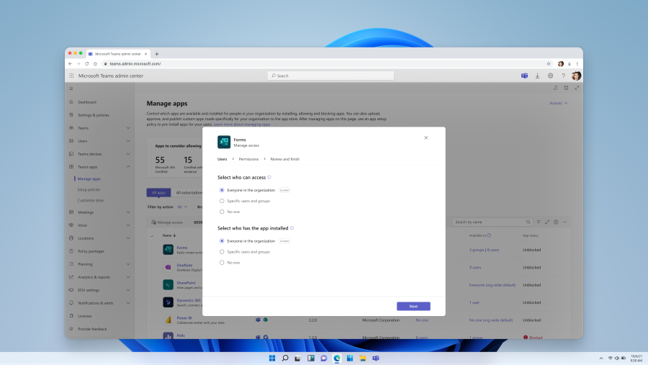
- The experience shows admins the actions needed to control access to the agent in Teams.
- Admins can review app availability, installation, and permission changes before applying them.
Note: Existing tenant app settings will not change as a result of this rollout. Changes are applied only after an admin reviews the configuration and selects Apply.
[Action required and recommendations]
No action is required before this rollout.
We recommend that you:
- Update internal app management documentation or training materials as appropriate.
- Continue to follow your organization's existing processes for app approval and permission consent.
[Compliance considerations]
No compliance considerations identified. Review as appropriate for your organization.
Details
In weekly changes
Platforms
- Web
Services
- Teams
Category
- Stay informed
Microsoft tags
- Admin Action
- New Feature
- User Adoption