MC1509801 Customize file extensions blocked by Weaponizable File Protection
Primary service: Teams
ChangePilot summary
- Microsoft Teams will let admins customize which file extensions are blocked by Weaponizable File Protection, instead of relying only on Microsoft’s default blocked list.
- Organizations can keep using the Microsoft-recommended default list and continue receiving automatic updates to that list.
- If admins choose to customize the list, the tenant will use the customized settings and will no longer automatically inherit Microsoft’s future default-list updates.
- This applies to organizations using Weaponizable File Protection in Teams across supported client platforms.
- No user experience change is expected; files with blocked extensions will continue to be blocked in Teams.
Latest update: Standard start: early December 2026 (previously early November 2026). Standard end: mid-December 2026 (previously mid-November 2026).
What it means for you
What admins need to do
Review whether your organization should keep the Microsoft-recommended blocked file-extension list or customize it based on local security requirements. If you need custom behavior, plan the configuration change in Teams administration and document the chosen extensions and ownership for future review. If you keep the default list, no change is needed, but you may still want to brief the helpdesk and security teams so they understand how blocked-file behavior will work.
Impact on users
End users should not see a change in how Teams handles blocked file types. Files with extensions blocked by Weaponizable File Protection will continue to be blocked as before. If your tenant customizes the list, users may find that different file types are blocked or allowed depending on your organization’s configuration.
If you miss it
If this is missed, the main risk is lost opportunity to tailor blocked file extensions to your organization’s security requirements. Teams will continue using the Microsoft-recommended default list, so there is no immediate service disruption or user-facing break. However, security teams may not be able to align file blocking with internal policy as precisely as intended, and any desired exceptions or additions will not be in place.
- Admin controls available
- Yes
History
Recorded changes
-
- Standard start: early December 2026 (previously early November 2026).
- Standard end: mid-December 2026 (previously mid-November 2026).
Microsoft message
Updated November 2, 2026: We have updated the timeline. Thank you for your patience.
[What and why]
Microsoft Teams is expanding admin controls for Weaponizable File Protection. Admins will be able to customize which file extensions are blocked in Teams based on their organization’s security needs or continue using the Microsoft-recommended default list. This change provides greater flexibility to tailor file protection policies while maintaining a secure collaboration experience.
[Rollout schedule]
- General Availability (Worldwide): Beginning in early December 2026 (previously early November) and expected to complete by mid-December 2026 (previously mid-November)
[Impact on your organization]
Who is affected
- Organizations that use Weaponizable File Protection in Microsoft Teams
Platforms and services
- Microsoft Teams
What will happen
- Before this rollout, Microsoft defines the file extensions blocked by Weaponizable File Protection, and admins cannot customize the list.
- After this rollout, admins can define which file extensions are blocked for their organization or continue using the Microsoft-recommended default list.
- Organizations with Weaponizable File Protection enabled will continue using the Microsoft-recommended list by default.
- Organizations that continue using the Microsoft-recommended list will automatically receive future updates to that list.
- If an admin customizes the list, the organization will use the customized list and will no longer automatically receive future updates to the Microsoft-recommended list.
- The user experience will not change. Files with blocked extensions will continue to be blocked in Teams as they are today.
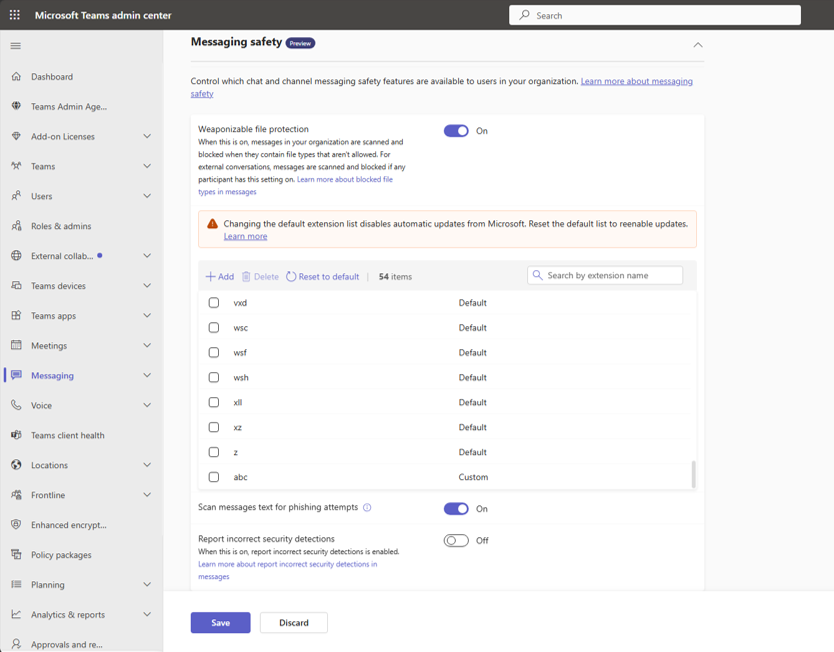
Screenshot 1 Customize file type view:
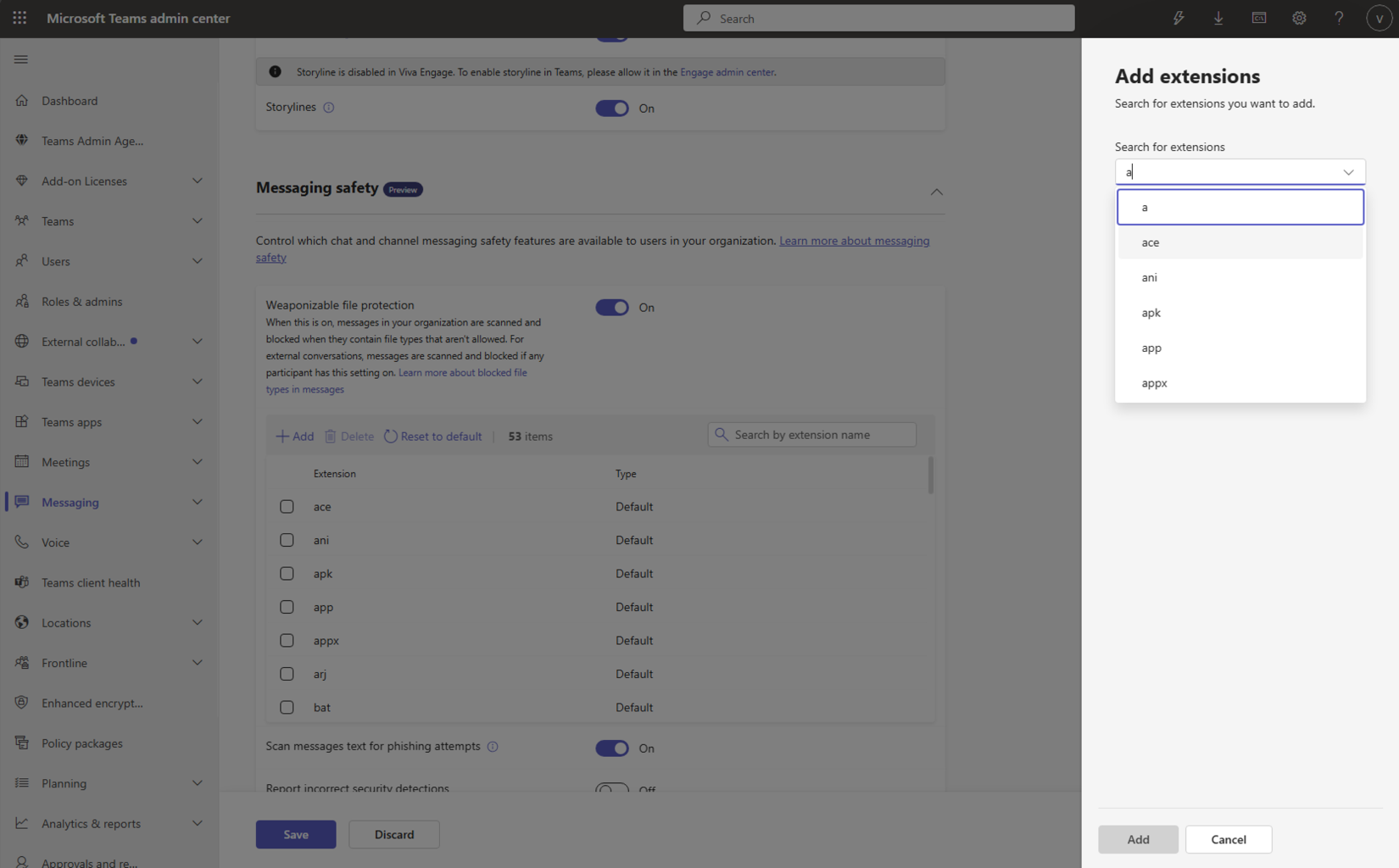
Screenshot 2 Customize file type add view:
[Action required and recommendations]
No action is required. Organizations with Weaponizable File Protection enabled will continue using the Microsoft-recommended list by default.
If your organization wants to customize Weaponizable File Protection:
- Admins can add or remove file extensions based on their organization’s security needs.
- Admins can reset the configuration to the Microsoft-recommended default list at any time to resume receiving automatic updates.
[Compliance considerations]
| Question | Answer |
| Does the change include an admin control? | Yes. Admins will be able to customize the file extensions blocked by Weaponizable File Protection or use the Microsoft-recommended default list. |
Details
In weekly changes
Platforms
- Android
- Desktop
- iOS
- Mac
- Web
Services
- Defender
- Security
- Teams
Category
- Stay informed
Microsoft tags
- Admin Action
- Feature Update
- User Adoption