MC1506735 AI-generated status reports in Planner Agent
Primary service: Planner
ChangePilot summary
- Microsoft Planner Agent will gain AI-generated status reports that summarize plan status, progress, risks, blockers, and next steps using Planner plan data.
- The feature is for organizations with Planner Agent enabled in the Microsoft 365 Copilot app and applies to users with an active Microsoft 365 Copilot license who generate reports.
- Users can customize report audience, tone, length, reporting period, and sections, then review and refine the generated content before sharing or exporting.
- Reports are created only from Planner content the requesting user already has permission to access; existing sharing permissions, Copilot policies, and agent controls still apply.
- Admins should review Planner Agent and Copilot settings, confirm license assignments, and inform support and users; no mandatory configuration change is required.
What it means for you
What admins need to do
Review Planner Agent availability and Copilot agent controls in the Microsoft 365 admin center, and confirm the intended users have active Microsoft 365 Copilot licenses. Prepare support teams and end-user communications for the new report-generation capability, including the requirement for sufficient Planner task data and a plan shared with a Microsoft 365 Group. Update internal guidance and training materials so users know where to access Reports in Planner or through Planner Agent in Copilot.
Impact on users
Licensed Copilot users who have access to Planner Agent will be able to generate AI status reports from their Planner plans, customize the report, review the draft, and export or share it. Users without a Copilot license can view or edit reports, but only licensed users can generate them. The feature uses only Planner content the user already has permission to access.
If you miss it
If IT does not review licensing and agent availability, eligible users may not be able to generate reports or may be surprised when the feature appears in Copilot and Planner. Support teams may receive questions about why report generation is unavailable or why a report can only be created for sufficiently populated, group-shared plans. The business impact is mainly reduced adoption and user confusion rather than a service outage or compliance issue.
- Admin controls available
- Yes
- Licences affected
- Copilot
History
Recorded changes
No changes recorded since ChangePilot first saw this post.
Microsoft message
[What and why]
We are introducing AI-generated status reports in Planner Agent. This feature uses Planner plan data to generate a status report that summarizes overall status, progress, risks, and next steps. Users can customize reports by specifying items such as audience, tone, length, reporting period, and report sections before reviewing and refining the generated content.
[Rollout schedule]
- Public Preview (Worldwide): Rollout has completed.
- General Availability (Worldwide): Rollout begins in late October 2026 and is expected to complete by mid-November 2026.
[Impact on your organization]
Who is affected
- Organizations who have Planner agent enabled as part of the Microsoft 365 Copilot app.
- Within those organizations, users with an active Microsoft 365 Copilot license who use Planner Agent.
- Note: Users who view or edit reports do not require a Microsoft 365 Copilot license; a Copilot license is required only to generate reports.
Platforms and services
- Microsoft Planner
- Microsoft 365 Copilot
What will happen
- Planner Agent will be able to generate AI-powered status reports from Planner plan data within Microsoft 365 Copilot app.
- Reports will be generated only from Planner content that users already have permission to access. Existing Planner sharing permissions, Copilot policies, and agent controls continue to apply.
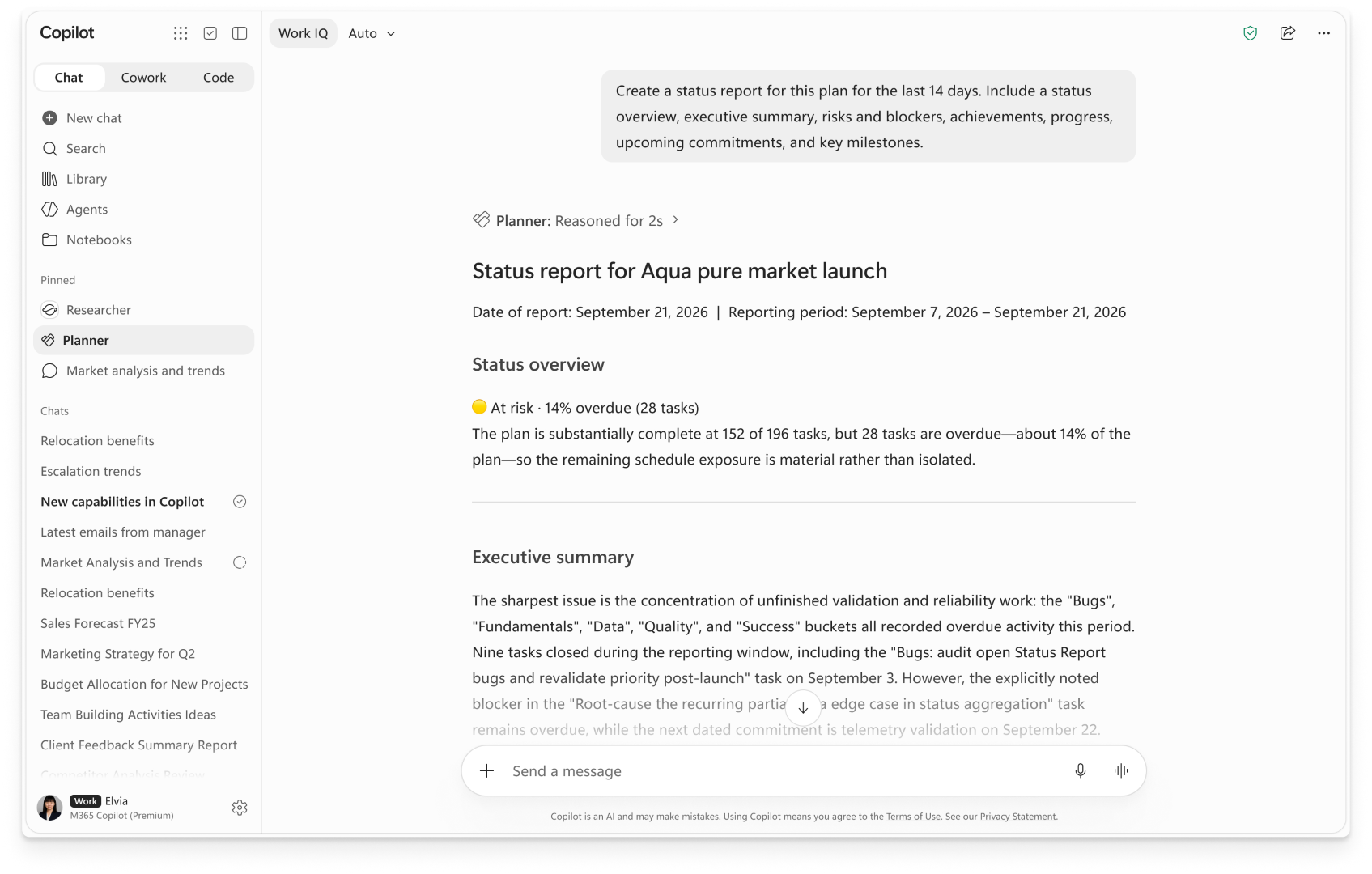
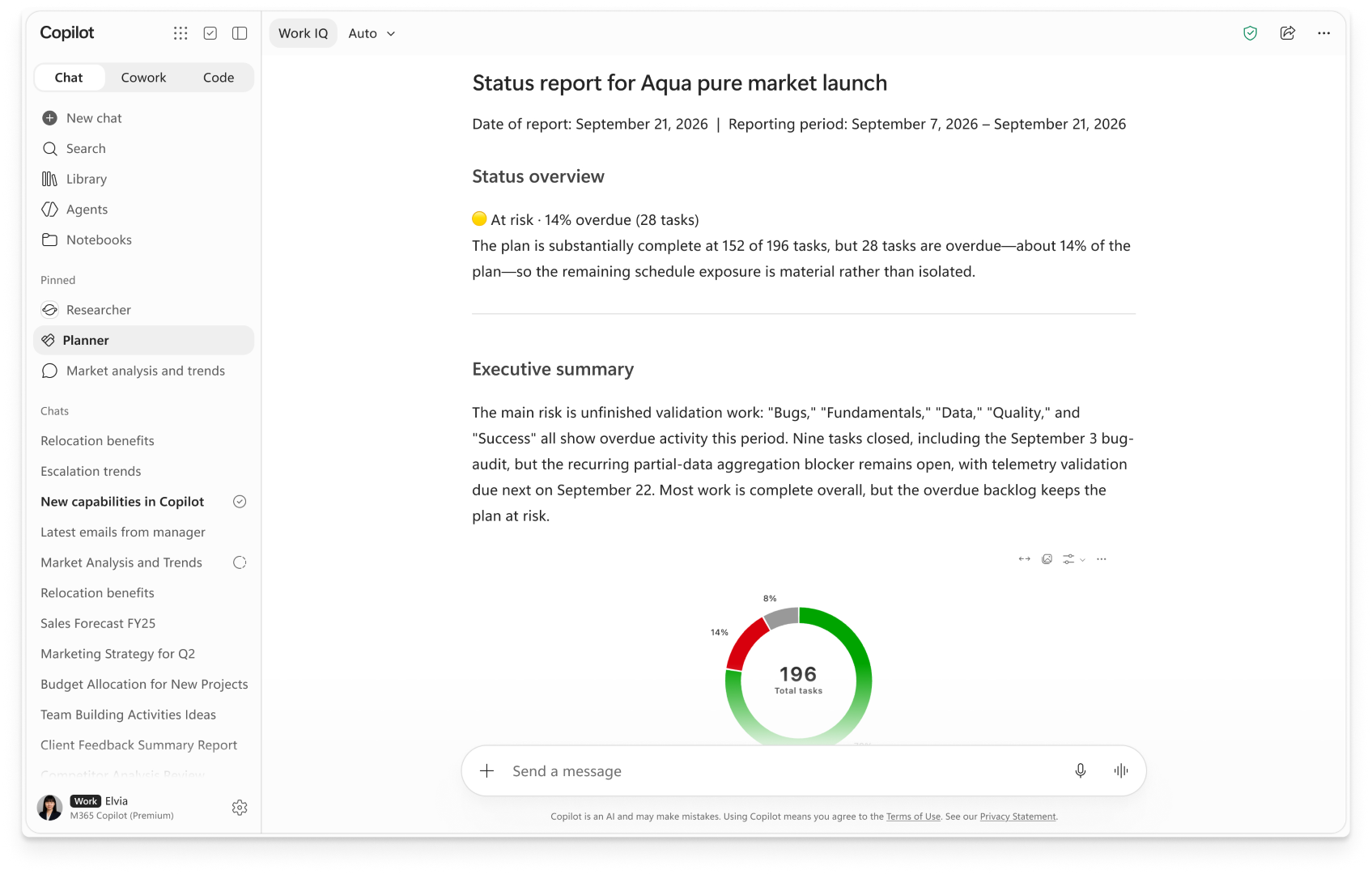
- Reports will synthesize plan information, including tasks, owners, due dates, status, buckets, and recent activity, into sections such as executive summary, progress, risks and blockers, achievements, milestones, and next steps.
- Users can customize reports by reporting period, sections, tone, length, audience, and additional instructions before reviewing and refining the generated content.
- Reports can be exported to a Copilot Page and shared by link or exported to Word and PDF.
- This feature adds new functionality and does not replace existing Planner capabilities.
Copilot-generated status report
[Action required and recommendations]
No action is required. We recommend that you:
- Confirm that intended users have an active Microsoft 365 Copilot license.
- Review Planner Agent and Copilot agent availability and settings in the Microsoft 365 admin center. If needed, the agent can be blocked tenant-wide.
- Inform support teams and users about the new status report generating capability, which can be accessed via the Planner Agent in Copilot or the Reports tab in Planner.
- Note that generating a report requires a plan that is shared with a Microsoft 365 Group and contains sufficient task data.
- Update internal documentation, training, and change management materials as appropriate.
[Compliance considerations]
To assist our customers with identifying compliance concerns, review the questions below and provide details for impact if appropriate:
- Does the change store new customer data?
- [Answer] Yes. A status report generated from your plan appears in the Microsoft 365 Copilot conversation. If a user chooses to export it, the report is also saved as a copilot page or a word document.
- Does the change alter how existing customer data is processed, stored, or accessed (e.g., documents, emails, chats, etc.)?
- [Answer] Yes. When an authorized user requests a report, Planner Agent uses information from a plan they can access to create a status report. If the user attaches a file as a template, that file will also be used for the request. This change does not edit the source plan or its tasks.
- Does the change introduce or significantly modify AI/ML or agent capabilities that interact with or provide access to customer data?
- [Answer] Yes. It adds the ability to generate and refine a status report through Planner Agent chat using accessible plan information. It does not grant the agent access to plans the requesting user cannot access.
Details
In weekly changes
Platforms
- Desktop
- Web
Services
- M365 Copilot
- Planner
Category
- Stay informed
Microsoft tags
- Admin Action
- Feature Update
- New Feature
- User Adoption