MC1492159 Microsoft 365 Copilot in PowerPoint: 'Clarify my thinking' skill for Mac
Primary service: M365 Copilot
ChangePilot summary
- Microsoft 365 Copilot in PowerPoint on Mac is gaining the built-in "Clarify my thinking" skill, formerly known as "GrillMe."
- The feature lets Copilot analyze presentation content and provide feedback to help users refine ideas, messaging, and presentation clarity.
- Affected users are those with Microsoft 365 Copilot access in PowerPoint on Mac; this is part of the existing Copilot experience.
- No admin action is required, but IT may want to notify users and update Copilot training or guidance materials.
What it means for you
What admins need to do
No configuration changes are needed. IT should update internal Copilot guidance and helpdesk awareness content, and optionally brief users who have Microsoft 365 Copilot in PowerPoint on Mac so they know the new skill is available and what it is for.
Impact on users
Users with Microsoft 365 Copilot in PowerPoint on Mac will see a new "Clarify my thinking" skill in Copilot. They can use it to ask for feedback that helps sharpen ideas, improve messaging, and make presentations clearer before sharing or presenting.
If you miss it
If IT does nothing, the feature will still appear for eligible users with no service disruption. The main impact is that users may be surprised by the new Copilot option and may miss an opportunity to use it effectively if they are not informed or trained.
- Admin controls available
- Yes
History
Recorded changes
No changes recorded since ChangePilot first saw this post.
Microsoft message
[What and Why:]
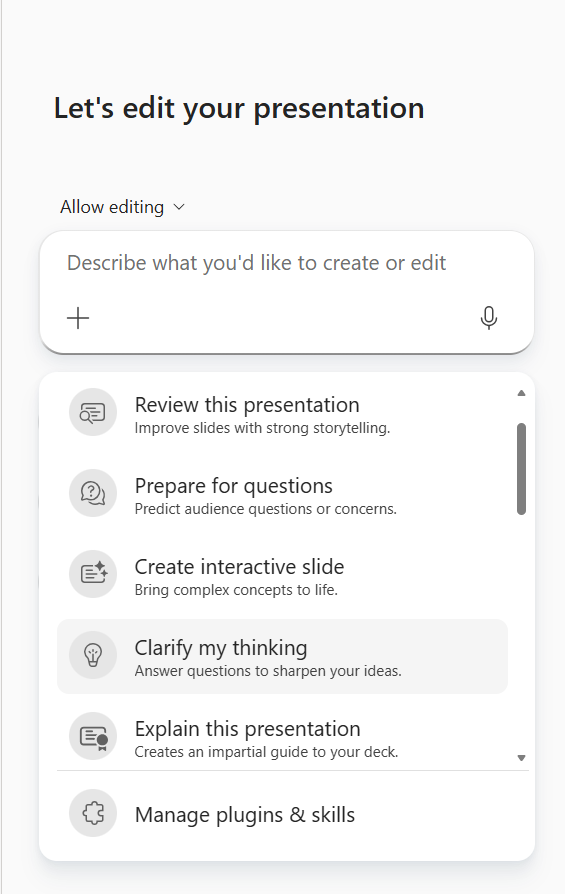
Microsoft 365 Copilot in PowerPoint is introducing the built-in Clarify my thinking skill for PowerPoint on Mac. This skill was previously referred to as “GrillMe” and has been renamed to use more customer-friendly wording.
With this skill, users can ask Copilot to answer questions that help sharpen their ideas and improve their presentation before sharing or presenting. This can help users refine messaging, clarify points, and strengthen the overall quality of a presentation.
[Rollout Schedule:]
General Availability (Worldwide): Rollout begins on October 8, 2026.
[Impact on Your Organization:]
Who is affected:
- Users with access to Microsoft 365 Copilot in PowerPoint on Mac.
- Organizations that use Copilot in PowerPoint to draft, refine, or review presentation content.
Platforms/Services:
- Microsoft 365 Copilot
- Microsoft PowerPoint on Mac
What will happen:
- Users will see the built-in Clarify my thinking skill in Copilot for PowerPoint.
- The skill helps users answer questions designed to sharpen ideas and improve presentation clarity.
- The feature is enabled as part of the existing Microsoft 365 Copilot in PowerPoint experience.
- Existing Microsoft 365 Copilot admin controls and licensing requirements continue to apply.
[Action Required/Recommendations:]
No admin action is required before rollout.
You may want to inform users that the Clarify my thinking skill is becoming available in Copilot for PowerPoint and update any internal Copilot guidance or training materials as appropriate.
[Compliance considerations:]
- Does the change introduce or significantly modify AI/ML or agent capabilities that interact with or provide access to customer data? Yes. The Clarify my thinking skill uses Microsoft 365 Copilot in PowerPoint to analyze presentation content and generate feedback.
- Does the change provide end users any new way of interacting with generative AI? Yes. The skill gives users a new prompt-based way to request presentation feedback from Copilot in PowerPoint.
Details
In weekly changes
Platforms
- Mac
Services
- M365 Apps
- M365 Copilot
- Mac
- PowerPoint
Category
- Stay informed
Microsoft tags
- New Feature
- User Adoption