MC1490905 Post-delivery protection for malicious QR codes in Microsoft Teams
Primary service: Defender XDR
ChangePilot summary
- Microsoft Defender for Office 365 is extending Teams URL protection to analyze URLs extracted from QR codes after message delivery and respond to malicious content.
- The update affects Microsoft Teams organizations that use Defender for Office 365, especially security operations teams that investigate threats in Defender XDR Advanced Hunting.
- Detected QR-code URLs will be surfaced in Advanced Hunting via the MessageUrlInfo table, with UrlLocation marked as QRCode.
- For eligible Teams messages, users may see warnings, and organizations with Teams ZAP enabled may have some malicious internal messages blocked through post-delivery protection.
- No separate end-user configuration is required, but Microsoft recommends reviewing Teams protection settings, ZAP configuration, and hunting/investigation workflows.
What it means for you
What admins need to do
Review current Microsoft Defender for Office 365 Teams URL protection and Teams ZAP settings to confirm how malicious QR-code links will be handled in your tenant. Brief security operations teams on the new MessageUrlInfo/UrlLocation=QRCode hunting signal and update investigation playbooks, alert triage, and threat-hunting queries as needed. If you rely on user awareness processes, update helpdesk guidance and internal security communications so users know Teams may warn on QR-code-based links.
Impact on users
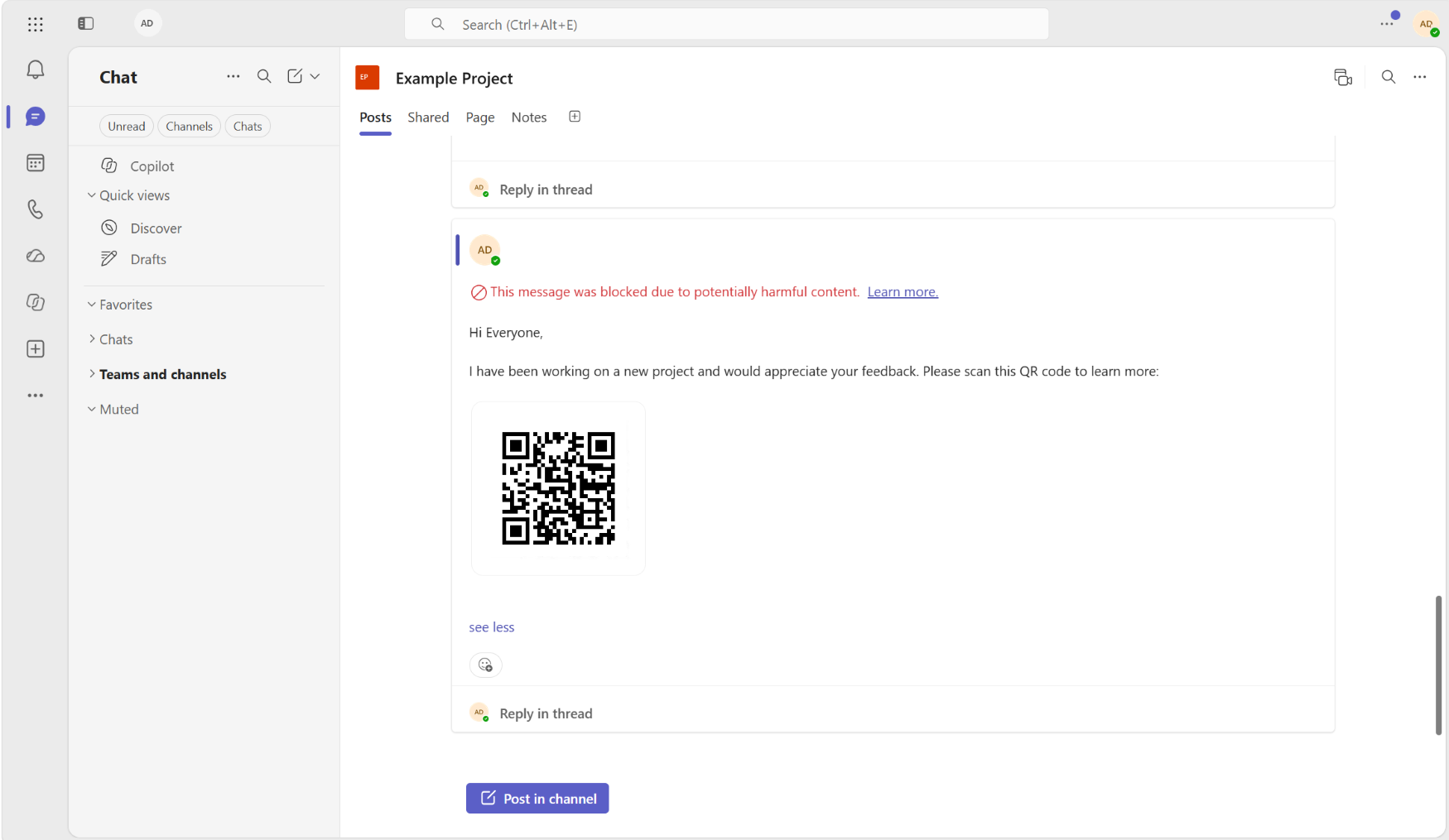
Users in Teams may see warning banners on messages that contain QR codes leading to malicious URLs. In organizations with Teams ZAP enabled, some malicious internal messages may be removed or blocked after delivery. Otherwise, the feature runs automatically and does not require any user configuration.
If you miss it
If IT does not review the new protection and hunting signals, the organization may miss or respond slowly to malicious QR-code attacks in Teams. Security teams could overlook detections in Advanced Hunting, reducing visibility during investigations and potentially allowing users to interact with harmful links before response actions occur. If ZAP settings are not understood, admins may also be uncertain about how internal messages are treated.
- Admin controls available
- Yes
History
Recorded changes
No changes recorded since ChangePilot first saw this post.
Microsoft message
[What and why]
We're extending Microsoft Teams URL protection in Microsoft Defender for Office 365 to detect and respond to malicious URLs embedded in QR codes. As attackers increasingly use QR codes to conceal malicious destinations, this update helps protect users by analyzing URLs extracted from QR codes after message delivery and applying post-delivery protections when malicious content is identified.
For organizations using Microsoft Defender for Office 365, this enhancement builds on existing Teams URL protection capabilities and improves visibility for security operations teams investigating QR-code-based threats. Security teams will also be able to identify QR code URL detections in Advanced Hunting through the MessageUrlInfo table.
[Rollout schedule]
- General Availability (Worldwide): Beginning in early October 2026 and expected to complete by early November 2026
[Impact on your organization]
Who is affected
- Organizations using Microsoft Teams with Microsoft Defender for Office 365
- Organizations using Microsoft Teams
- Organizations licensed for Microsoft Defender for Office 365
- Security operations teams that use Microsoft Defender XDR Advanced Hunting
- Organizations that have Zero-hour Auto Purge (ZAP) for Teams enabled can receive additional protection for eligible internal messages
Platforms and services
- Microsoft Teams
- Microsoft Defender for Office 365
- Microsoft Defender XDR Advanced Hunting
What will happen
- Teams messages containing QR codes will be analyzed after message delivery.
- URLs extracted from QR codes will be evaluated for malicious content.
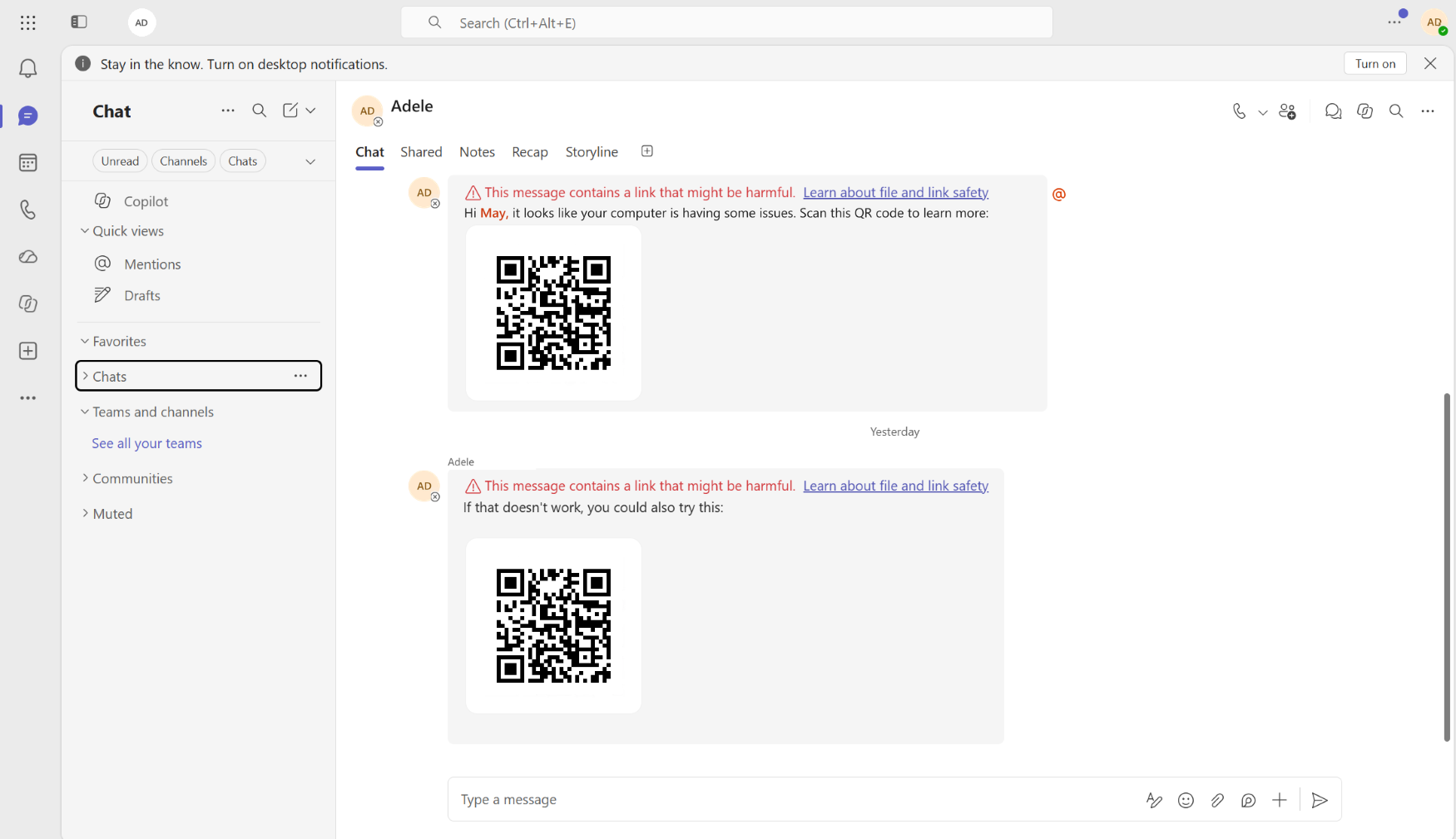
- When a malicious URL is identified in an external conversation, users will see a warning on the affected Teams message.
- When a malicious URL is identified in an internal conversation, users will see a warning on the affected Teams message.
- Organizations with Microsoft Defender for Office 365 Plan 1 or Plan 2 and Teams ZAP enabled may have eligible malicious internal messages blocked through existing post-delivery protection mechanisms.
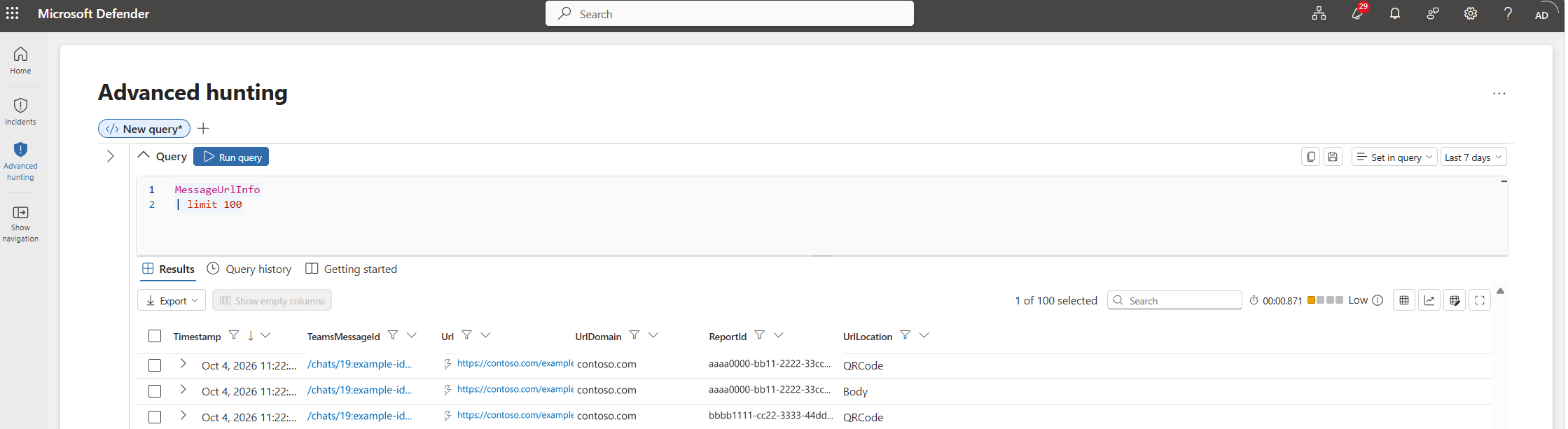
- Security teams will gain visibility into QR code URL detections through Advanced Hunting.
- URLs extracted from QR codes will appear with QRCode in the UrlLocation column of the MessageUrlInfo table.
- The feature is enabled as part of existing Teams URL protection capabilities. No separate end-user configuration is required.
Screenshot 1 - QR-code-blocking:
Screenshot 2 - QR-warning-protection:
Screenshot 3 - QR-Code Advanced Hunting:
[Action required and recommendations]
No action is required.
We recommend that administrators:
- Review existing Microsoft Defender for Office 365 Teams protection settings and Teams ZAP configuration to understand how blocking behavior applies in your organization.
- Inform security operations teams that QR code URL detections will become available in Advanced Hunting.
- Review your incident investigation and threat hunting processes to incorporate QR code detections where applicable.
Learn more
- Configure ZAP for Teams protection in Defender for Office 365 - Microsoft Defender for Office 365 | Microsoft Learn
- Zero-hour auto purge (ZAP) in Microsoft Teams - Zero-hour auto purge (ZAP) in Microsoft Defender for Office 365 - Microsoft Defender for Office 365 | Microsoft Learn
[Compliance considerations]
No compliance considerations identified, review as appropriate for your organization.
More information
Details
In weekly changes
Services
- Defender XDR
- Security
- Teams
Category
- Stay informed
Microsoft tags
- Admin Action
- Feature Update
- User Adoption