MC1489931 Activity Logs
Primary service: Backup
ChangePilot summary
- Microsoft 365 Backup is gaining built-in activity logs for administrators to monitor backup policy changes and restore activity from within the product.
- Logs will show key metadata such as service, activity type, status, impact, task details, timestamps, and the admin who performed the action.
- Administrators can filter, search, and export activity logs to CSV for reporting, offline review, and compliance workflows.
- Access to logs is role-based, so admins will only see workloads they are authorized to manage.
- No action is required, but backup administrators should be informed that monitoring is now available in the Microsoft 365 Backup experience.
What it means for you
What admins need to do
Notify Microsoft 365 Backup administrators that activity logs will be available directly in the product and update any internal runbooks or support guidance to include the Recent activities page. If you use backup audit evidence or operational reporting, evaluate whether the new CSV export meets your needs and whether existing monitoring processes should be adjusted.
Impact on users
End users should not see any direct change in their day-to-day experience. The update is aimed at administrators managing Microsoft 365 Backup and its restore/policy operations.
If you miss it
If this update is missed, administrators may simply continue using their existing monitoring approach and could overlook a new built-in way to review backup and restore activity. There is no expected service disruption or compliance risk, but IT teams may miss an opportunity to improve visibility, troubleshooting, and audit reporting within Microsoft 365 Backup.
- Admin controls available
- Yes
History
Recorded changes
No changes recorded since ChangePilot first saw this post.
Microsoft message
[What and why]
We're introducing activity logs in Microsoft 365 Backup to help administrators monitor backup policy and restore activities directly within the product. Activity logs provide greater visibility into configuration changes, restore progress, failures, and operational status without requiring administrators to leave the Microsoft 365 Backup experience.
[Rollout schedule]
- General Availability (Worldwide): Rollout begins in mid-October 2026 and is expected to complete by mid-October 2026.
[Impact on your organization]
Who is affected
- Administrators who manage Microsoft 365 Backup
Platforms and services
- Microsoft 365 Backup
- SharePoint Online
- OneDrive
- Exchange Online
What will happen
- Activity logs will be available for Microsoft 365 Backup actions across supported workloads, including SharePoint Online, OneDrive, and Exchange Online.
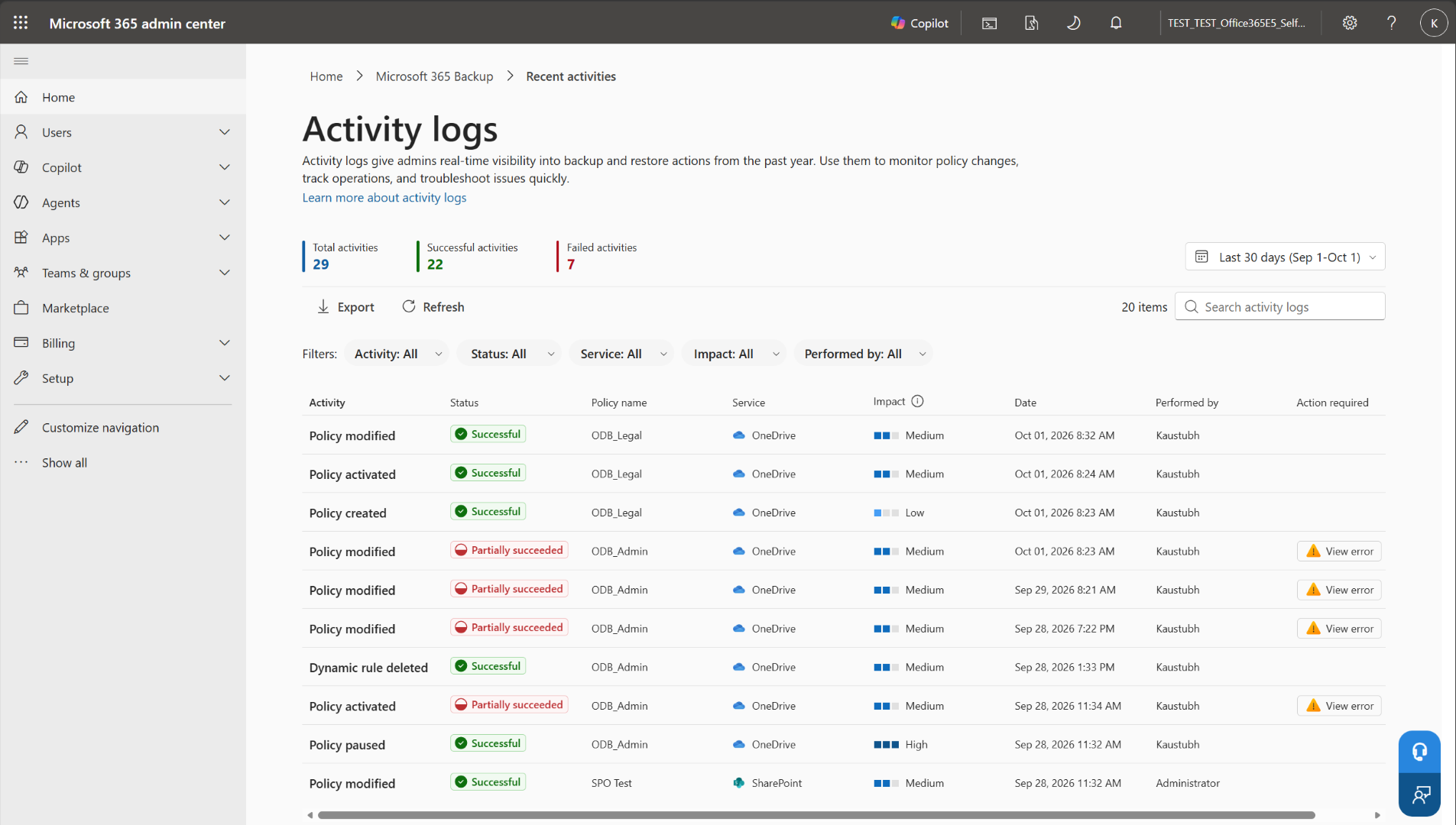
- Activity log entries will include metadata such as service, activity type, status, impact, policy or restore task details, timestamps, and the administrator who performed the action.
- Administrators will be able to:
- Filter logs by service, activity type, activity status, impact, and date range.
- Search activity logs using free text.
- Export filtered or searched logs to CSV for offline review, reporting, and compliance workflows.
- Role-based access controls will apply. Administrators will only be able to view logs for workloads they are authorized to manage.
- To access this feature:
1. Go to the Microsoft 365 admin center.
2. Open Microsoft 365 Backup.
3. Select Recent activities to open the Activity logs page.
4. Use the date selector, search, or filters to review activity. Select Export to download the current result.
Activity logs in the Microsoft 365 admin center
[Action required and recommendations]
No action is required. We recommend that you inform your backup administrators that activity monitoring for Microsoft 365 Backup will be available directly within the product.
[Learn more]
We will update this post with new documentation.
[Compliance considerations]
No compliance considerations identified. Review as appropriate for your organization.
Details
In weekly changes
Platforms
- Web
Services
- Backup
- Exchange
- OneDrive
- SharePoint
Category
- Stay informed
Microsoft tags
- Feature Update
- New Feature
- User Adoption