MC1489646 Microsoft Sales Agent: Lead summary for lead records
Primary service: Dynamics
ChangePilot summary
- Microsoft is adding Lead Summary in Microsoft Sales Agent and a lead summary insight banner in Dynamics 365 to generate concise, AI-grounded overviews of lead records from CRM data.
- The feature affects organizations using Microsoft Sales Agent with supported CRM data sources, along with sales administrators and sellers working lead records in Sales Agent or Dynamics 365.
- Administrators can customize summary content, format, instructions, and which CRM data sources are included, including whether notes and engagement data are used.
- Microsoft states no action is required before rollout, but recommends reviewing the AI instructions and ensuring lead data is current to improve summary quality.
What it means for you
What admins need to do
Review the Lead Summary custom AI instructions in Sales Agent settings and decide whether to tailor the summary format, included CRM fields, and inclusion of notes/engagement data to match your sales process. Confirm lead records and related CRM data are being maintained well, and brief sales users/helpdesk on what the new summary banner and lead summary request experience will do.
Impact on users
Sellers will be able to ask for an AI-generated summary of a lead and view it in Sales Agent or the Dynamics 365 lead summary banner. The summary will help them understand lead context faster, but the quality of the output depends on the data available in CRM and how your organization configures the summary instructions.
If you miss it
If IT does nothing, the feature will still appear and users will be able to use it, but the summaries may not reflect your preferred sales process or may be less useful if CRM data is incomplete. That can lead to inconsistent seller experiences, more manual review of lead records, and missed opportunities to optimize the AI output for your organization.
- Admin controls available
- Yes
History
Recorded changes
No changes recorded since ChangePilot first saw this post.
Microsoft message
[What and why]
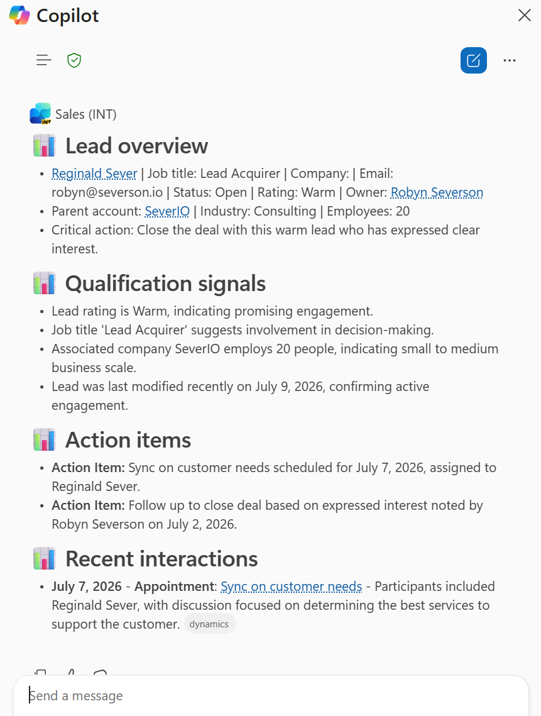
We're introducing Lead Summary in Microsoft Sales Agent and the lead summary insight banner in Dynamics 365. Lead Summary helps sellers quickly understand lead context by generating a concise overview from CRM data and related lead information.
This feature helps improve seller productivity by reducing the time spent reviewing CRM records and related activities before engaging customers. Organizations can customize the content and format of summaries to align with their sales processes and business priorities.
[Rollout schedule]
General Availability (Worldwide): Available now
[Impact on your organization]
Who is affected
- Organizations using Microsoft Sales Agent with supported CRM data sources
- Sales administrators who manage Sales Agent settings
- Sellers who work with lead records in Sales Agent or Dynamics 365
Platforms and services
- Microsoft Sales Agent
- Microsoft Dynamics 365
What will happen
- Sellers will be able to request a summary of a lead within Sales Agent.
- Sales Agent will generate grounded lead summaries based on available CRM data.
- Sellers will be able to view lead summaries directly in the lead summary insight banner within Dynamics 365.
- Summaries may include lead details, company information, lead source, qualification status, activities, notes, engagement information, and other relevant CRM data.
- Administrators can customize the summary format, summary instructions, CRM data included in summaries, and whether notes and engagement-related data are included through Sales Agent settings' Custom AI instructions.
- The quality and completeness of summaries will depend on the CRM data available for each lead and the organization's configured summary instructions.
[Action required and recommendations]
No action is required before rollout.
We recommend that administrators:
- Review and customize the Lead Summary experience within Sales Agent settings' Custom AI instructions to align summaries with organizational sales processes and business priorities.
- Ensure lead records, activities, and related CRM data are maintained and up to date to improve summary quality.
- Communicate the availability of this feature to sellers who work with lead records.
Learn more
[Compliance considerations]
| Question | Answer |
| Does the change store new customer data? | Yes. The feature information provided states that data is stored in Dataverse. The request does not indicate any additional storage location beyond existing service storage. |
| Does the change alter how existing customer data is processed, stored, or accessed? | Yes. CRM data, notes, activities, engagement information, and related lead data are processed to generate lead summaries and are surfaced to users through Sales Agent and Dynamics 365 experiences. |
| Does the change introduce or significantly modify AI/ML or agent capabilities that interact with customer data? | Yes. Lead Summary uses generative AI to create grounded summaries from CRM data and related lead information. |
| Does the change provide end users a new way of interacting with generative AI? | Yes. Sellers can request lead summaries through Sales Agent and receive AI-generated responses based on CRM data. |
| Does the change include an admin control? | Yes. Administrators can customize summary content, summary instructions, included CRM data, summary format, and whether notes and engagement-related data are used. Administrative controls are available through Admin UI controls. |
More information
Details
In weekly changes
Services
- Dataverse
- Dynamics
- M365 Copilot
Category
- Stay informed
Microsoft tags
- Admin Action
- New Feature
- User Adoption