MC1486291 new guided Copilot onboarding experience
Primary service: M365 Copilot
ChangePilot summary
- Microsoft is introducing an optional, admin-led Microsoft 365 Copilot onboarding experience for Frontier participants to help users learn Copilot through guided, role-based activities.
- The experience is enabled in the Microsoft 365 admin center and can be shared with users via email template or deep link; it launches in the Copilot app or on the web depending on the admin-selected destination.
- The onboarding is personalized by role, work context, Copilot familiarity, and license assignment, and includes a Starter journey and a Premium journey for Copilot Premium licensed users.
- Reporting for onboarding completion is available through Viva Learning for admins with the appropriate role.
- Microsoft states this does not replace or retire existing Copilot functionality and is disabled by default.
Latest update: Post updated as a reminder.
What it means for you
What admins need to do
Review whether your organization wants to use the Copilot onboarding experience for Frontier users, then enable it in Copilot settings if desired. Confirm Learning Agent and Microsoft 365 Copilot are available for the intended users, decide whether to include your AI policy in the onboarding flow, and prepare the email template or deep link for sharing. If you want completion reporting, ensure the appropriate admins can access Viva Learning reporting and brief the helpdesk on the new onboarding path.
Impact on users
If enabled by your admins, users will see a guided Copilot onboarding flow that takes about 5 to 10 minutes and presents role-based examples and activities. They may be prompted for some information in the Starter journey, and Copilot users with Premium licenses will see a richer Premium journey. If IT does not enable it, nothing changes for users.
If you miss it
If IT misses this message and wants to use the feature, the onboarding experience will remain disabled and users will not receive the guided Copilot introduction. That is low risk operationally, but it could reduce Copilot adoption and leave admins unprepared to share the experience or review completion reporting when they do want to roll it out.
- Admin controls available
- Yes
- Licences affected
- Copilot
History
Recorded changes
- Post updated as a reminder.
- Frontier end: late November 2026 (previously early November 2026).
Microsoft message
Updated November 18, 2026: We have updated this post as a reminder. Thank you for your patience.
[What and why]
To help organizations increase Microsoft 365 Copilot adoption and build user confidence, we are introducing a new admin-led Copilot onboarding experience for Frontier participants. This guided, in-product experience helps users learn how to use Copilot through role-based activities within the Copilot app. The experience is tailored to the user’s familiarity with Copilot and their license assignment, helping users build confidence through relevant, guided examples while giving organizations control over how onboarding is introduced. This supports Personal and Team Productivity by helping users learn how to use Copilot effectively in their daily work.
[Rollout schedule]
- Frontier (Worldwide): Rollout begins in late October 2026 and is expected to complete by late November 2026 (previously early November).
[Impact on your organization]
Who is affected
- Microsoft 365 admins participating in the Frontier program who want to provide guided Copilot onboarding to their users.
- Users for whom the onboarding experience has been enabled and shared.
Platforms and services
- Microsoft 365 admin center
- Microsoft 365 Copilot
- Learning Agent
- Viva Learning (reporting)
What will happen
- This is a new, optional onboarding experience that does not change, replace, or retire existing Microsoft 365 Copilot functionality.
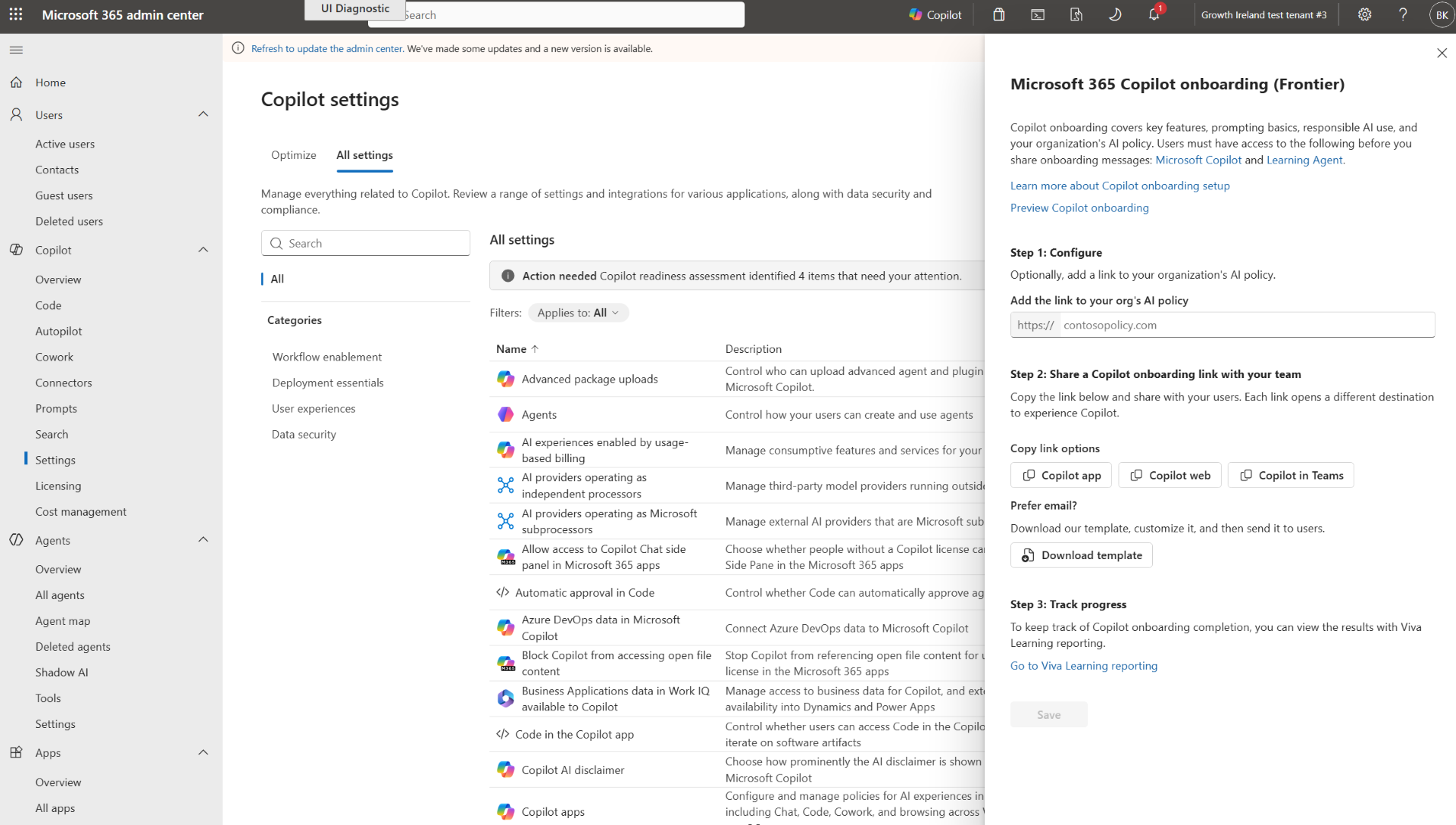
- The experience is disabled by default and must be enabled by an admin with the Global Administrator, Knowledge Administrator, or AI Administrator role. Admins can enable the experience in the Microsoft 365 admin center under Copilot settings > Microsoft 365 Copilot onboarding and include their organization's AI policy as part of the onboarding experience.
- After enabling onboarding, admins can share the experience with users by using the provided email template or onboarding deep link. When users open the onboarding deep link, the Copilot app launches in the preferred destination set by the admin that shared the experience, such as the Copilot app for Windows, Copilot on the web, or Copilot in Teams.
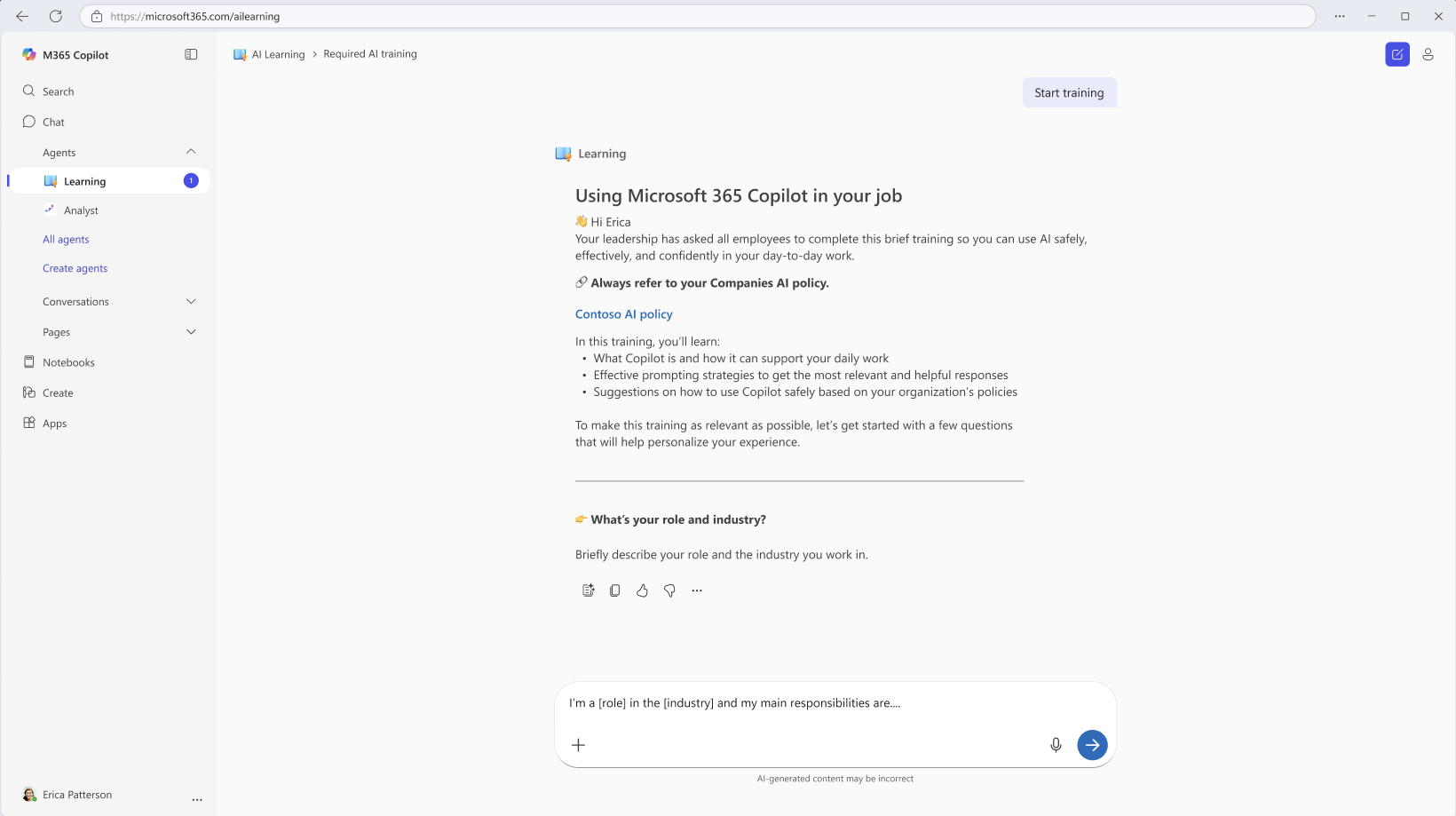
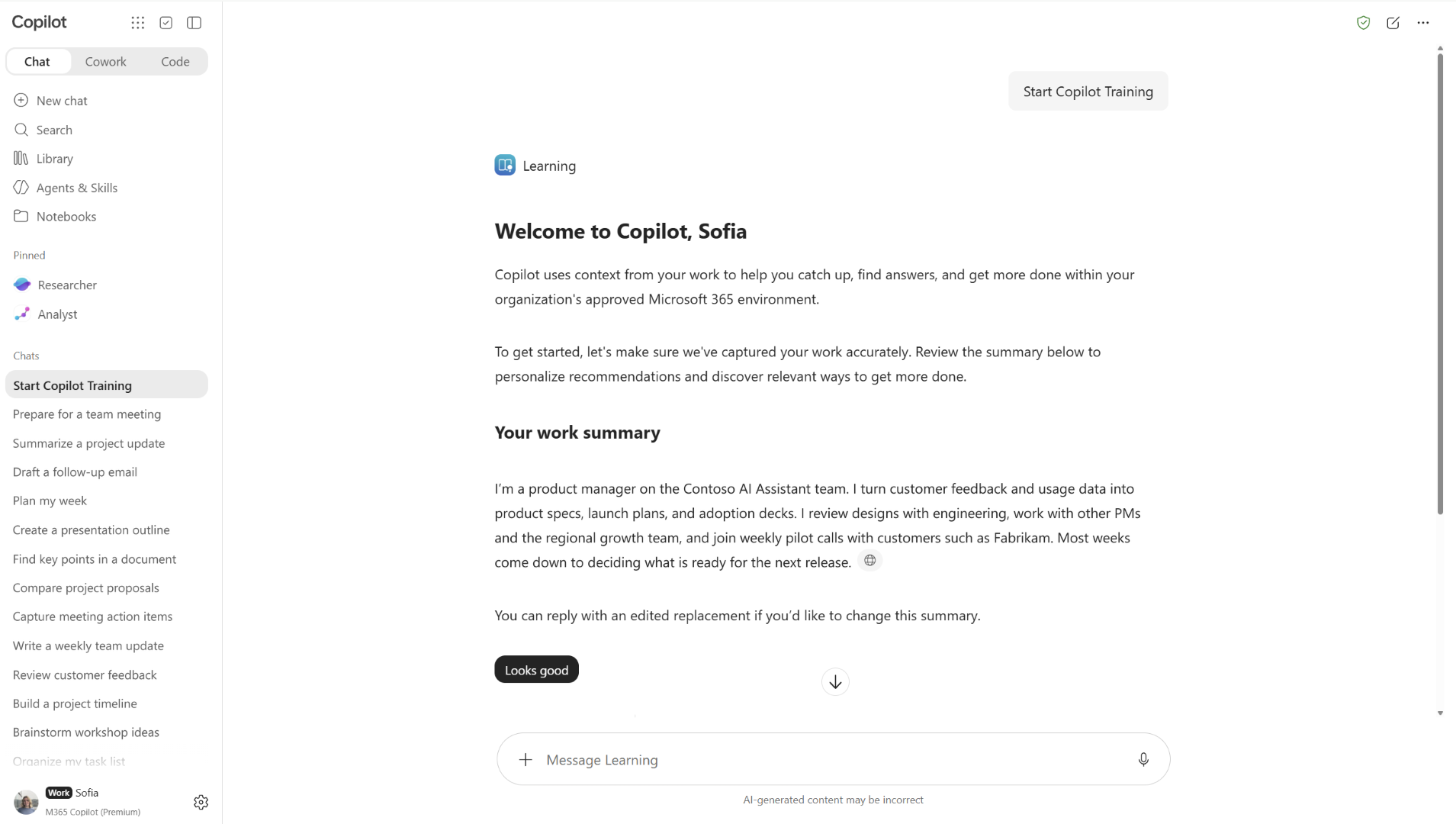
- Learning Agent automatically starts the onboarding experience, which takes approximately 5 to 10 minutes to complete, and is personalized based on the user's role, work context, familiarity with Copilot, and license assignment.
- The Starter journey collects information from the user to personalize the onboarding experience.
- The Premium journey uses available work and role context to provide relevant examples of how the user can apply Copilot to their work. This journey is only available to users with a Copilot Premium license.
- If desired, admins with the Global Administrator or Knowledge Administrator role can access and use Viva Learning reporting to review onboarding completion.
Starter journey Copilot onboarding experience
Premium journey Copilot onboarding experience
Microsoft 365 admin center Copilot onboarding flyout menu
[Action required and recommendations]
No action is required unless you want to enable Microsoft 365 Copilot onboarding for your organization during the Frontier rollout. If you plan to use the experience:
- Ensure Learning Agent and Microsoft 365 Copilot are enabled for targeted users who will participate in the onboarding experience.
- In the Microsoft 365 admin center, go to Copilot settings > Microsoft 365 Copilot onboarding and enable the experience.
- Review your organization's AI policy and determine whether you want to include it in the onboarding experience.
- Share the onboarding experience with users by using the provided email template or onboarding deep link. We recommend that you share the onboarding experience with new or inexperienced users to help them learn how to use Copilot in their role.
- If you want to view reporting and have the Global Administrator or Knowledge Administrator role, use Viva Learning reporting to review onboarding completion.
[Learn more]
We will update this post with new documentation.
[Compliance considerations]
No compliance considerations identified. Review as appropriate for your organization.
Details
In weekly changes
Services
- Admin
- M365
- M365 Copilot
- Viva
Category
- Stay informed
Microsoft tags
- Admin Action
- New Feature
- User Adoption
- Highlighted